Godot Version
v4.7.2.stable.official [ed1daf0bf]
Question
Hello everyone,
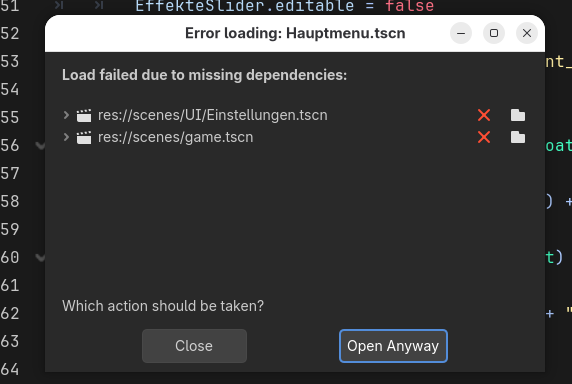
I am working on a game for the last 2 weeks, but this morning after opening the project, the main game scene and two other scenes can’t be opened. Strangely, I can still play the game in the editor and the missing scenes are usable.
I can’t tell from the screenshots exactly which files it lists, but this pattern (the scene won’t open in the editor, yet the game runs fine) is usually a UID mismatch rather than truly missing files. Each ext_resource line in a .tscn stores both a uid:// and a res:// path. At runtime Godot falls back to the path when the UID doesn’t resolve, so the game still works, but the editor’s dependency check flags it.
It typically happens when files were moved or renamed outside the editor (file manager, git checkout, a sync tool), or when the .uid files that 4.4+ creates next to scripts and shaders got lost or weren’t committed.
Things to try, in order (back up or commit first):
- In the Missing Dependencies dialog, use Fix Dependencies, point each entry at the current file, then save the scene. That rewrites the UIDs.
- If that doesn’t stick, close Godot and delete the .godot folder in the project (it’s only a cache and gets rebuilt), then reopen. This clears a stale UID cache.
- Open the .tscn in a text editor and compare the path= in the ext_resource lines with where the files really are now. If only the uid is wrong, removing the uid=“…” part from that line lets Godot reassign it on save.
- Going forward, move and rename files from the FileSystem dock, and commit the .uid files along with your scripts.
If you can paste the list of files the dialog shows, that would help narrow it down.
Thank you for your responce!
The first two points did not make any difference.
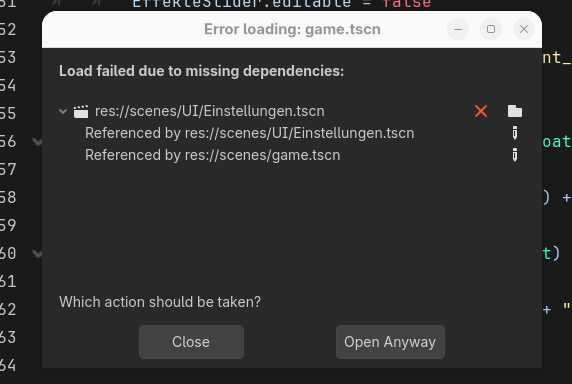
I noticed that only one Scene was corrupted and removed it from every other Scene through a texteditor. Now I can access the project again.
I think the corrupted scene was referencing to itself, but I was not able to fix it.