Godot Version
Godot 4 from Playstore (On Chromebook)
Question
did i accidentally do something to my code because i don’t know also are my nodes wrong because i tested my game multiple times for the movement and it doesn’t work
extends CharacterBody2D


const SPEED = 300.0
const JUMP_VELOCITY = -400.0


func _physics_process(delta: float) -> void:
	# Add the gravity.
	if not is_on_floor():
		velocity += get_gravity() * delta

	# Handle jump.
	if Input.is_action_just_pressed("ui_accept") and is_on_floor():
		velocity.y = JUMP_VELOCITY

	# Get the input direction and handle the movement/deceleration.
	# As good practice, you should replace UI actions with custom gameplay actions.
	var direction := Input.get_axis("ui_left", "ui_right")
	if direction:
		velocity.x = direction * SPEED
	else:
		velocity.x = move_toward(velocity.x, 0, SPEED)

	move_and_slide()
what does “doesn’t work” mean? Do you get errors? What are you expecting to happen versus what really happens?
well my movement isn’t working because i waas pressing my arrow keys and space bar it used to work but why is it not working anymore
What does “working” mean?
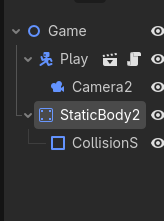
Can you share your scene tree?
my scene tree looks like this
You don’t have anything visual other than presumably the player in this scene. With the camera as a child you have no frame of reference to base movement off of, add any other sprite to the scene and test again.
im spamming my arrow keys and space bar nothing is happening
What do you expect to happen?
for it to move but it isn’t moving
Read again what @gertkeno wrote. If the camera is attached to the dog, and there’s nothing else in the scene that’s not moving, the camera will follow the dog and the dog will appear not to move relative to the camera. Both, the camera and the dog will move by the same amount relative to the world. But if the world is empty, it will appear as though nothing is moving. Add some stationary background graphics to your scene or parent the camera to the world instead to the dog.
ohhh im so stupid it was attched to Doodle Dog