Godot Version
v4.6.stable.official
Question
I have a P2P multiplayer game where players can pick up and throw objects. So far, pick up is working fine for all players but throwing would only work properly with the host. Any clients would simply drop the item. Sometimes the item would spin, but I’m unsure if that is the apply_central_impulse.
extends Area3D

@onready var interaction_ctrl = $"."
var interaction_component = RigidBody3D
@onready var remote_transform_3d: RemoteTransform3D = $HoldSpaceRMT
@onready var _camera: Camera3D = %Camera3D

var viable_item = null
var held_item = null

func _process(_delta) -> void:
	if !is_multiplayer_authority(): return
	if Input.is_action_just_pressed("Interact") and viable_item != null:
		remote_transform_3d.remote_path = viable_item.get_path()
		held_item = viable_item
	elif Input.is_action_just_pressed("Interact") and held_item != null:
		throw()

	var forward := _camera.global_basis.z
	var target_angle := Vector3.FORWARD.signed_angle_to(forward, Vector3.UP)
	interaction_ctrl.global_rotation.y = lerp_angle(interaction_ctrl.rotation.y, target_angle, 1)

func _on_body_entered(_body):
	if _body.has_method("pickup"):
		viable_item = _body

func _on_body_exited(_body):
	if _body.has_method("pickup"):
		viable_item = null

func throw():
	remote_transform_3d.remote_path = "."
	held_item.apply_central_impulse(-_camera.global_basis.z * 50)
	held_item = null
	print_debug("throw works")
Here’s the setup for the player.
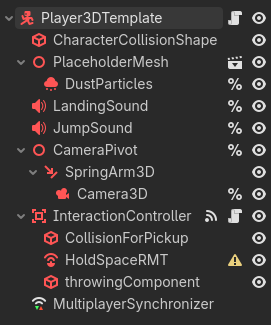
I can get the function to work for everyone if I desynchronize object positions, but I don’t want to do that. Also with desyncing the objects, clients can see when the host throws an object but a client throwing an object would look like they dropped it from the perspective of any other player.
I’ve attempted to make the throwing function into an RPC but I keep on getting the same result of the clients only dropping the item or getting the following error
throw: Invalid call. Nonexistent function ‘apply_central_impulse’ in base ‘Nil’.
What confuses me most though is that in my player movement script, it has similar code for pushing rigidbodies that works for ALL players.
func _physics_process(delta: float) -> void:
	for i in get_slide_collision_count():
		var c = get_slide_collision(i)
		if c.get_collider() is RigidBody3D:
			c.get_collider().apply_central_impulse(-c.get_normal() * push_force)
I feel like I’m missing something fundamental and would appreciate any help.