Godot Version
4.8.beta1
Question
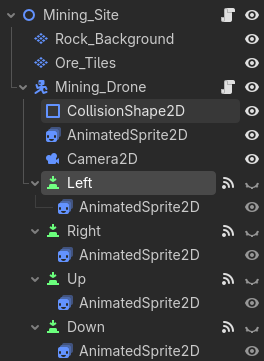
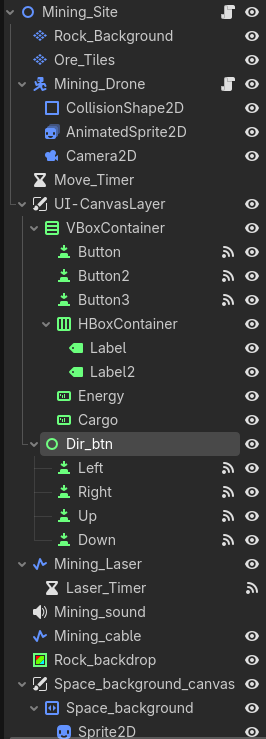
I have 4 buttons that surrounds the player. I wanted to have each button be animated, which was why I have the nodes arraigned in the following order:
However, the arrows cannot be clicked on:
I tried to change the z-index of the buttons, but that didn’t help. I also read somewhere that it’s not ideal to have 2D nodes be children of Control nodes and vice versa. So I don’t know what the ideal way to arrange this is.
Are you sure your buttons are placed over the AnimatedSprites?
You may be able to use Area2Ds instead of buttons to detect mouse inputs.
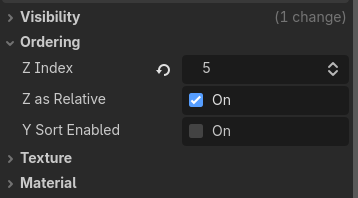
I deleted the animated sprites and added text to the buttons to test further. The buttons still don’t react to mouse clicking for some reason. Below is how I have the z-index ordered:
In the Debugger panel the “Misc” tab will tell you which node your clicks are hitting
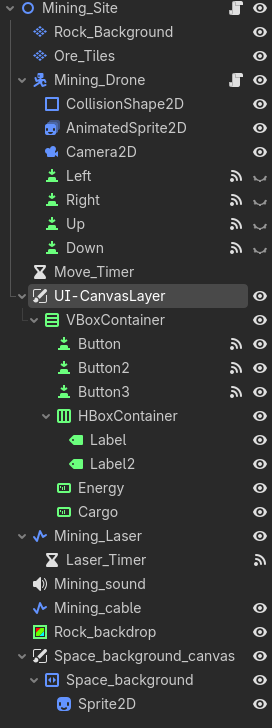
Thank you. I took a look and it says that I’m clicking on the ColorRect node. How I ahve my nodes are shown below:
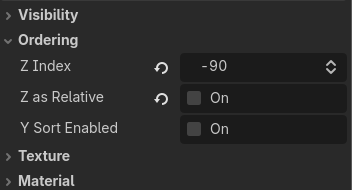
I changed it’s Z index settings below:
However, this didn’t work unfortunately.
I believe Z index doesn’t affect input, only the scene tree order. It’s a good habit to move your nodes to layer before messing with Z index anyways.
Understood, I’ll add a CanvasLayer then. Should both the Mining_Drone node and the buttons be under the CanvasLayer? Or should it be arraigned Mining_Drone > CanvasLayer > buttons?
I’m also not sure how to arrange the buttons so it’s around the Mining_Drone itself.
I rearranged the nodes to the following:
This worked, thanks for the help.
Kind of the opposite of what I was expecting. If you wanted Rock_backdrop to be drawn below other layers then it should’ve been moved up in the scene tree, which also means it’s processing inputs later.
CanvasLayers are great for dividing 2D and UI though.