Godot Version
4.6.1
Question
Need help with understanding how to use var in the autoload. I followed a tutorial for a inventory. I am new to autoloads but need the inventory to be one. Please don’t comment and tell me to just look at the documentation. I already did, its NOT helpful.
If someone could explain to me how to use vars in globals and make the array work I would appreciate it! If you know a video or another forum that describes this, I could really use the link!
Here is the code I am trying to convert to an autoload.
@onreadyonready var slots: Array = $“Inventory Image/MarginContainer/GridContainer”.get_children()
I can not seem to get this to work at all, its throwing errors.
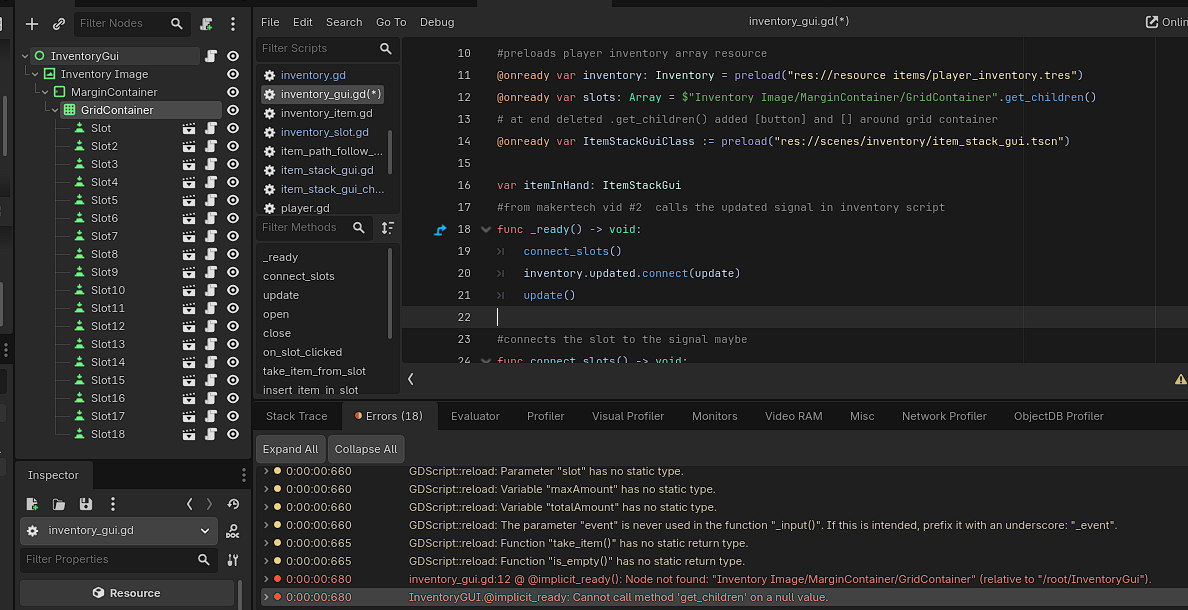
E 0:00:00:680 Invent@implicit_readyryGUI.@implicit_ready: Cannot call method ‘get_children’ on a null value.
inventory_gui.@implicit_readyd:12 @ InventoryGUI.@implicit_ready()
E 0:00:00:680 inventory_gui.gd:12 @ @implicit_ready(): Node not found: “Inventory Image/MarginContainer/GridContainer” (relative to “/root/InventoryGui”).
If you share code, please wrap it inside three backticks or replace the code in the next block:
#this is a global
extends Control
#maker tech #1
class_name InventoryGUI

signal opened
signal closed

var isOpen: bool = false

#preloads player inventory array resource
@onready var inventory: Inventory = preload("res://resource items/player_inventory.tres")

@onready var slots: Array = $"Inventory Image/MarginContainer/GridContainer".get_children()

# at end deleted .get_children() added [button] and [] around grid container
@onready var ItemStackGuiClass := preload("res://scenes/inventory/item_stack_gui.tscn")

var itemInHand: ItemStackGui
#from makertech vid #2  calls the updated signal in inventory script

func _ready() -> void:
	connect_slots()
	inventory.updated.connect(update)
	update()


extends Button
#from makertech vid #2

@onready var SlotBackground: Sprite2D = $"slot background"
@onready var container: CenterContainer = $CenterContainer

@onready var inventory := preload("res://resource items/chest_inventory_1.tres")

var itemStackGui: ItemStackGui
var index: int

#adds itemStackGui to the container
func insert(isg: ItemStackGui) -> void:
	itemStackGui = isg
	container.add_child(itemStackGui)

	#need to fix bug here when moving item to a spot not in the array
	#because the spots are not yet unlocked
	if !itemStackGui.inventorySlot || inventory.slots[index] == itemStackGui.inventorySlot:
		return

	inventory.insert_slot(index, itemStackGui.inventorySlot)

#vid 2 click and move from inventory maker tech
#removes itemStackGui from the scene
func take_item():
	var item := itemStackGui

	inventory.remove_slot(itemStackGui.inventorySlot)

	container.remove_child(itemStackGui)
	itemStackGui = null

	return item

func is_empty():
	return !itemStackGui
Chances are you added the script .gd as an autoload, of which scripts do not have children so the autoload creates a new node and attaches your script. If you add the inventory scene .tscn to your autoload instead then it will load the entire scene and so long as your script is attached to the root node (which it is) you will be able to access all of the variables you need from the global, including any children of the autoloaded scene.
Thanks! I had no idea I messed it up! I will go to my back up and try it again!
It’s a weird interface; but you may not need to revert anything, remove the script autoload and add the scene as the same named autoload
1 Like
ugh still getting errors
new ones though
E 0:00:00:685 set_path: Another resource is loaded from path ‘res://scenes/inventory/item_stack_gui.tscn’ (possible cyclic resource inclusion).
E 0:00:00:685 instantiate: Failed to instantiate scene state of “res://scenes/inventory/item_stack_gui.tscn”, node count is 0. Make sure the PackedScene resource is valid.
E 0:00:00:685 start: Failed to instantiate an autoload, path is not pointing to a scene or a script: res://scenes/inventory/item_stack_gui.tscn.
func insert(isg: ItemStackGui) → void:
itemStackGui = isg
container.add_child(itemStackGui)
maybe this is the problem?
its from the slot gui
I put the slot gui script in the description above. the actual inventory gui one is super long
I just reverted back because i saved right before making the changes
Did you remove the last autoload? Do your button scripts as SlotX make use of the Inventory global?
yes i reset to before i made them
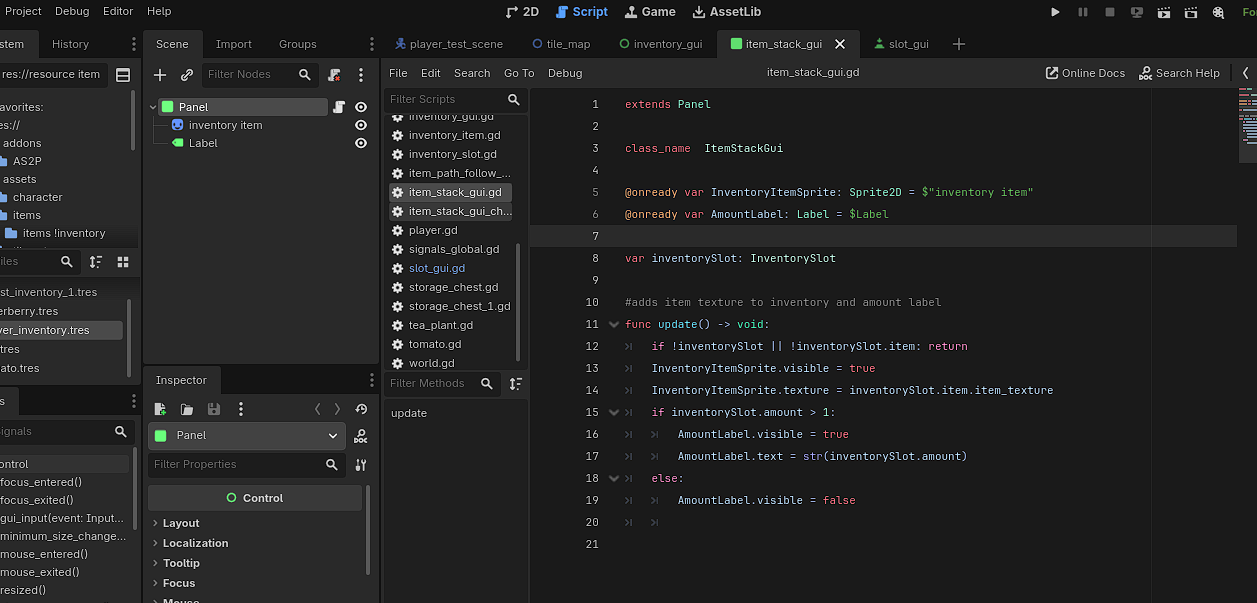
the item stack gui code is the most independent
the slot gui calls add_child and remove child on the stack gui
the inventory one manages them all
@onready var ItemStackGuiClass := preload(“res://scenes/inventory/item_stack_gui.tscn”)
i am wondering if this may be the problem
I call this on the inventory gui
I am not sure if there is a better way to do this or if its not needed now that it is a global.
Here is the entire inventory gui script its very long
extends Control
#maker tech #1
class_name InventoryGUI

signal opened
signal closed

var isOpen: bool = false

#preloads player inventory array resource
@onready var inventory: Inventory = preload("res://resource items/player_inventory.tres")
@onready var slots: Array = $"Inventory Image/MarginContainer/GridContainer".get_children()
@onready var ItemStackGuiClass := preload("res://scenes/inventory/item_stack_gui.tscn")

var itemInHand: ItemStackGui
#from makertech vid #2  calls the updated signal in inventory script
func _ready() -> void:
	connect_slots()
	inventory.updated.connect(update)
	update()

#connects the slot to the signal maybe
func connect_slots() -> void:
	for i in range(slots.size()):
		var slot = slots[i]
		slot.index = i

		var callable := Callable(on_slot_clicked)
		callable = callable.bind(slot)
		slot.pressed.connect(callable)

#update the slots size checks the number in the array
func update() -> void:
	for i in range(min(inventory.slots.size(), slots.size())):
		var inventorySlot: InventorySlot = inventory.slots[i]

		if !inventorySlot.item: continue

		var itemStackGui: ItemStackGui = slots[i].itemStackGui
		if !itemStackGui:
			itemStackGui = ItemStackGuiClass.instantiate()
			slots[i].insert(itemStackGui)

		itemStackGui.inventorySlot = inventorySlot
		itemStackGui.update()

func open() -> void:
	visible = true
	isOpen = true
	opened.emit()

func close() -> void:
	visible = false
	isOpen = false
	closed.emit()

#functionality for moving items in inventory
#inserts the item into the new slot if empty also calls the stack items if its the same item name
func on_slot_clicked(slot) -> void:
	if slot.is_empty():
		if !itemInHand: return

		insert_item_in_slot(slot)
		return

	if !itemInHand:
		take_item_from_slot(slot)
		return

	if slot.itemStackGui.inventorySlot.item.item_name == itemInHand.inventorySlot.item.item_name:
		stack_items(slot)
		return

	swap_items(slot)

#picks up item into itemInHand
func take_item_from_slot(slot) -> void:
	itemInHand = slot.take_item()
	add_child(itemInHand)
	update_item_in_hand()

#removes item from itemInHand
func insert_item_in_slot(slot) -> void:
	var item = itemInHand

	remove_child(itemInHand)
	itemInHand = null

	slot.insert(item)

#swaps the items in the slot to the in hand
func swap_items(slot) -> void:
	var tempItem = slot.take_item()

	insert_item_in_slot(slot)

	itemInHand = tempItem
	add_child(itemInHand)
	update_item_in_hand()

#stacks items when moved taking into account the max allowed per stack
func stack_items(slot) -> void:
	var slotItem: ItemStackGui = slot.itemStackGui
	var maxAmount = slotItem.inventorySlot.item.max_amount_stack
	var totalAmount = slotItem.inventorySlot.amount + itemInHand.inventorySlot.amount

	if slotItem.inventorySlot.amount == maxAmount:
		swap_items(slot)
		return

	#when the total amount is less than max changes the total amount and takes it out of the hand
	if totalAmount <= maxAmount:
		slotItem.inventorySlot.amount = totalAmount
		remove_child(itemInHand)
		itemInHand = null
	else:
		#takes the leftover after max amount reached and adds it to hand
		slotItem.inventorySlot.amount = maxAmount
		itemInHand.inventorySlot.amount = totalAmount - maxAmount

	slotItem.update()
	if itemInHand: itemInHand.update()

#when item is in hand it moves with the mouse
func update_item_in_hand() -> void:
	if !itemInHand: return
	itemInHand.global_position = get_global_mouse_position() - itemInHand.size / 2

func _input(event: InputEvent) -> void:
	update_item_in_hand()
Yeah that’s probably it, you do not need it in general, if you need to access something within the same script you can use self or omit self entirely, self.visible = true and visible = true are the same.
It’s also a really good idea to avoid preload for scenes, and at most use it with very small resources that have no other dependencies.
Ok thanks! Should i just use class names for references instead? I am still unsure the best way to reference other nodes and scripts. I just followed a tutorial.
class names are good, seems like you already have a class name ItemStackGui and are using it. If you want to instantiate the item stack scene use load instead of preload