Godot Version
4.4.1 Stable
Question
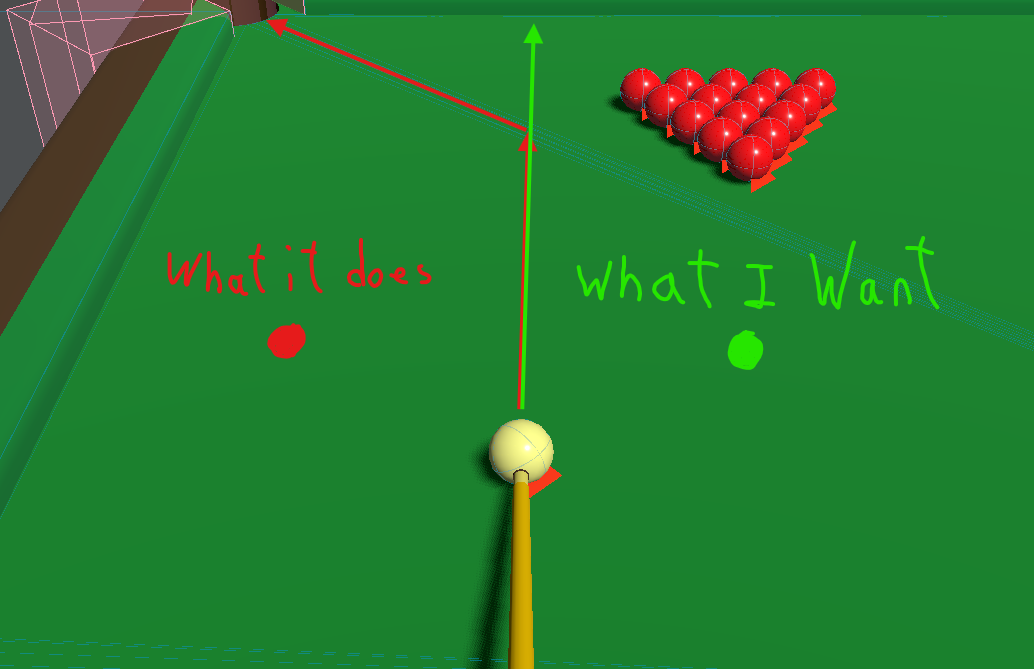
I’m making a pool game and the que ball wants to guide across the lines of the Trimesh. Sadly, this also happens when I place down box collisions together at the same height. This glitch happens less when bounce is at 0 but still happens very often making the game unplayable. I’ve tried about every combination of the physics material on all of the objects. Everything else is accurate and works great. Any ideas on what is causing this weird bug?
I’ve attempted a lot, I changed the bounce and friction to different values even if it broke how the ball functioned when hitting other ones, I’ve changed the friction, absorbent value, rough value, changed from jolt to godot, and even upped the iterations of each check to 4 x the amount. There’s either a bug with the engine’s physics or I’m missing a setting that will help and I’m guessing its the second one.
Note: When it doesn’t actually change angle, it instead slows it down and causes the ball to spin.