I have just started using Godot and there are many things that are confusing me. First is the fact that Godot considers -Z to be forward but the Gizmos Z points in the opposite direction. Also all the assets I have (mostly Synty) are all facing the wrong way, I have to import them all in blender and then rotate them and export. I was hoping to find a way to fix the direction in the fbx or glb importer but so far I have not been able to. But my main question is: I have thousands of animations that I purchased in the unity asset store however when I try to use them in Godot, I cannot make the root motion work. I had no issues with Mixamo animations though. Does anybody know if there is a way to fix that?
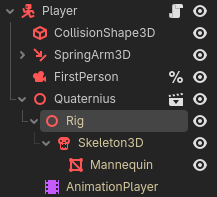
You can rotate mesh nodes to face the opposite way in Godot, as long as you apply other rotations to a parent Node3D. In this scene tree with the imported “Quaternius” model I can rotate the nodes Quaternius or Rig 180° to fix the model facing while I rotate the root Player node in code.
First of all, thanks for the resply. Yup using the RootMotion View. and with mixamo animation I can clearly see the grid sliding under my character’s feet. However with for example MocapOnline animation (unity package) I can import the fbx, but have to disable the normalize coord though otherwise the animation shifts my character 1m above the ground, besides that it works. But, in the animation tree, when I select the root bone (hips) I can see the RootMotionView grid rocking but it does not advance. I tried to track other bone at random with no success, Also if I convert the animation to glb in blender it seems to play fine in blender (I am no expert though). but when I import the glb in godot I have exactly the same issue.
I purchased most of the synty assets from their own store and there is a source version (fbx, not unity package) but they till face the wrong way. As far as I know you are allowed to use packages you purchased. I fact I just purchased a unity to Godot, still have not had time to try it though. I think you cannot use those free assets you get from unreal and stuff like that. but it is also easy to contact the vendors and ask.. Thanks for the tips I will experiment a bit.
Blender does not let you choose the Z orientation when you export in gltf, only Y. so I would have to either rotate them or export in FBX which has the option. I watched and followed those tutorials (videos) that did not help. at least not for the animation. I think I used your import script that you posted in another thread to invert the Z and that worked perfectly. So, for now at least the only issue is the root motion. But I will be moving my assets through code for now, until I find a good solution.