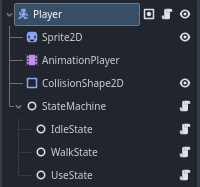
Hello, I have implemented a node-based state machine based on examples. If I use @export variables in the base state class, everything works fine, but I have to manually add all these variables in the object inspector. I would like to initialize the player and animation_player variables in one place so that I can use them in child states.
I tried initializing them with @onready in PlayerState, and player surprisingly started working, but now there is a problem with AninationPlayer. Now the program crashes when it needs to play the animation in enter() in IdleState.
I tried to understand what the problem might be, apparently in the order of ready() calls in parents and descendants.
Below is the code that works, but not quite the way I need it to:
@abstract
class_name State extends Node


signal transitioned(new_state_name: StringName)

func enter() -> void:
	pass

func exit() -> void:
	pass

func update(_delta: float) -> void:
	pass

func physics_update(_delta: float) -> void:
	pass

func handle_input(_event: InputEvent) -> void:
	pass
class_name StateMachine extends Node


@export var current_state: State
var states: Dictionary = {}

func _ready() -> void:
	for state in get_children():
		if state is State:
			states[state.name] = state
			state.transitioned.connect(on_state_transitioned)
		else:
			push_warning('State is not State!')

	current_state.enter()

func _process(delta: float) -> void:
	if current_state.has_method('update'):
		current_state.update(delta)

func _physics_process(delta: float) -> void:
	if current_state.has_method('physics_update'):
		current_state.physics_update(delta)

func _handle_input(event: InputEvent) -> void:
	if current_state.has_method('handle_input'):
		current_state.handle_input(event)

func on_state_transitioned(new_state_name: StringName) -> void:
	var new_state = states.get(new_state_name)

	if new_state != null and new_state != current_state:
		current_state.exit()
		current_state = new_state
		current_state.enter()
	else:
		push_warning('New state is null or current state!')
class_name PlayerState extends State


const PLAYER_STATES_NAMES: Dictionary = {
	'IDLE': 'IdleState',
	'WALK': 'WalkState',
	'USE': 'UseState',
}

@export var player: Player
@export var animation_player: AnimationPlayer

func handle_input(_event: InputEvent) -> void:
	if _event.is_action_pressed('use'):
		transitioned.emit(PLAYER_STATES_NAMES.get('USE'))

func update_state_animation(state_prefix: String, last_direction: Vector2) -> void:
	match last_direction:
		Vector2.UP:
			animation_player.play(state_prefix + '_up')
		Vector2.DOWN:
			animation_player.play(state_prefix + '_down')
		Vector2.LEFT:
			animation_player.play(state_prefix + '_left')
		Vector2.RIGHT:
			animation_player.play(state_prefix + '_right')
class_name IdleState extends PlayerState


const IDLE_ANIMATION_PREFIX: String = 'idle'

func enter() -> void:
	update_state_animation(IDLE_ANIMATION_PREFIX, player.last_direction)

func physics_update(_delta: float) -> void:
	if player.direction != Vector2.ZERO:
		transitioned.emit(PLAYER_STATES_NAMES.get('WALK'))
1 Like
Post the scene structure.
Also the code that crashes.
When I do this, my code immediately crashes with an animation error because AnimationPlayer is null.
class_name PlayerState extends State


const PLAYER_STATES_NAMES: Dictionary = {
	'IDLE': 'IdleState',
	'WALK': 'WalkState',
	'USE': 'UseState',
}

@onready var animation_player: AnimationPlayer = $AnimationPlayer # <-----
@onready var player: Player = owner as Player # <-----

func handle_input(_event: InputEvent) -> void:
	if _event.is_action_pressed('use'):
		transitioned.emit(PLAYER_STATES_NAMES.get('USE'))

func update_state_animation(state_prefix: String, last_direction: Vector2) -> void:
	match last_direction:
		Vector2.UP:
			animation_player.play(state_prefix + '_up')
		Vector2.DOWN:
			animation_player.play(state_prefix + '_down') # <----- ERROR
		Vector2.LEFT:
			animation_player.play(state_prefix + '_left')
		Vector2.RIGHT:
			animation_player.play(state_prefix + '_right')
class_name IdleState extends PlayerState


const IDLE_ANIMATION_PREFIX: String = 'idle'

func enter() -> void:
	update_state_animation(IDLE_ANIMATION_PREFIX, player.last_direction)

func physics_update(_delta: float) -> void:
	if player.direction != Vector2.ZERO:
		transitioned.emit(PLAYER_STATES_NAMES.get('WALK'))
Yeah, so here’s what’s happening. You’ve got a race condition. Nodes are initialized bottom to top. Your StateMachine is being created before your AnimationPlayer. StateMachine enters _ready() which triggers enter() in your IdleState. Since AnimationPlayer doesn’t exist yet, IdleState cannot create its @onready variable and it crashes.
Potentially easy fix, move AnimationPlayer lower in the tree. Better fix, make your StateMachine wait for Player to be ready before starting.
func _ready() -> void:
	get_parent().ready.connect(_on_player_ready)


func _on_player_ready() -> void:
	for state in get_children():
		if state is State:
			states[state.name] = state
			state.transitioned.connect(on_state_transitioned)
		else:
			push_warning('State is not State!')

	current_state.enter()
Also, FWIW, your abstract keyword doesn’t need to be at the top of the State class, as you haven’t made any abstract functions. You also do not need update(), physics_update() or handle_input() functions. You can just turn the existing functions off and re-enable them when needed.
class_name State extends Node

signal transitioned(new_state_name: StringName)


func _ready() -> void:
	set_process(false)
	set_physics_process(false)
	set_process_input(false)
	set_process_unhandled_input(false)


func enter() -> void:
	pass


func exit() -> void:
	pass
Then on enter() and exit() just turn what you need on and off again. Then you can simplify your StateMachine:
class_name StateMachine extends Node

@export var current_state: State

var states: Dictionary = {}


func _ready() -> void:
	for state in get_children():
		if state is State:
			states[state.name] = state
			state.transitioned.connect(on_state_transitioned)
		else:
			push_warning('State is not State!')

	current_state.enter()


func on_state_transitioned(new_state_name: StringName) -> void:
	var new_state = states.get(new_state_name)

	if new_state != null and new_state != current_state:
		current_state.exit()
		current_state = new_state
		current_state.enter()
	else:
		push_warning('New state is null or current state!')
If you want to see another way to do a state machine, check out my State Machine plugin. It’s a pull instead of push method. It’s a little more complicated than yours to use, but each state is atomic and can be added and removed at runtime. It also handles race conditions.
1 Like
animation_player is null because the node path you used is incorrect. From the perspective of a state node the path is $"../../AnimationPlayer"
The order appears to be fine here. Btw _ready() is called top to bottom, depth first. Only _input() and _exit_tree() are called bottom to top.
1 Like
Noted. Thanks for the correction.
1 Like