Godot Version
Godot Mono 4.7
Question
I have multiple PathFollow2D objects(with a Path2D parent) which, when I attach a script to them (to their scene that is) called PopEnemy, they never appear in-game. But if I don’t attach a script to them they move along the path as intended.
Here’s the script I’m trying to attach to them - they inherit from BaseEnemy which is also below. Even if I comment out the collider.SetDeferred(“disabled”, false); and Hide(); in _Ready() in BaseEnemy they still never appear.
public partial class PopEnemy : BaseEnemy, IEnemy
{
  public override void _Ready()
  {
    base._Ready();
    Activate();
    Show();
  }
}
using Godot;
using System;

public partial class BaseEnemy : Node2D, IEnemy //acts as parent class of all enemies
{
	public float health;
	public CollisionShape2D collider;

	public override void _Ready()
	{
		collider = FindChild("CollisionShape2D") as CollisionShape2D;
		collider.SetDeferred("disabled", true);
		Hide();
	}

  public virtual void Activate()
  {
		collider.SetDeferred("disabled", false);
		Show();
        GD.Print("activate was called"); //this gets printed for PopEnemy!
  }

	public override void _Process(double delta)
	{
		if(health <= 0)
		{
			QueueFree();
		}
	}

	public void ReceiveDamage(int damage)
	{
		health -= damage;
	}
}
Here’s my scene tree in case it’s relevant:
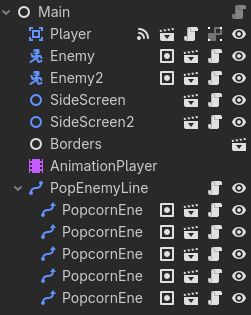
A weird thing is that my Enemy & Enemy2 objects, which have a separate class inherited from BaseEnemy (called EnemyOne), appear just fine as opposed to my PathFollow2D enemies. Yet I don’t see any meaningful difference in the code between EnemyOne & PopEnemy. Here’s the _Ready() method for EnemyOne in case it could be relevant:
	public override void _Ready()
	{
        base._Ready(); //calls parent method

		enemyResource = GD.Load<EnemiesResource>("res://Resources/EnemiesResource.tres");
		health = enemyResource.health;
		speed = enemyResource.speed;
		fireRate = enemyResource.fireRate;

		fireRateTimer = GetNode<Timer>("FireRate");
		fireRateTimer.SetWaitTime(fireRate);
		GetNode<Timer>("FireRate").Start();

		main = GetParent<Main>();
		player = GetNode<Player>("/root/Main/Player");

		playerPos = player.GetPosition();

		sprite = GetNode<AnimatedSprite2D>("AnimatedSprite2D");
		collider = GetNode<CollisionShape2D>("CollisionShape2D");
		animPlayer = GetNode<AnimationPlayer>("AnimationPlayer");

		sprite.LookAt(playerPos);
		collider.LookAt(playerPos);
	}
(The EnemyOne class gets activated by an animation player)
Sorry if this is so much to read through, I just have no clue what could be going wrong here and why 1 enemy class is visible while the other isn’t. I’m super appreciative for any/all responses 