Godot Version
4.6.1
Question
I have a problem with billboard occlusion in Godot. I used Sprite3Ds with billboard enabled. As I move the sprites past each other in the z-axis the point at which the two sprites swapped occlusion layers wasn’t related to the sprites’ origin.
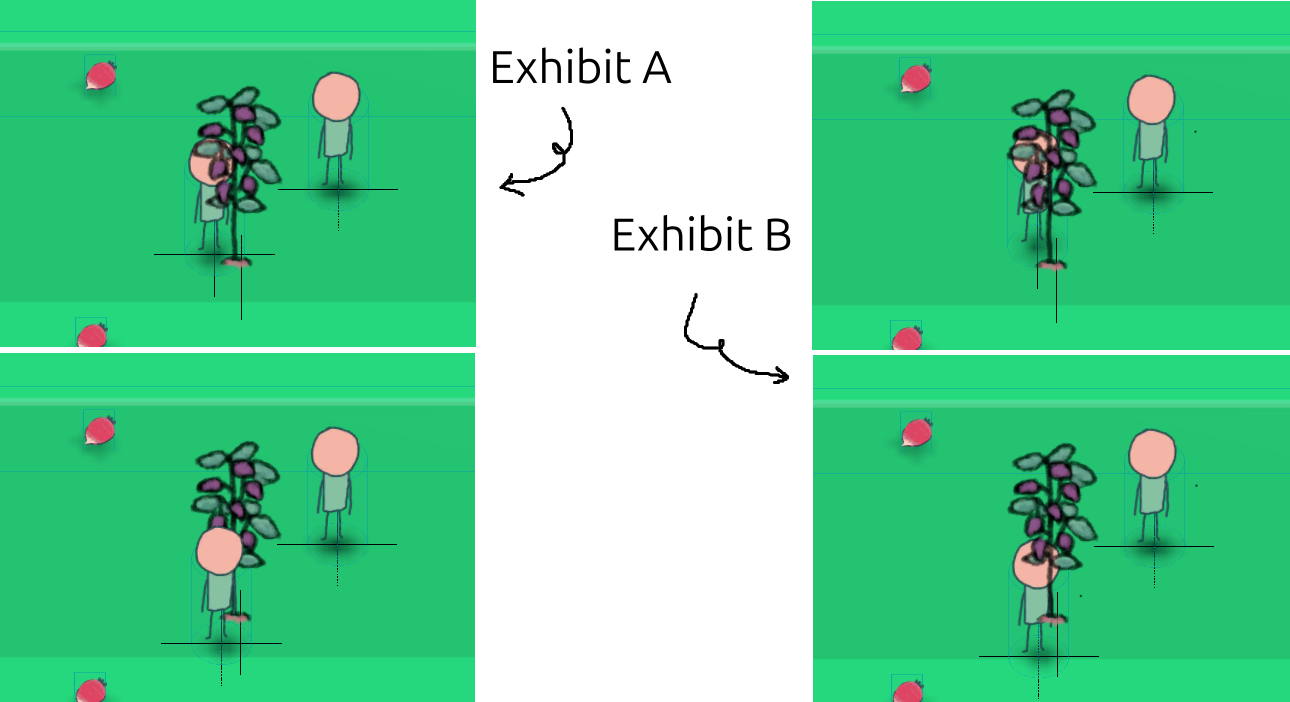
Exhibit A is the desired effect. Exhibit B is what I’m actually getting.
I thought it might be the size of the Sprite3D bounding box so I tried setting the z-scale to 0.01 but it didn’t help. I’ve also tried messing with the image offsets and position.
My workaround for now (Exhibit A) is using the same size texture for all billboard sprites but this is not ideal since I end up with a lot of unused space in my image files.
This seems like something people have probably solved. I’ve used Godot heavily for over a year but this is my first foray into 3D so perhaps I’m missing something obvious.
Thanks!