Godot Version
4.2.2
Question
Hi, as you can see in the attached video my pixel art trees are exhibiting a visual glitch when I move my player character around. None of my other sprites are having this issue just these trees. I've tried changing the texture filter from inherit and nearest for both the StaticBody2D node and the accompanying Sprite2D node.The player character is using a pretty standard move_and_collide based on velocity and direction.
Anyone know what’s going on here and how to fix it?
Are your trees scaled by a fractional amount?
I should have mentioned this - no in project settings I am using integer scaling (1X). None of my individual sprites are scaled at all. Viewport dimensions are 540, 360 and window size is 1620, 1080. I use the aseprite importer to import my aseprite files as png. All my other sprites are working except this one.
I should also add, as you can see in the video this only happens when the character moves up and down hitting certain y axis.
That’s the kind of effect you get with texture set to NEAREST when a sprite is at a non-integer position. Something’s moving things to a non-integer position in Y, in all likelihood.
Do you know how I might fix that?
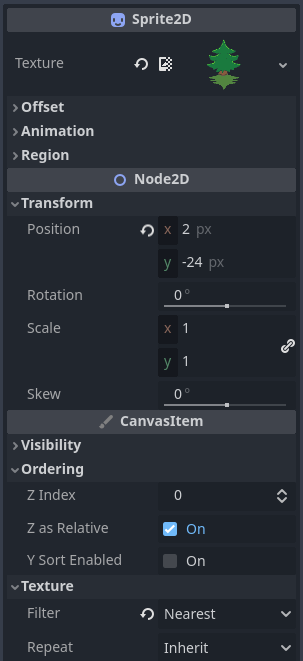
The position in the scene is an integer and there is no scaling (see screenshot below). Nothing is moving the sprite during gameplay. The only thing moving is the player character with move_and_collide.
You may only be moving the player, but the background is moving under them; presumably you have a Camera2D?
I’d suggest using floor() on either the player’s position, or the camera position.
You shouldn’t have to modify movement code if you have “snap 2d transforms to pixel” enabled in your project settings, the path is “rendering/2d/snap/snap_2d_transforms_to_pixel”
Woah - that worked! Thank you both for your help!