I’m working on a 2D top-down pixel art game. I have a player character (CharacterBody2D) and various static environment objects in the world — bushes, trees, stones. Some are individual scene instances, and the bushes specifically are placed as tiles on a TileMapLayer.
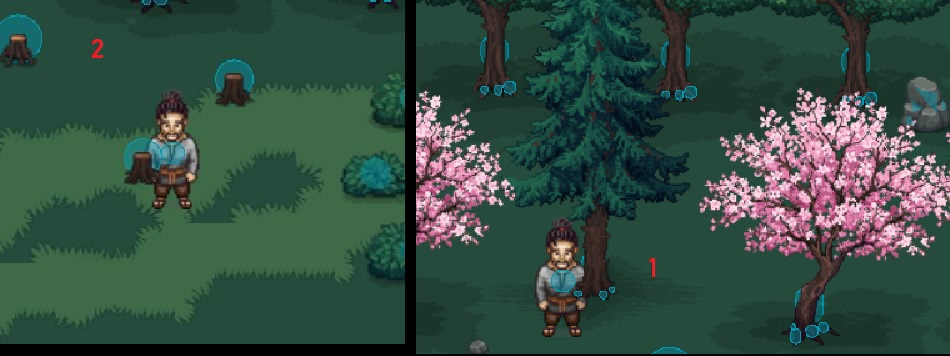
In the first (1) screenshot, my character is standing right in front of a large pine tree — the body renders correctly in front of the trunk, but the arm/hand overlapping the trunk area looks wrong: it appears clipped or partially sunk into the tree trunk instead of rendering cleanly in front of it, like the hand gets “cut off” right where it crosses the trunk’s edge.
In the second (2) screenshot, I get a milder version of the same thing around tree stumps and small bush patches — the character is clearly positioned in front of them, but at shoulder/hand height there’s occasional incorrect overlap where it shouldn’t be, while the rest of the body sorts fine
I’ve already tried reorganizing my scene tree (grouping the player and environment objects under a shared parent node) but the problem is still happening in some cases.
The blue circles in the screenshots are the collision shapes (CircleShape2D) on the player and the environment objects. I changed their size many times to try to fix the visual clipping, but this made new problems:
Sometimes the player gets stuck on a tree and can’t move.
Sometimes the player stops too far from a tree, more than it should.
When I added small collision circles near the hands and feet, the player now gets stuck on many more objects than before.
Not sure if this is connected to the rendering problem or a separate issue
Has anyone run into this kind of inconsistent sprite overlap before? What should I be looking at to get reliable draw order in a setup like this? Happy to share my scene tree structure or screenshots if that helps.
Have you enabled y-sorting on the TileMapLayer and set the tree’s y-sort origin to the base of the trunk and the player’s y-sort origin to its feet? The problem with the player’s arm drawing behind the tree looks like a y-sorting issue.
Is the player sprite composed of multiple pieces? Since you mention that the player’s body sorts correctly but its hands don’t?
Hello Elali
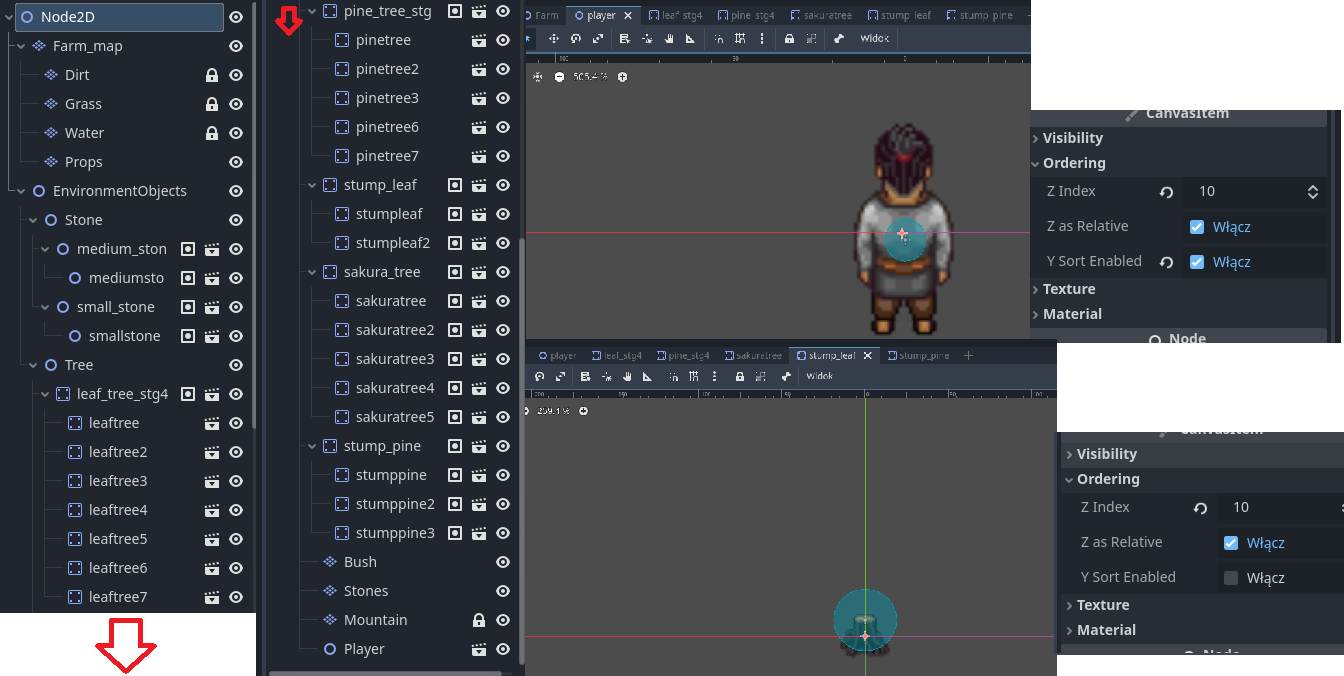
Yes, both the trees and the player are separate scenes (instanced .tscn files), not part of a TileMapLayer. So “Y Sort Origin” doesn’t apply for the trees — that setting only exists for tiles inside a TileSet/TileMapLayer, not for regular Node2D-based scenes. The player sprite is not composed of multiple pieces, it’s a single sprite. Attaching a screenshot of the Inspector for both the player scene and one of the tree scenes (stump_leaf) in case it helps spot something.
It looks like OP’s nodes are all based on Node2D, so Y-sorting is possible with the current scene tree. My understanding is that Y-sorting won’t work for things nested in vanilla Nodes because vanilla Nodes don’t have a position property or Y-sorting property–but it is possible for things nested in vanilla Node2Ds.
Ok, in that case the y-sort origin of the sprite nodes is the origin of the sprite itself. But if the sprite’s parent does not have Y-sorting enabled, then the sprite will sort using the origin of its parent.
Enable Y-sorting on any nodes whose children should Y-sort independently, and disable Y-sorting on any nodes whose children should sort as a group with a single origin. From the screenshot, I think “EnvironmentObjects”, “Tree”, “Stone”, and your root “Node2D” are in the former category, and “Player” is definitely in the latter category. I’m not sure whether leaf_tree_stg4 is a composite sprite or a collection of several independent sprites.
In your screenshot, it looks like the player character has its sprite centered on the scene origin. Your player character is probably a CharacterBody2D, right? If the player screenshot is showing the player scene, then you should move its sprite up within the player scene so that its feet are at y=0. (Then adjust the collision shape to line up with the sprite again.) And make sure that Y-sorting is disabled for the Player node so that the sprite will use the Player’s origin as the y-sort origin. If Y-sorting is enabled on Player, then the sprite will sort using its own origin, which is (usually?) the sprite’s center.
For that tree stump sprite, you should probably move it up a bit so that its origin is somewhere in the mass of roots.