Godot Version
4.5
Question
Hello! I have a bit of an issue with getting the global position of the player.
So I have the player node, which is referenced in the scene root. I have another global CanvasLayer node, which is structured like this:
- Canvas Layer
– Sprite2D (named heart)
The relevant code in the CanvasLayer goes like this:
func _process(_delta: float) -> void:
	heart.position = get_tree().current_scene.player.position
Which obviously just updates the heart’s position to the player’s position.
However, when I run the game, the heart behaves weirdly: instead of just following the player, it instead follows the player at a strange changing offset.
What could be the issue here? I have been wracking my brains over this for some time now, and can’t seem to find what is wrong.
Can you try using global_position instead of position?
heart.global_position= get_tree().current_scene.player.global_position
1 Like
Hello! Yes, I already tried that, leads to the exact same result, unfortunately.
I am betting one cent that you are using get_mouse_position.
If not, could you give us the code on the movement of the player node?
Github issue: mouse_position is not consistent in one _process() call in Godot 4
I am not using get_mouse_position, the player is controlled with arrow keys. The code is kinda overcomplicated, but here it is (without the stuff that changes the sprite, because I don’t think that’s the issue):
extends CharacterBody2D
class_name Player

@export var run_speed = 240
@export var water_run_speed = 180

var current_run_speed : int
var current_facing_direction : String = "forward"

func _ready():
	current_run_speed = run_speed
	PlayerManager.player = self

func _physics_process(_delta):
	velocity = Vector2.ZERO
	var direction = Vector2.ZERO
	var diagonal = false

	var forward_animation : String = "forward_run"
	var back_animation : String = "back_run"
	var right_animation : String = "right_run"
	var left_animation : String = "left_run"

	if true:
		if Input.is_action_pressed("up"):
			velocity.y -= 1
			direction = Vector2(0, -1)
		if Input.is_action_pressed("down"):
			velocity.y += 1
			direction = Vector2(0, 1)
		if Input.is_action_pressed("left"):
			velocity.x -= 1
			direction = Vector2(-1, 0)
		if Input.is_action_pressed("right"):
			velocity.x += 1
			direction = Vector2(1, 0)

		if Input.is_action_pressed("up") && Input.is_action_pressed("down") && velocity.x == 1:
			velocity.y -= 1
			direction = Vector2(1, 0)
		elif Input.is_action_pressed("up") && Input.is_action_pressed("down") && velocity.x == -1:
			velocity.y -= 1
			direction = Vector2(-1, 0)
		elif Input.is_action_pressed("up") && Input.is_action_pressed("down"):
			velocity.y -= 1
			direction = Vector2(0, -1)

		if Input.is_action_pressed("left") && Input.is_action_pressed("right") && velocity.y == 1:
			velocity.x -= 1
			direction = Vector2(0, 1)
		elif Input.is_action_pressed("left") && Input.is_action_pressed("right") && velocity.y == -1:
			velocity.x -= 1
			direction = Vector2(0, -1)
		elif Input.is_action_pressed("left") && Input.is_action_pressed("right"):
			velocity.x -= 1
			direction = Vector2(-1, 0)

	else:
		$AnimatedSprite2D.stop()

	if Input.is_action_pressed("ui_cancel"):
		velocity = velocity.normalized() * current_run_speed * 2
	else:
		velocity = velocity.normalized() * current_run_speed
	move_and_slide()
Can you make a video showing the behavior.
Also post your remote scene tree.
Aha, you got my one cent, but the problem may be similar.
If I understand correctly, _physics_process is called once on each physics tick, but we do not know how many physics ticks happen in one visual frame (i.e. one _process call). Thus, it is rather natural to have offsets.
Have you tried _physics_process for the CanvasLayer?
Hello! Here’s the video of the behavior:
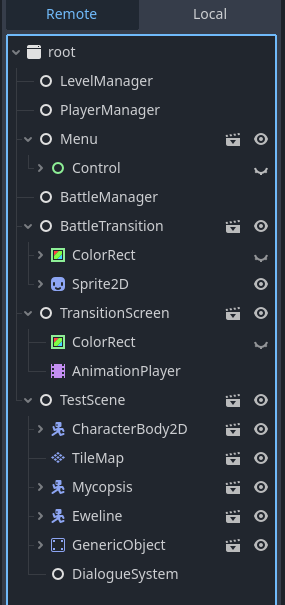
And here’s the remote scene tree, from as much as fits on a screenshot:
I tried using the physics_process as well, and it didn’t help. I doubt such a huge offset could be caused by that anyway.
Where’s the heart in that remote tree?
The heart is the Sprite2D on the BattleTransition node.
Where’s the canvas layer then?
BattleTransition is the CanvasLayer.
TestScene is Node2D, and BattleTransition is a CanvasLayer, I don’t know why they look like Nodes in the Remote Scene Tree. But I could try making a heart to follow the player its own scene.
It doesn’t look like it is. Something is messed up with your scene setup. The behavior looks like double transform caused either by heart being child of the player while at the same time copying its local position from the player, or unwanted multiple instances of the same script are running. Happens typically when you forget you have an autoload and use the same script on a regular node or vice versa.
Oh yeah, I do have BattleTransition as an autoload, but I don’t have it in my testing room scene. How could it be running twice?
prints(self.name, self.get_path()) just before you update the position. And yeah, always use global_position in cases like this.
Maybe you don’t know you have it. Or you have it on another autoload. Or you have a different script that is updating heart’s parent. Or a reference to the player node is incorrect. Check all those things.
This just prints “BattleTransition /root/BattleTransition”. But I’m going to check the other things you told me about.
Alright, I figured out what the problem was. While messing around, I decided to click “follow viewport” on in the BattleTransition CanvasLayer, and it fixed the issue! So there’s that.