I have a very simple game prototype which I exported to Android on my Fire Tablet 8, 2022 model. And the performance is very strange: When I enter a level, it runs at a buttery-smooth framerate. Then after some time, it drops to 30fps. And after waiting even longer, the game just freezes.
There is not much in terms of physics objects, just a rigidbody player and a couple of areas. It is especially strange that the performance starts fine and then drops, despite the fact that, looking at the profiler and monitor, not a lot else is being loaded in.
Has anyone else had this problem? Do I need to switch from Vulkan to OpenGL? Do I need to downgrade to Godot 3? Let me know if you have an answer!
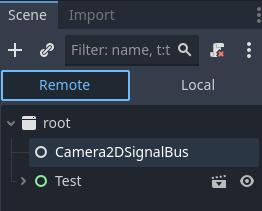
Alternately, you may be creating a bunch of nodes that aren’t orphaned but just hanging off the tree. You can see that in the editor by going to the Remote tab in the scene tree when the game is running.
Before blaming the Android export I would recommend trying it in the editor and exporting to your development OS (Windows/Linux/Mac) and seeing if the same thing happens there.
I checked, and it does not seem to be creating any more nodes.
EDIT: I just tested it on my PC. Problem is, my PC is very beefy, so there aren’t any frame drops, and my Android tablet is pretty weak. I want it to be a game that can run at 60FPS on low-end devices.
Are you running in Mobile or Compatibility mode? Try the other one. Compatibility mode is useful in particular for older Android devices.
If you are using any GPUParticles2D/3D nodes, convert them to CPUParticles2D/3D. They GPU ones don’t work well on older mobile devices.
Remove all shaders. Shaders require a GPU to run. If you’re having performance problems remove them all and add them in one-by-one like an elimination diet.
I just did Remote Debugging. And I saw that the framerate just continues to get lower and lower. I looked through the Monitor and could not find anything that could be causing it.
And the craziest part? I decided to just load in a completely empty scene with nothing in it, and I got the SAME gradually decreasing framerate!
Alright, so I decided to make a truly empty scene with nothing in it, not even a camera. And guess what? No dropping framerate. But then I added in a camera. And that caused the performance to start tanking.