4.6
Why for in approach doesn’t work? I’m honestly confused.
var arr = [[1, 2, 3], [1, 2, 3]]
	var arr2 = [[1, 2, 3], [1, 2, 3]]
	arr.resize(5)
	for row in arr:
		if row == null:
			row = []
			row.resize(5)
		for col in row:
			col = 1
	print(arr)

	arr2.resize(5)
	for i in range(arr2.size()):
		if arr2[i] == null:
			arr2[i] = []
			arr2[i].resize(5)
			for j in range(arr2[i].size()):
				arr2[i][j] = 1
	print(arr2)

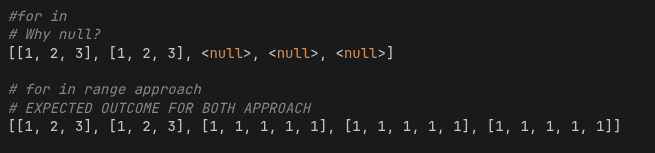
#for in
# Why null?
[[1, 2, 3], [1, 2, 3], <null>, <null>, <null>]

# for in range approach
# EXPECTED OUTCOME FOR BOTH APPROACH
[[1, 2, 3], [1, 2, 3], [1, 1, 1, 1, 1], [1, 1, 1, 1, 1], [1, 1, 1, 1, 1]]
What exactly isn’t working, and what are you trying to achieve?
Why are you resizing the Array ?
Like, what are you trying to accomplish besides a generic coding exercise?
I’m trying to resize my 2D array to a new size and also understand why the elements are null
This one. Can you help me understand why it’s null? I expect the outcome for the ‘for row in arr’ approach to be the one in ‘for in range’.
I recommend you read this post and then give us enough information to help you.
Godot Docs and use the Forum Search functionality to make sure your question hasn’t been answered or there isn’t an ongoing discussion on that topic already.
If you don’t know where to start, try here: Getting started , Your first 2D game , Your first 3D game .
Resizing an Array is not something you typically do in GDScript. So the fact that you are doing it raises red flags. If you’re trying to make a game, tell us what you’re actually trying to accomplish with this solution.
If you want to know how the internals of how the engine works, take a look at the source code:
          	Vector<Variant> validated_array = p_array._p->array;
          	Variant *write = validated_array.ptrw();
          	for (int i = 0; i < validated_array.size(); ++i) {
          		ERR_FAIL_COND(!_p->typed.validate(write[i], "append_array"));
          	}

          	_p->array.append_array(validated_array);
          }

          Error Array::resize(int p_new_size) {
          	ERR_FAIL_COND_V_MSG(_p->read_only, ERR_LOCKED, "Array is in read-only state.");
          	Variant::Type &variant_type = _p->typed.type;
          	int old_size = _p->array.size();
          	Error err = _p->array.resize_initialized(p_new_size);
          	if (!err && variant_type != Variant::NIL && variant_type != Variant::OBJECT) {
          		Variant *write = _p->array.ptrw();
          		for (int i = old_size; i < p_new_size; i++) {
          			VariantInternal::initialize(&write[i], variant_type);
          		}
          	}
And if you feel there is a bug, log it here: Issues · godotengine/godot · GitHub
Here, because row is a local variable and you’re setting it to a new value, it won’t change arr. You’ll need to set the nth element of arr to the new value of row in order to update arr.
for row in arr:
	if row == null:
		row = []
# I'm setting the value of the first element as an example
# since you don't have the index of row
arr[0] = row
I see, thanks man. Coming from Javascript made this hard to understand.