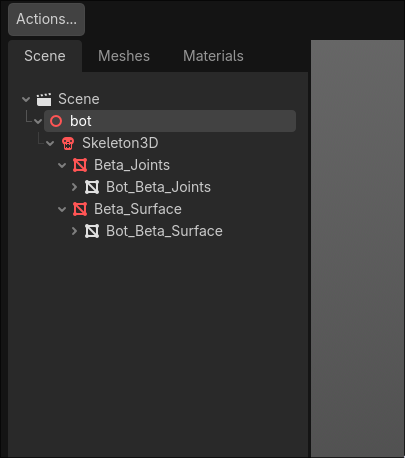
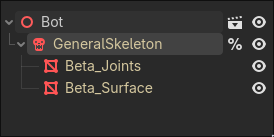
The Scene and bot are actually redundant. How to remove one of them?
List the attempts I’ve made:
create new inherited scene. But I got can't operate on nodes the current scene inherite from! when I tried to edit bot or Scene node
copy the neccesary nodes, which are the subtree rooted at bot, to a total new scene. This works but I got
The text-based scene at path "res://Arts/Characters/Bot/bot_copy.tscn" is large on disk (2.38 MiB), likely because it has embedded binary data.
This slows down scene saving and loading.
Consider saving its binary subresource(s) to a binary `.res` file or saving the scene as a binary `.scn` file.
This warning can be disabled in the Editor Settings (FileSystem > On Save > Warn on Saving Large Text Resources).
of course I dont want to embed any binary into .tscn file.
Any other ideas? What should I do? Or correct workflow? thx in advance.
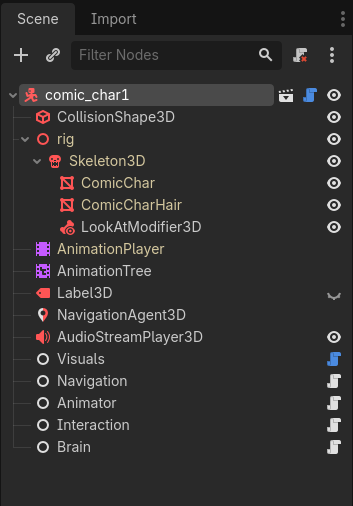
Your scene could be the CharacterBody3D. If your bot or my rig should be it’s own node is debatable. But it’s correct so far.
As you can see, my rig, skeleton and meshes are displayed as yellow. Yellow means it’s inherited and not embedded.
Right click on your glb and inherit from that (as CharacterBody3D), always ensure that the skeleton and meshes stays yellow. If they are white at some point, than one of your actions on it made the data unique. That’s where your warning comes from.
EDIT: It has also the benefit, that you can override the glb and your tscn will be updated automagically. Take a look at the file size of your current scene, it could be huge. And check it with the inherited glb, that one should be small.