Resource based state machine example

Godot Version

v4.5.1.stable.mono.official
Introduction

Hello! In my current project, I reached the point where I needed to make the state machine. I began doing some researches on how to make one and all the tutorials were awful but in the end I kind of understood how it works.

I thought of re-designing the usual way that it’s made in most projects (i think it’s called “node based state machine”) which i thought was very bad the way they did it, or rather the node based was not how a finite state machine should be structured in an entity overhaul.

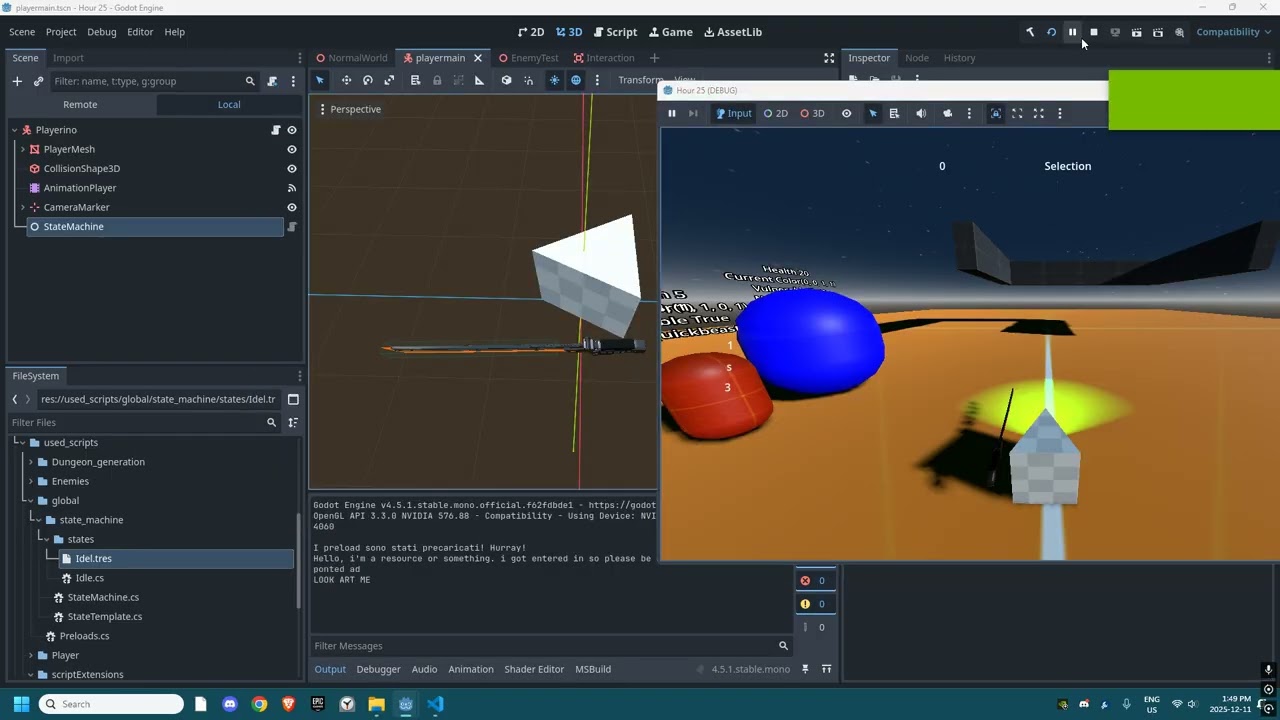
the state machine shown in the example video is a prototype of what i achieved in like, of 1 day of thinking and a few hours of coding so it’s very raw for now. I haven’t thought of what else to add so for now this is what I will show.

How it works

I have 2 main scripts, one is a template for all the states and the other one is the main finite state machine NODE.

In the finite state machine I will have a “Beginning State” variable to set the first state for the specific entity I want and then a dictionary<string, StateTemplate> to keep all the other states.

The State template script will keep the base functions and variables for any state I want.
I add the virtual keyword to the functions witch allows me to overwrite them with a child, otherwise it will keep the normal functionality.

When I want to make a new state I just make a new script that inherits from the StateTemplate and then make it a global class allowing me to create a resource out of the script. With the resource I can plug it in any state machine. this comes with the cost of having double files but i don’t think it’s too heavy performance wise.

Unrelated note

  1. This is my first time doing ALL of this, the project and showcase and post. I’m trying my best especially writing in English because this is my second language and most of the time I write short messages. ANY feedback would be nice even angry ones
  2. Yes, I’m working in C# because i think if i learn how to use C# rather than GDScript I will have a better understanding of how programming works and having an easier time understanding other languages and how they are structured.
  3. If anyone has anything to object, I would be glad to answer because I don’t know how optimal this method is but it feels pretty good.
  4. This is a solution as well to those people who want to have multiple scripts in a single node
1 Like

To be clear, the virtual keyword means you must define the function in the inherited class, and it cannot be declared in the parent class. You can override any function in an inherited class even without the virtual keyword.

You can learn programming with GDScript too. What’s important is not the language, but the concept and way of thinking like a programmer.

I’m curious how you came to this conclusion.

A node-based machine makes sense in Godot because Godot supports nodes and is optimized to run them quickly. There’s nothing wrong with using resources instead, but a Node isn’t that much heavier than a node from a processing standpoint when it comes to running pure code. You’re never going to notice the difference. In which you should ask yourself what the easiest way to use your state machine is.

I’ve actually made a state machine using resources in C#. I ended up refactoring it into a node-based state machine using GDScript. The code is available here as a plugin if you want to take a look at it: GitHub - dragonforge-dev/dragonforge-state-machine: A base state machine class to be used in games.

4 Likes

Thank you very much for the feedback!

That’s probably due to the fact that i’m kind of a hater sometimes. My main reasoning was that it should just execute a script and not need multiple nodes which, in my opinion, becomes very ugly.

Please tell me more! Why did you switch? Why were you using C# in the first place? Why switch to GDScript, was it because of a limitation? Why did you change to a node based state machine?

I checked the documentation of your state machine and i’ll be definitely implementing some of the fearures.
Especially the adding and removing a state from the state machine. If I want to give the player abilities, sutch feature will come in handy.

I suppose that depends on your definition of ugly. Godot focuses on ease of use as a design philosophy.

From a functional processing speed standpoint, both Node and Resource inherit from Object. Both are created with specific jobs in mind, and both are optimized in C++. From a memory standpoint, Resources are slightly smaller. But that size difference is rather miniscule on a modern computer.

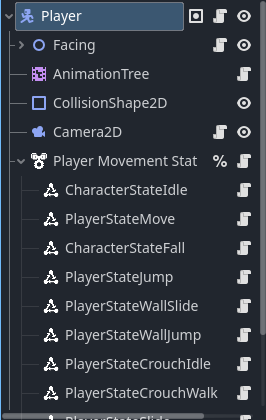
I switched because I found using Resources to be cumbersome from a design and maintenance perspective. This is what my StateMachine looks like today.

As I’m creating new states, or tweaking old ones - it’s very easy to find and tweak the attached script in the editor. If I want to know what states are there, I can literally just open up the node and look. Also, because a StateMachine operates on the object it is contained within, it often needs references to other nodes - and creating references between nodes is very easy.

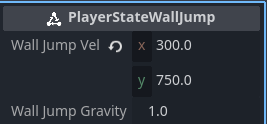
I have implemented a pull method for my StateMachine, so I can enable and disable functionality by adding or removing nodes. If I remove PlayerStateWallJump from the above StateMachine, it monitors states entering and exiting the tree, and activates or deactivates them as appropriate in-game. So if I’m making a game where I want to add such an ability as a powerup, I just add it to the tree programmatically.

It also means that I can add @export member variables for each state, and I don’t have to go digging for them - which increases speed of use in the editor.

I had been using Godot with GDScript for a few years, and I couldn’t answer questions on the forum here about C# as well because I’d never used Godot with C#, even though I had been using C# professionally for years. So, I took a course in C# for Godot and built a game (Dash and His Ghost Girlfriend) for a game jam to get the full experience. That course introduced a resource-based node machine, which I really liked and wanted to leverage in GDScript going forwards.

Yes and no. One of the primary reasons is it takes MUCH longer for a C# game project to load, and compiling before each run is SUPER time-consuming after using GDScript. That’s the limitation.

But the other reason is a reduction in limitations. When I first started using Godot in version 2.5/3.x, C# was faster at processing certain things. Now, GDScript has been optimized so heavily that it actually meets or exceeds C# in many areas when it comes to speed when running games.

I also always prefer to work in the language that something is written in. That’s a personal preference from years of being bitten by libraries supporting other languages for a library being updated with new features later, or not at all. Something that the Godot team is valiantly trying to rectify in 4.6 - but something I don’t have to deal with in GDScript.

As I got more used to Godot’s design philosophy over the past year, I realized that a Node-based StateMachine gave me a lot of useful built-in functionality that I didn’t have to code. It also just made for a better user experience.

I’m tagging @wchc who might have some thoughts for you as well.

3 Likes

Agreed with @dragonforge-dev about utilizing already available functionality that Godot provides - namely the Node system.

I was also an opponent before and if I were to design such a system myself from scratch, I would probably also go the Resource route instead of Nodes. But now working with the @dragonforge-dev’s State Machine in my project, I’m an advocate for the Node-based approach. It makes it very easy to debug and test different scenarios and have an always available overview of the states in the Node tree.

We have an ongoing discussion about a couple improvements to his system that should make it easier to use and allow for more complex scenarios, you can check it in this PR, if you’re interested.

There is nothing wrong with the Resource-based state machine per se and has some advantages over the Node-based system, it’s just that the Node-based is easier to work with, test and debug in Godot.

This is very true. If you haven’t already @Signor_Fior, I’d say try GDScript for at least a week or two. You’ll see the difference in development speed, easier of use and overall higher enjoyment of the development process. If you know and have experienced these advantages, it’s really hard to go back to C#.
Highly recommend this talk from the GodotFest, where the speaker illustrates how working with Godot and GDScript is superior to any other engine and language in terms of development speed.

C# of course has its advantages and if you’re aiming for professional work as a programmer specifically in C#, it’s still good to know and practice. But working with Godot, I’d choose GDScript over C# any day. Godot also gives you the opportunity to mix-and-match GDScript with C#, if you ever need it.

3 Likes

I’m not sure thats true. Try running an iterative maths equation on hundreds of thousands of numbers on both C# and GD Script and tell me which is quicker. (It will always be C#) And yes of course thats not something that most people will be doing as part of a project, but thats not really the point.

There’s more marshalling with C# , and you have to be extremely careful around allocations and GC, you absolutely could have something running slower in C# if you are not careful, but generally it will always win out over GD Script when it comes to performance.

As time goes on C# will also get better as well in Godot.

If someone doesn’t need the performance sure stick with GD Script. If someone is only ever going to use Godot and isn’t going to consider another engine, stick with GD Script.

Absolutely nothing wrong with that. I wouldn’t recommend anyone start from scratch with C# and Godot, but personally for me coming C# in general and Unity, its fine.

Also C# is transferable, GD Script isnt (unless there are other game engines using a python like language).

But these arguments have been done to death.

2 Likes

I understand why you would think that. That actually came from another thread where I replied to someone that C# was always faster and would always be faster in processing speed. I was corrected by a team member and told that in fact GDScript surpassed C# for certain things now.

Well, that was the point of what I was saying. GDScript is faster as a game engine. And have you tested that theory about math processing?

First of all, you would need to argue this with the architects, not me. Second, your argument also makes the point that if you don’t know what you’re doing in C# you can make things worse, not better.

The Godot team is working on better integration in 4.6 for GDExtension, starting with C#, but C# is not a specialized game programming language. It is a high-level language built on C++ just like GDScript. It is compiled instead of interpreted, but that seems to mean a lot less in terms of processing speed these days.

Again, the team says that GDScript is faster and getting faster. I choose to believe them. For me to trust what you are saying to be true, I’d need to see recent post 4.5.1 benchmarks.

I disagree. The skills are transferrable. Learning a new language is going to happen in most developers’ lives. It makes no sense when learning a modern language to learn C# so that you might one day be able to use it for another project. Especially when there is no visible, measurable, difference in performance for the average user. And when C# is harder to use in comparison with GDScript in the context of using it to create a game in Godot.

I’ve taught lots of people programming on the job. It is infinitely easier to tech someone with experience in another language who understands that language, than someone who has to learn concepts as well as syntax from scratch.

4 Likes

No not yet , but will do If I get 5 minutes.

2 Likes