Godot Version
v4.4.1 stable mono official
Question
Hello,
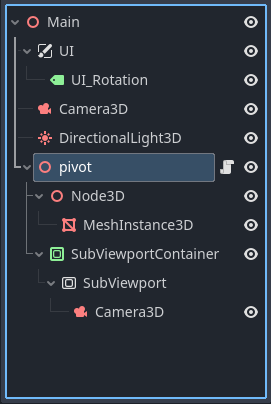
I have a simple mesh body and a camera3D. I can rotate the meshbody via keyboard keys. For this I have placed a Node3D and a Meshinstance3D into a pivot Node3D. This all works nice.
Now I would like to add a second camera with picture in picture with a subviewport to always face a certain surface of the mesh. So I added a Subviewportconainer→Subviewport→Camera3D to the pivot node3D. This also works, except that the second camera is not rotating with the pivot but always stays stationary like the first camera.
So how can I make the Subviewport rotate with the rotation of the pivot?
func _process(delta):
# global rotation
	if Input.is_action_pressed("UI_global_pan_cw"):
		rotate_z(keyboard_speed * delta)
	elif Input.is_action_pressed("UI_global_pan_ccw"):
		rotate_z(-keyboard_speed * delta)
	if Input.is_action_pressed("UI_global_tilt_cw"):
		rotate_y(keyboard_speed * delta)
	elif Input.is_action_pressed("UI_global_tilt_ccw"):
		rotate_y(-keyboard_speed * delta)
	if Input.is_action_pressed("UI_global_roll_cw"):
		rotate_x(keyboard_speed * delta)
	elif Input.is_action_pressed("UI_global_roll_ccw"):
		rotate_x(-keyboard_speed * delta)
# local rotation
	if Input.is_action_pressed("UI_local_pan_cw"):
		rotate_object_local(Vector3.FORWARD, keyboard_speed * delta)
	elif Input.is_action_pressed("UI_local_pan_ccw"):
		rotate_object_local(Vector3.FORWARD, -keyboard_speed * delta)
	if Input.is_action_pressed("UI_local_tilt_cw"):
		rotate_object_local(Vector3.UP, keyboard_speed * delta)
	elif Input.is_action_pressed("UI_local_tilt_ccw"):
		rotate_object_local(Vector3.UP, -keyboard_speed * delta)
	if Input.is_action_pressed("UI_local_roll_cw"):
		rotate_object_local(Vector3.RIGHT, -keyboard_speed * delta)
	elif Input.is_action_pressed("UI_local_roll_ccw"):
		rotate_object_local(Vector3.RIGHT, keyboard_speed * delta)
Thanks
You may need to use a RemoteTransform3D as the transform of the pivot cannot be passed down from a non-3d node such as SubViewportContainter
1 Like
Thanks for the reply. How exactly does that work? I am a total noob to Godot.
So I added the RemoteTransform3D to root and added the subviewport. Then assigned the Node3D that is inside of the pivot. But it does nothing. The subview still shows the rotating mesh as if nothing happened. Do I have to do the rotation in code?
If you add the RemoteTansform3D as a child of the pivot it can copy it’s own rotation/position/scale to the assigned node, in your example it’s remote path should be assigned to the Camera3D
Ok, thanks.
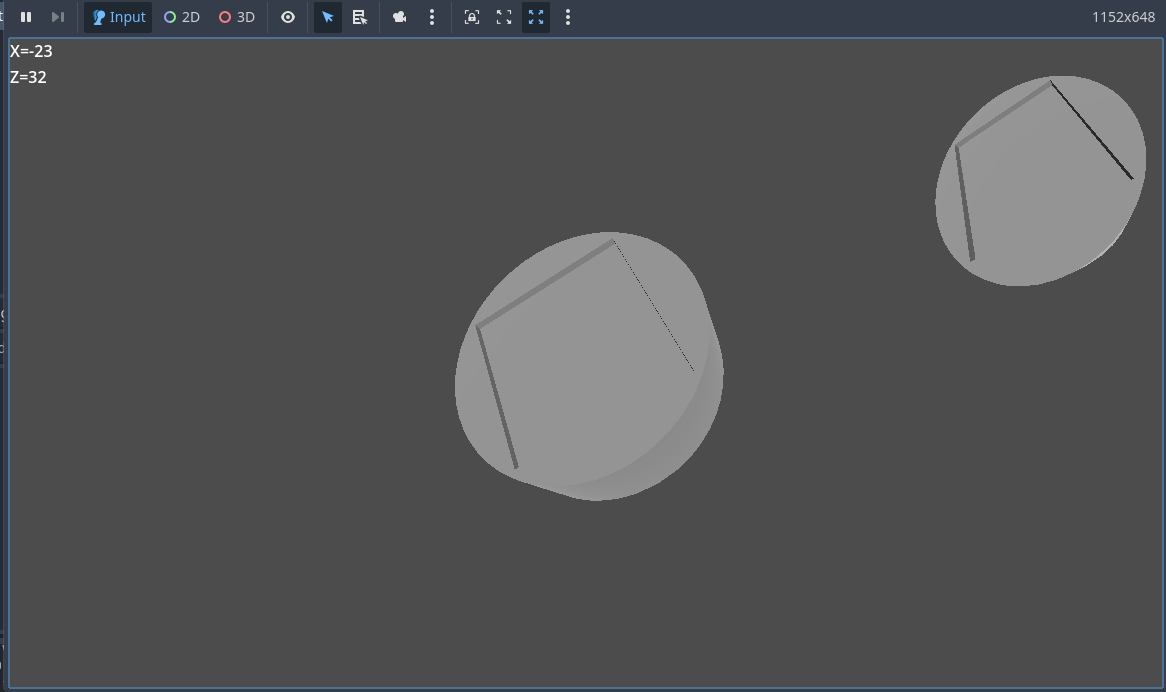
Now the funny thing is, my subview camera view shows the rotating mesh and the original camera is fixed to the mesh inside of the mesh.
Can you explain what you expect to happen?
Ok, so I have a simple mesh on the scree, a cylinder. The main camera looks at the cylinder and I can use some keyboard keys to rotate the cylinder along the global x, y, z axis or around its local x, y, z axis. As if you have a little cylinder in you hand and look straight at it and rotate it with you hands.
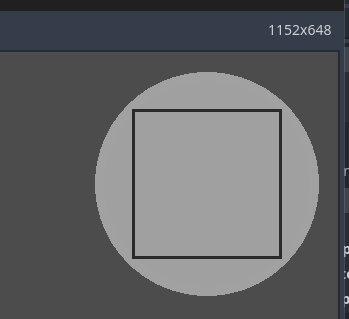
The subview should show one of the faces of the cylinder and move with it, as if you were to attach a camera physical and rigid to that cylinder. If the cylinder moves, the subview camera should always show the same face of the cylinder in the same orientation. Just the background in that image would move.
So that is what I would like to achieve. I know almost nothing of Godot.
So the upper right Subview should always show this:
Did you assign the correct camera to the remote path? You should have two options one for each camera, have you tried them both?
It doesn’t really make any difference which one I assign. The result is exactly the same with both. Plus it somehow moves my camera inside of the mesh.
Parent the remote transform node to the cylinder and adjust its position/orientation to exactly where you’d want camera to be/look. Disable “scale” in the remote transform and assign the viewport camera to remote path.
1 Like