Godot Version
Godot v4.7.2 downloaded from Steam.
Question
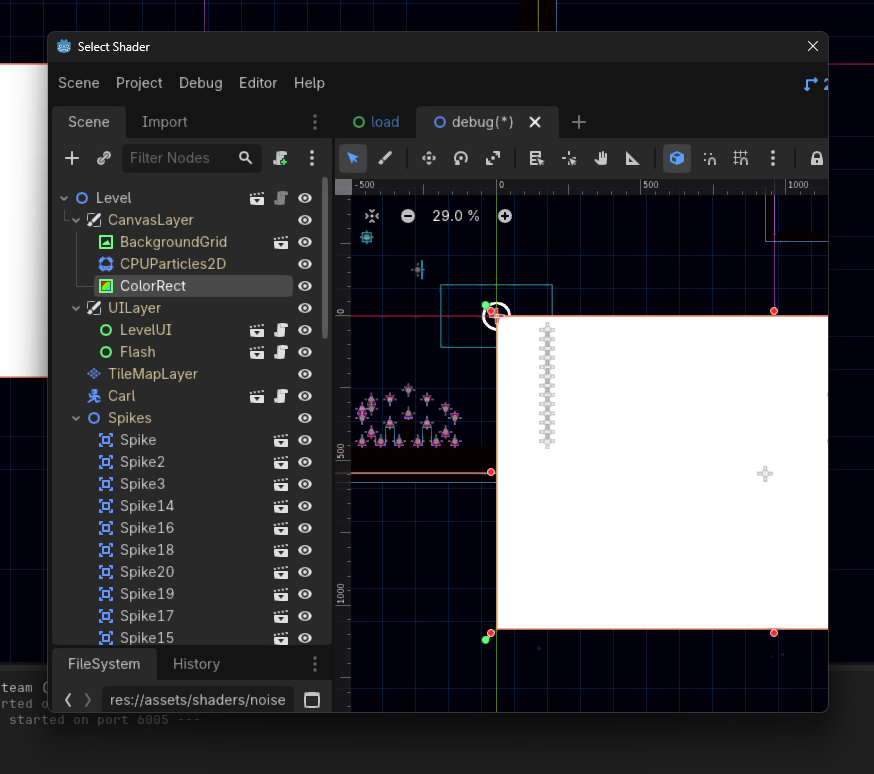
The shader selector dialog shows a copy of the editor, it looks like this:
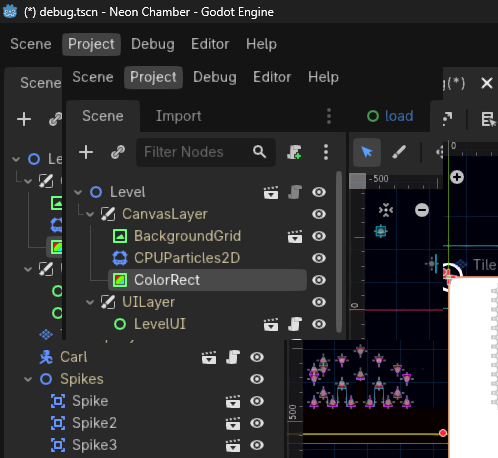
Now, resizing the window fixes the glitch. But the thing is that this happends with every single pop-up:
I have to basically guess where the “Quit to Project List” option is.
This glitch only happends in this specific project and not in any other one, I even tried to copy all the files to a new freshly-made project and it keept happening. Any help?
Looks like an issue with either your PC / GPU drivers, or you have an Editor script / addon running that is modifying the draw routine. Can you try and disable your addons if you have any, and disable every single script which has the @tool tag attached to it?
I disabled all addons and tool scripts, it didn’t fix it
EDIT: I also reinstalled my NVIDIA drivers, it also didn’t work
What are your PCs specs? Does it change if you run Godot with the compatibility renderer?
I changed to the compatibility renderer and it fixed it, thanks!
I’m glad my response was helpful, if it helped you, you can mark it as a solution!