Godot Version
4.6.3
Question
Hi!
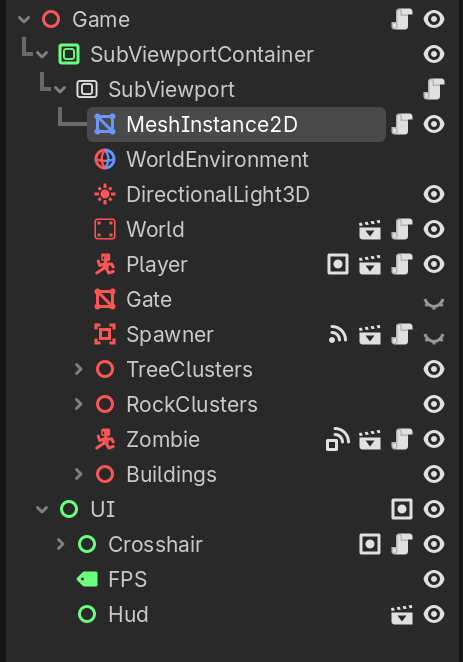
I use a MeshInstance2D to apply a Shader for outlines (edge detection) in my 3D game.
The quad mesh is a child of a SubViewport which also contains all the 3D nodes I want it to affect.
However, I can’t find a way to create a new SubViewport which will exclude it’s children from the Shader effect. Not only is everything affected by the shader, but also the Pixelation effect created by the SubViewContainers Stretch Shrink.
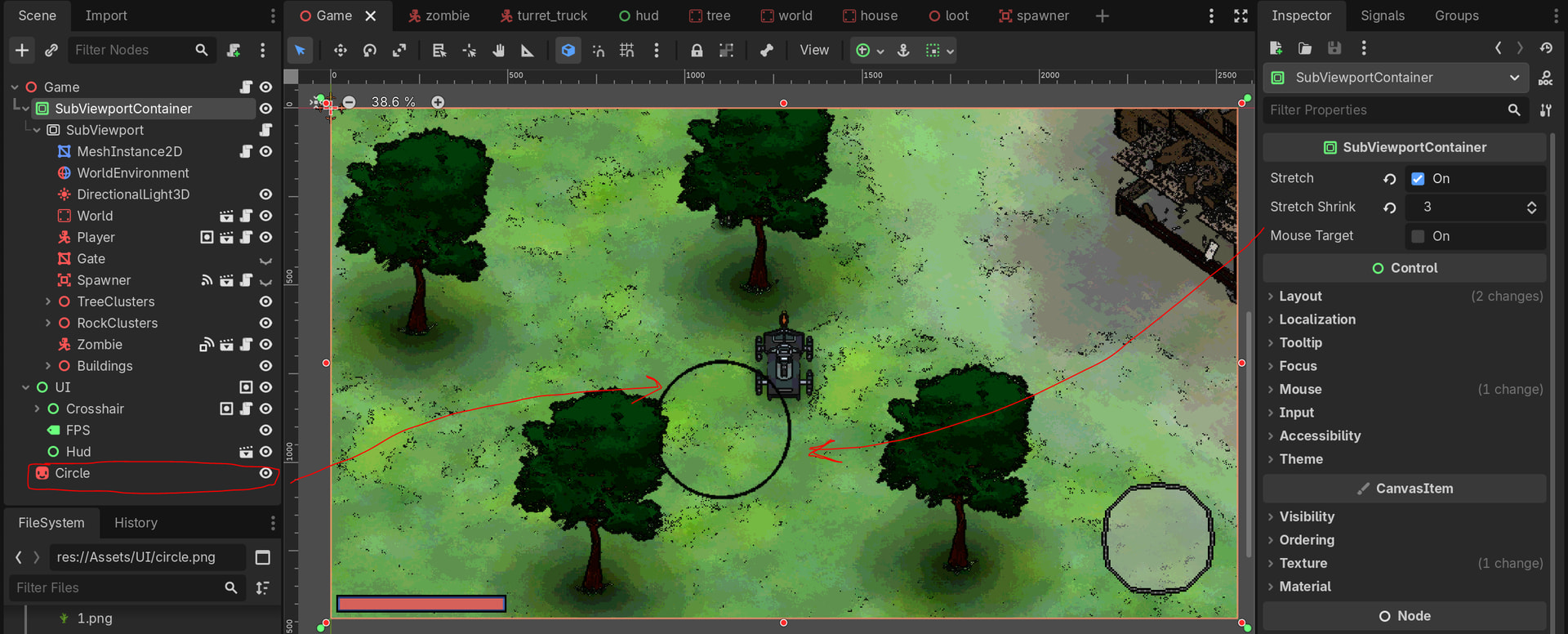
Even if I place the node completely outside of the SubViewportContainer, it still receives both the shader and the stretch pixelation effects.
As you can see, the circle Sprite gets pixelated even though it’s not a child.
Here’s the shader attached to the MeshInstance2D (Probably irrelevant to the topic):
shader_type canvas_item;
render_mode skip_vertex_transform, unshaded;

uniform float colors_per_channel : hint_range(4.0, 256.0, 4.0) = 16.0;

// =====================================================// COLOR CONTROLS// =====================================================

uniform bool grayscale_enabled = false;

uniform float brightness : hint_range(-0.5, 1.0, 0.05) = 0.0;uniform float contrast   : hint_range(0.0, 3.0, 0.05) = 1.0;uniform float saturation : hint_range(0.0, 3.0, 0.05) = 1.0;

// =====================================================// OUTLINE - COLOR DISTANCE EDGE// =====================================================

uniform bool color_outline_enabled = true;

uniform float color_edge_width :hint_range(0.5, 8.0, 0.1) = 1.0;

uniform float color_edge_threshold :hint_range(0.0, 5.0, 0.05) = 0.35;

uniform float color_edge_blur :hint_range(0.0, 8.0, 0.25) = 0.0;

uniform vec4 color_edge_color :source_color = vec4(1.0, 1.0, 1.0, 1.0);

// =====================================================

uniform sampler2D screen_texture :hint_screen_texture, filter_nearest;

void fragment() {
vec2 uv = SCREEN_UV;

// =====================================================
// COLOR DISTANCE OUTLINE
// =====================================================

float color_edge = 0.0;

if (color_outline_enabled) {

    vec2 edge_texel = SCREEN_PIXEL_SIZE * color_edge_width;

    float hard_edge = 0.0;
    float blurred_edge = 0.0;
    float blur_t = clamp(color_edge_blur / 8.0, 0.0, 1.0);
    vec2 blur_texel = SCREEN_PIXEL_SIZE * color_edge_blur;

    for (int bx = -1; bx <= 1; bx++) {
        for (int by = -1; by <= 1; by++) {

            vec2 offset = vec2(float(bx), float(by)) * blur_texel;

            vec3 s_up    = texture(screen_texture, uv + offset + vec2(0.0, -edge_texel.y)).rgb;
            vec3 s_down  = texture(screen_texture, uv + offset + vec2(0.0,  edge_texel.y)).rgb;
            vec3 s_left  = texture(screen_texture, uv + offset + vec2(-edge_texel.x, 0.0)).rgb;
            vec3 s_right = texture(screen_texture, uv + offset + vec2( edge_texel.x, 0.0)).rgb;

            float s = step(color_edge_threshold, length(s_left - s_right) + length(s_up - s_down));

            if (bx == 0 && by == 0) hard_edge = s;
            blurred_edge += s;
        }
    }

    blurred_edge /= 9.0;
    color_edge = mix(hard_edge, blurred_edge, blur_t);
}

// =====================================================
// BASE SAMPLE
// =====================================================

vec3 center = texture(screen_texture, uv).rgb;

// =====================================================
// QUANTIZATION
// =====================================================

float levels = colors_per_channel - 1.0;
vec3 color = round(center * levels) / levels;

// =====================================================
// SATURATION
// =====================================================

float luminance = dot(color, vec3(0.299, 0.587, 0.114));
color = mix(vec3(luminance), color, saturation);

// =====================================================
// CONTRAST
// =====================================================

color = ((color - 0.5) * contrast) + 0.5;

// =====================================================
// BRIGHTNESS
// =====================================================

color += brightness;

// =====================================================
// GRAYSCALE
// =====================================================

if (grayscale_enabled) {
    float gray = dot(color, vec3(0.299, 0.587, 0.114));
    color = vec3(gray);
}

// =====================================================
// APPLY OUTLINE
// =====================================================

color = mix(color, color_edge_color.rgb, color_edge * color_edge_color.a);
color = clamp(color, 0.0, 1.0);

COLOR = vec4(color, 1.0);}
Any Help Will Be Appreciated!