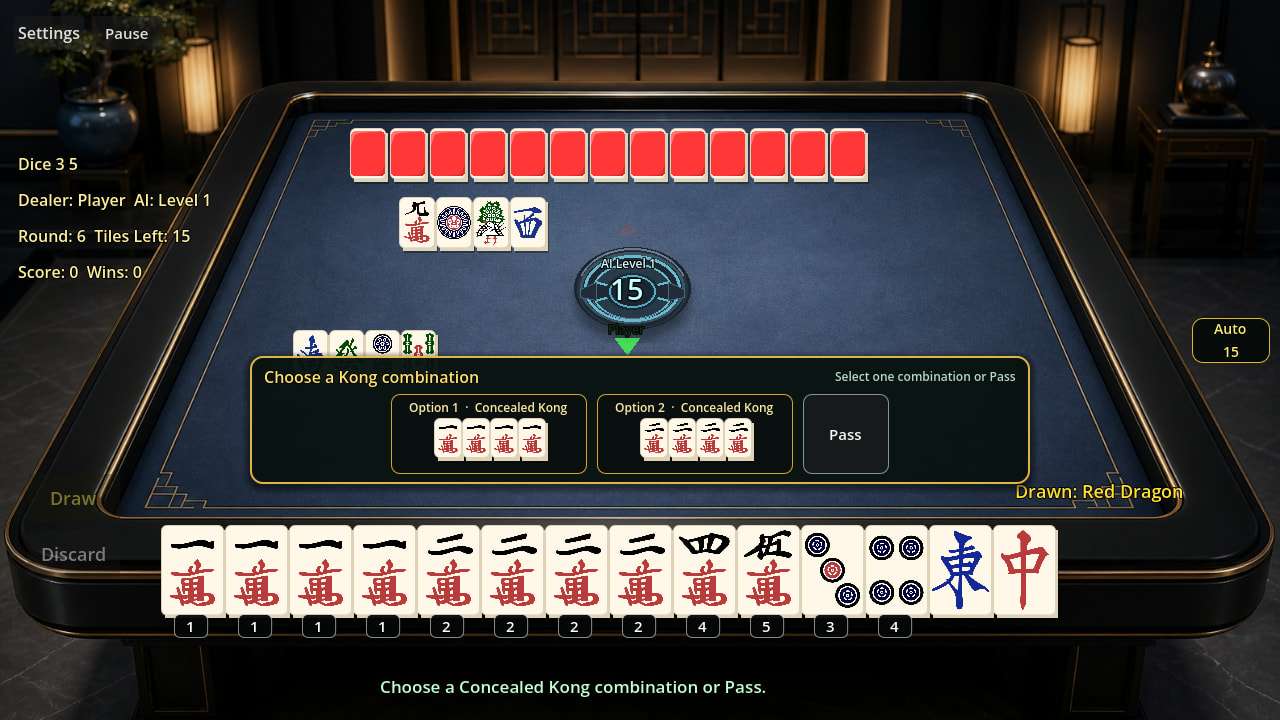
Shipped a two-player mahjong game — mostly writing this to thank GL Compatibility

I’ve been working on a two-player mahjong game for a while now, and I wanted to
post something that isn’t really a devlog — more a thank-you note to whoever
worked on the GL Compatibility renderer.

The short pitch: mahjong, but you only need one human. Solo against an AI with
8 difficulty levels, 64-tile wall, no dead wall. There’s a free browser trial up
on itch.io.

Link: 欢乐二人麻将 | Chinese Two-Player Mahjong (Web Trial) by OldyoungCN

Here’s the part I actually wanted to write about.

I picked GL Compatibility early and honestly didn’t think much about it at the
time. I just wanted the game to run on cheap Android phones and in a browser
without me babysitting a fallback path. What I didn’t expect was how much of a
non-issue rendering would turn out to be. Two and a half years of tile layouts,
hover states, animated panels, a 3D table layer that I later disabled, and I
basically never had to think about the renderer again. It just kept working on
everything I threw at it.

The other thing is exports. Windows, Android AAB, and Web all come out of the
same project with nothing but preset differences. For a solo dev that’s the
difference between shipping three builds and shipping one. Same story with ENet
— the LAN mode is built on ENetMultiplayerPeer and the three-RPC setup was
enough for a host-authoritative match. I never needed to reach for anything
fancier.

Two honest notes, both my fault, not the engine’s:

  1. I built the entire UI procedurally in GDScript instead of using scenes. It
    works, and it made tweaking tile spacing fast, but the file is now well past
    10k lines and I regret it. If you’re starting something similar: use scenes,
    or at least split your UI builders into their own scripts before it’s too
    late. Godot gave me the rope, I used it.

  2. GDScript is quick to iterate in, which is exactly why I let one script grow
    to that size. The engine isn’t the bottleneck there — my own discipline was.

Anyway. No real question here, just wanted to say thanks to the engine folks.
If anyone wants to try the browser build, it’s WebGL so it needs a real browser
(Chrome/Safari/Firefox) — in-app browsers tend to choke on it. Feedback on the
AI difficulty curve is very welcome.

5 Likes

A small update since I first wrote this:

The Windows version is now also available, and LAN multiplayer is working.
If you have another player nearby, you can try the local network battle mode here:

I’m also preparing to release the game on Steam. It has been a long journey as a solo developer, and I would really appreciate your support, feedback, and encouragement when it goes live. I’ll share the Steam link once it is available.

One more honest confession: my art skills are honestly not very good. :sweat_smile:
A lot of the visual work is still done with my limited ability as a programmer rather than a professional artist, so please forgive the rough edges.

If anyone is interested in improving the artwork, UI, animations, or just wants to create something together, I would be very happy to collaborate. This project started as a personal experiment, but I hope it can grow with help from more people in the community.

Thank you again to everyone who plays, tests, gives feedback, or simply takes a look. :heart:

1 Like

A small update about the project: one thing I really appreciate about Godot is how easy it is to support multiple languages.

For my Mahjong game, I created separate translation resources for Chinese and English. Most UI text is managed through Godot’s localization system, so switching languages does not require rewriting the game logic.

The basic workflow is quite simple:

  • Keep all player-facing text in translation tables instead of hardcoding strings.

  • Use translation keys in scenes/scripts.

  • Let Godot handle language switching and text replacement.

This made it possible for me, as a solo developer, to prepare both Chinese and English versions without maintaining two separate projects.

I’m still improving the English UI and rules explanation, but it has been a great learning experience. Thanks again to the Godot team for making indie development more accessible!

If anyone is interested in trying the game, the free web version is here:

3 Likes

As a long-standing (that’s to say : very old…) modest family player of Mah Jong, this intrigued me. I tried the Web trial, and have been convinced enough to buy the full version (now available with English display…). It’s got a multi-player function, but, for me, playing against the built-in ‘bot’ is quite enough for me. I’ve not yet won a ‘hand’, but have enjoyed trying..! It’s a very clean, smooth game, and worth a look, in my humble opinion. It gets a solid ‘Thumb’s up..!’ from me.

2 Likes

My sister and aunt play top Amateur league Mahjong in Holland.

My sister’s response:

So cool! :star_struck:

2 Likes

Wow, that’s really cool! :blush:

Thank you for sharing this with me. Knowing that your sister and aunt are involved in the Mahjong community in Holland makes this even more special.

One of the things I love about Mahjong is that it has traveled across the world and become part of so many different cultures and families. It’s amazing to see a traditional Chinese game bringing people together in different countries.

I’m just a solo developer trying to create a small Mahjong experience that more people can enjoy, so hearing reactions like this really makes me happy.

Please also say thank you to your sister for the kind words! :star:

I would love to hear any thoughts from experienced Mahjong players as I continue improving the game. Thanks again for sharing this wonderful connection!

2 Likes

Thank you so much for your kind words! :blush:

I have to say, I really enjoyed reading your message — especially the “very old” part! Mahjong is exactly the kind of game that can stay with us for a lifetime, and I love hearing from players who have their own family memories and traditions around the table.

I’m really happy that you tried the Web version and decided to support the full game. As a solo developer, every purchase and every encouraging message means a lot to me.

I’m also glad you are enjoying playing against the built-in bot. Don’t worry about not winning a hand yet — Mahjong has a wonderful way of humbling everyone, beginners and experienced players alike! :grinning_face_with_smiling_eyes: Hopefully your first win will come soon, and it will feel even more satisfying.

I’ll continue improving the game and adding more features to make it a better experience for both new players and long-time Mahjong fans.

Thank you again for the “Thumb’s up” — it truly made my day!

Wishing you many enjoyable Mahjong hands ahead! :mahjong_red_dragon:

1 Like

Small update on this project — and this one actually came directly from some of the comments here.

A few people mentioned two things that stuck with me:

One was basically, “I’ve always wanted to learn Mahjong, but does the game actually teach a beginner how to play?”

The other came from an older player who said the 10-second turn timer was simply too fast for him.

Both were completely fair points, so… I went back and changed it. :slight_smile:

v0.1.37 is out now.

There’s now a beginner tutorial covering the basic flow of Chow, Pong, Kong, Win and Self-draw, and the Windows version has an adjustable turn timer from 5 to 60 seconds.

I also finished a proper Chinese/English interface pass. That turned into a little more work than I expected because, unsurprisingly, English text does not always fit nicely into buttons that were originally sized around Chinese. :sweat_smile: So quite a few button widths, spacing and result screens got adjusted along the way.

I also fixed an occasional bug where a valid tile couldn’t be discarded while declaring Ready Hand.

The free Web version has been updated too, so the tutorial and bilingual interface can be tried without installing anything.

What I really like about this update is that I probably wouldn’t have prioritized some of these things this quickly without the feedback from this thread.

So, genuinely, thanks for that.

Still a solo project, still learning things the hard way, and apparently still discovering new ways to make my 10,000+ line GDScript file regret its life choices. :grinning_face_with_smiling_eyes:

Full v0.1.37 notes are on the itch.io devlog:
[devlog link]

1 Like

Good evening…

Many thanks for the uber-swift updates; kudos for reacting so well to our modest remarks. That’s the Good News.
Now the less welcome stuff : there’s still a little more left to do, I think…

1 - Please leave the ‘Settings’ opening page on screen when first running the game, and not have the Game start immediately. Presently, there is no time to adjust the settings; the Start Play comes up at once. Maybe add the ‘Settings’ button to that opening UI box..?
2 - Why is this important..? It appears that the audio volume levels have no effect, and the Game starts with the music and Fx at full blast..! Opening the ‘Settings’ works, but the Audio sliders do nothing, the music and Fx remain at maximum. Luckily for me, I have quick enough reflexes to hit my keyboard ‘Mute’ key; my already aged hearing was thus saved (but it was close..!).
3 - The ‘Updates’ function in the settings page didn’t find the new ‘v1.37’; it told me that I was up to date with v1.36.

I’ll download a new 1.38 version once these little details are fixed; you’re doing a great job. Take the time to enjoy a cup of tea (or coffee..?), it’s well earned. There’s no fire, nor kittens harmed. Meanwhile…

Have a splendid day.

Douglas

hi~, Douglas,

Thank you very much for testing the game again and for describing each problem so clearly. Your report genuinely helped me identify what was happening.

I have confirmed that version 0.1.37 is currently available on itch . The update checker was still reading an older version record, which explains why your v0.1.36 copy incorrectly reported that it was already up to date. The Windows package itself has been uploaded correctly.

To download the latest version:

Sign in to itch .io with the same account or email address used for your original purchase.

Open the game page: Windows Full Edition Updated: English Interface & Offline License / Windows正式版更新:英文界面与离线授权 by OldyoungCN

Select the download option connected to your existing purchase. You do not need to buy the game again.

Make sure the downloaded package is named ChineseTwoPlayerMahjong_Windows_Licensed_v037.zip.

The package should be approximately 79 MB.

Close the old game, extract the entire ZIP into a new folder, and do not run it directly from inside the archive.

Launch ChineseTwoPlayerMahjong_Windows_Licensed_v037.exe.

If the older package is still displayed, please refresh the page or open “My Library” from your itch .io account and locate the game there. Your existing purchase remains valid, and downloading the updated version does not require another payment. On the same computer, your existing activation should normally remain valid.

I am also reproducing the other two issues you reported: the game starting before there is enough time to adjust the settings, and the music and sound-effect sliders not applying their volume levels correctly. I will test both carefully before preparing the next build.

Thank you again for the thoughtful report—and I’ll have that cup of tea, then get back to work.

Have a splendid day too~
OldYoung

1 Like

BCThum

1 Like

In the new version, I’ve placed the settings on the homepage, and clicking the settings doesn’t immediately start the game. The volume adjustment works fine on my end. Is it working correctly on your end as well? I look forward to your feedback and wish you a happy day.

Downloaded again, just in case, but it’s the same. It’s v1.37, and the playing time extension now works, but the opening ‘bare table’ screen, for the settings, closes after about 1 second; even if I have time to select ‘Settings’, the ‘Start Game’ screen displays. I can only access Settings after starting a Game. Once there, the Audio sliders have no effect, nor do the Audio Check boxes.
My PC is an ordinary 12-core Xeon-processor HP Z440, 16 Gb, , the OS is Windows 11 Pro x64, GPU GeForce NVidia GTX 1650, the browser is Brave. I have no audio issues with other software, including Reaper, other games and Godot. Does any of this help at all..? Chum
Douglas

Edit : I now find that the Audio volumes do, in fact, change, but not in ‘real time’. If I close the Game and re-open it, the new volume levels (and choice of background music…) have been executed. That makes it at least work-able; the only real issue left is the access to Settings upon opening the programme, before starting a Game. Hope this helps.

Hi Douglas,I’m very happy to receive your reply. As an individual developer, I’m really happy to get your feedback because you are always able to carefully and diligently identify problems and provide feedback to me, which is very important to me.:smiling_face_with_three_hearts:

You’ve confirmed two separate issues: the opening menu is disappearing before Settings can be used, and audio changes are only taking effect after restarting the game. Both are now fixed in the newer Windows build: the opening menu stays on screen until Start Game is pressed, Settings can be opened before a match, and music/SFX changes apply immediately.:face_with_monocle:

Please download the file marked as the newest version on the itch.io purchase page, rather than the older v1.37 ZIP that is still listed there. I’m preparing one clearly named replacement package as well, so there will be no ambiguity. Thank you again for taking the time to test this so carefully.

I will upload the update package shortly and get back to you as soon as possible.:grin:

Good evening…

Et voilà..! The ‘v1.39’ works perfectly; many thanks for the swift updates. It’s not that I’ve yet to win, but the game is such that we get to the end of the tiles before either I or the Robot are able to claim ‘Mah Jong..!’. Early days; I’ll keep playing; it’s addictive.
One minor note : I’m not sure that the lady is pronouncing correctly the …
No, I’m kidding, of course. There’s no way I could criticise the Chinese terms. Just a joke. Yes, it’s late, that’s my excuse. Thanks again; a Great Job. 140 - 3p9T3qx

Douglas

Good evening, Douglas!

Your thoughtful and detailed feedback is honestly a big part of what keeps me motivated. It makes me really happy to know that you’re still playing, testing the updates, and taking the time to tell me what you find. It gives me a lot of motivation to keep improving the game.

And about the lady’s pronunciation… :grinning_face_with_smiling_eyes: There are actually two Chinese voice options in the game: Standard Mandarin and Sichuan dialect. You can switch between them in the settings.

I promise the pronunciations are correct! For example, when playing the 1 Bamboo, in Mandarin it’s called “yi tiao”, while in the Sichuan version we call it “yao ji” “yao ji” is the English word for “chicken”.:baby_chick: So if you hear something that sounds completely different, it may just be the Sichuan lady speaking. :grinning_face_with_smiling_eyes:

Now I’m starting to wonder… is the computer opponent too difficult?

I could always make an extremely easy robot for you. Hahaha! But then again, if I make it too easy, I’m afraid winning might stop being fun. :grinning_face_with_smiling_eyes:

Seriously though, thank you again, Douglas. Your feedback really means a lot to me, and I’m looking forward to hearing how you get on with the new version.

-– OldYoung

Yes, it’s still late, and I’m still playing (but off to bed very soon, I promise…). One last request, please..? Could the present External log be put in the ‘User’ folder, along with the other logs (which seem to be duplicates..?) instead of popping up on my Desktop..? They make fascinating reading, seeing how the Robot is reacting, and translating the ‘hints’ in there. Not a major issue; just a detail that would improve the already close-to-perfection.
I’m rather used to our tile set, with the Bird to represent the ‘1 Bamboo’, but there are so many variation in tile design. We also have ‘cheat’ Arabic numbers on the corner of each tile, which makes it easier, for us, (and thus more rapid…) to know which Character is which. Not a problem there; I’m just very slowly learning a little Chinese..! No bad thing, maybe.
‘Enough..!’ I hear you cry, ‘Hie thee to bed anon..!’ Indeed, I’m off now. Bye…

Douglas

220 - IFAd4gO

A small but important UI pass in v0.1.42.

The multi-choice Chow/Kong panel has been rebuilt: each legal combination now has its own card, tiles are larger, Pass is separate, the countdown sits outside the panel, and the original action row is hidden while making a choice.

The rules themselves are untouched.

That was actually the point.

The longer I work on Mahjong, the more I feel that its strength comes from how little it needs around it. This is a game tradition that has lived across generations in China because the pleasure is already there: observing, remembering, judging and choosing.

So this update is less about adding something new, and more about removing what stands between the player and the table.

Hi Douglas, I have met all the requirements you mentioned in your previous post. Please update your client or download the latest version to play.:smiling_face_with_three_hearts: :smiling_face_with_three_hearts: