I have an area_enteredsignal where I change the name of a variable that is in a global script. However, the changed value isn’t reflecting. I know this because when I change the value within the global script, works like intended but nothing changes when that line is being ran within the signal.
Carrot.gd
func _on_area_entered(area: Area2D) -> void:
	if area.is_in_group("Crops"):
		UserPlacement.can_place = false


func _on_area_exited(area: Area2D) -> void:
	if area.is_in_group("Crops"):
		UserPlacement.can_place = true
I’m making a farming game and working on placement validation (Users won’t be able to place if two crops are overlapping each other) I do have CollisionShape2Das a child of the instantiated crop scene with their shapes set.
To test whether or not the signal even runs, I replaced UserPlacement.can_place = truewith queue_free()and the crops delete when they collide so I know the signals are running as intended.
The Global/Autoloads system creates a new instance of the designated script/scene and adds it to the game’s root node, if you are trying to access a specific node already inside the scene tree then this system is not what you need.
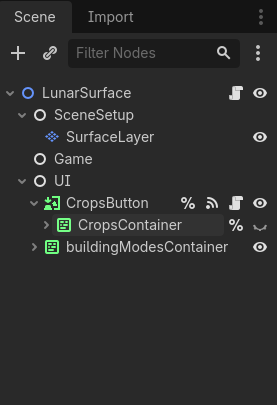
This is the scene tree for the main game scene. The crops aren’t in the tree initially but are added to $Gamewhen they instantiate (Crop button is pressed then the instantiating happens). The script attached to LunarSurfaceis the autoload/global script.
Maybe in Carrot.tscnaccessing the script through UserPlacement.[variable]creates a new instance of the script thus the change isn’t being reflected in the original script? Is that how this works?
This is what I mean, you now have two LunarSurfaces in your game, one is the autoload and the other is from this scene.
When you run the game, check your scene tree again, there will be a “Remote” button that shows the in-game scene tree, including the new Autoload alongside your normal scene.
That change doesn’t reflect in the scene tree on my end. Though because I’m on a school device and they haven’t approved Godot, I’m stuck doing this on the web version which has its annoyances.
Then what is the point of autoload then if it’s just going to make a copy? I thought the point of making it global was to access one of its variables from anywhere.
There are a lot of options for access and control flow, Autoload fills an important role, picking one node out of every possible scene and making it accessable doesn’t really make sense with the engine’s internals.
You can add a separate script with your overlap variable as an Autoload, or use static variables.
It’s not making a copy. It’s instantiating a node of a given script class and parenting it to the root, providing a global name to access that node. The script in question isn’t supposed to run on any other node elsewhere in the scene.
Autoloads are not a way to “make a script global”. That’s a misconception. The whole idea of a “global script” is bogus. A node script always runs in the context of the node it’s attached to. Since the same script can be attached to any number of nodes at the same time, the concept of making the script itself “global” - simply doesn’t make sense. Which of those multiple instances of a script would be “global”?
Read the chapter on autoloads in the docs to get a better idea of how they work and how/when to use them.