Hello everyone!
After leveling up I was finally able to find a solution to the problem regarding split-screen or local multiplayer. The solution came from this post: How to make a local multiplayer game
But the approach was completely reworked, so first you need to read this reference post. The solution is made through the AutoLoad script. But it does not change the essence in any way
The idea is to add only the required set of actions to the InputMap. After that, when connecting players or new joypads, ALL actions from the initial InputMap are copied and new actions with new events are dynamically created!
But of course there are very tough “pitfalls”:
- Inside the engine, all input
devices are assigned to a specific number, which always starts with 0. That is, the keyboard is always device 0.
A joypad connected to a PC is device 0. The second joypad is device 1, and so on. So keyboard and joypad #1 is device 0.
The Input.get_connected_joypads() function shows connected joypads. But you CANNOT CHANGE THE DEVICE NUMBER inside this array, even if you manually shift the indexses inside this array.
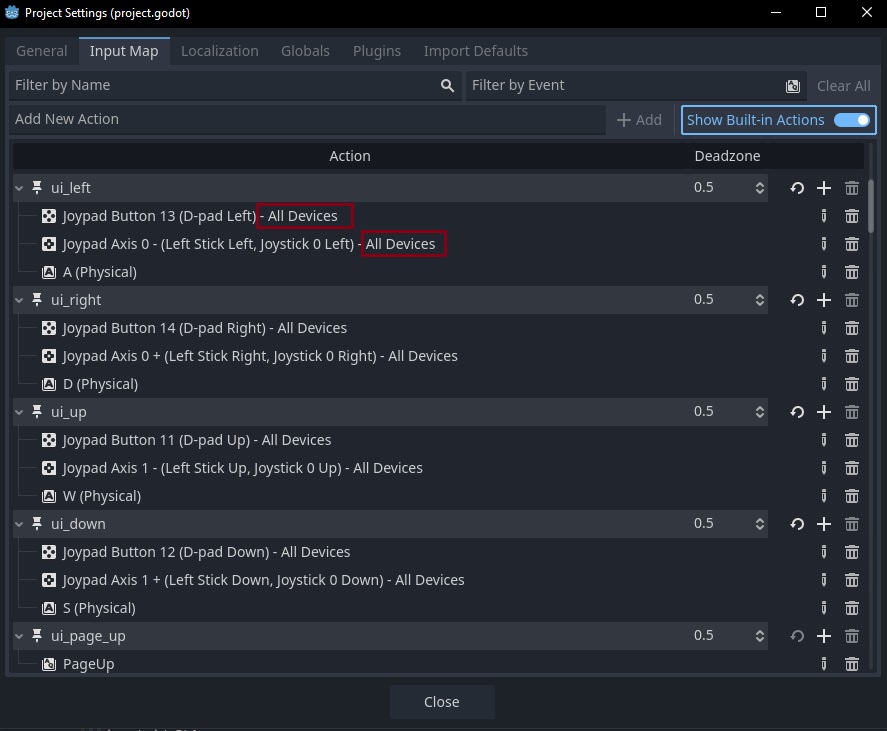
- It is still unclear whether each new action should have the correct input device set or not. But in many posts on GitHub, those who created new actions manually in InputMap set a new device index for each new set.
- Simply copying the inputmap will only end in pain, because
events inside actions are OBJECTS. And when an entire array or dictionary is copied, it copies objects (events), but does not break the connection between them. Accordingly, as soon as one of the objects changes (something is erased from them or buttons are changed), this happens both in the original object (InputMap) and in its copy.
- Events themselves represent an
Object (depending on the assigned buttons inside the action). Problem that we can get access only via Array[InputEvent]. Each of these is a certain type of InputEvent. At the same time, if we look at the project.gd file, the saved new actions are more reminiscent of Dictionaries. Accordingly, it is not so easy to just take and get access to information inside the event, because each component has a different data type: for example, InputEventKey and InputEventJoyButton.
extends Node

# --- Input -------------------------------------------------------------------
@onready var start_actions: Array = InputMap.get_actions()
var start_actions_events: Dictionary = {}
var players_in_game: Dictionary = {}
var prefix_action: String = "PL"
@onready var start_actions: Array = InputMap.get_actions() - this is a list of actions that should be saved as the initial one, which cannot be changed.
var start_actions_events: Dictionary = {} - This is a variable for saving the initial data from the InputMap.
var players_in_game: Dictionary = {} - This is a dictionary with the assignment {Device : Player_ID}, so that it can be assigned to players later.
var prefix_action: String = "PL" - this is a prefix for new actions, the construction will be “action+PL+device” for example “ui _acceptPL0”.
func _ready() -> void:

	init_inputmap()
	Input.connect("joy_connection_changed", _on_joy_connection_changed)

# INPUT MAP ---------------------------------------------------------------------------------------

func init_inputmap():
	for action in start_actions:
		var events: Array = InputMap.action_get_events(action)
		var start_events: Array = events.map(func(i): return i.duplicate(true))
		start_actions_events[action] = start_events
init_inputmap() - The very first function that makes a deep copy of events. The starting actions are iterated over and each action receives not only a copy of the ARRAY events inside, but also a copy of ALL OBJECTS of each “event” (Array[InputEvent]), inside each action. Moreover, a copy of objects using the map() function occurs with the creation of an INDEPENDENT copy. Thus, any change to these events in the future will not affect (since it has no connection) the original events inside the InputMap.
func _on_joy_connection_changed(device: int, connected: bool):
	var players = Input.get_connected_joypads()
	if connected:
		players_in_game[device] = (prefix_action + str(device))  #{0:PL0}
		add_player_inputmap(device)
	else:
		players_in_game.erase(device) #{0:PL0}
func _on_joy_connection_changed(device: int, connected: bool) - This is a function that is associated with the Input.connect("joy_connection_changed", _on_joy_connection_changed) signal. When a new joypad or player connection occurs, this function saves the device number inside the dictionary - as a key and Player_ID as a value.
Then DYNAMIC creation of new actions in InputMap occurs.
When the joypad is disconnected, the key is simply erased, i.e. the device number, but not the actions inside InputMap.
func add_player_inputmap(device: int):
	for action in start_actions:
		var new_action: StringName = (action + prefix_action + str(device))
		if not InputMap.has_action(new_action):
			InputMap.add_action(new_action)

			# INFO: Duplicate InputEvents inside Array[InputEvent]
			var new_events: Array = start_actions_events[action].map(func(i): return i.duplicate(true))
			var new_actions_events: Dictionary = {}
			new_actions_events[new_action] = new_events

			# INFO: SET new_events to new_actions via dictionary keys
			for index in range(new_actions_events[new_action].size()):
				if new_actions_events[new_action][index] is not InputEventKey:
					new_actions_events[new_action][index].set_device(device)
					InputMap.action_add_event(new_action, new_actions_events[new_action][index])
add_player_inputmap(device: int) - the function starts iterating all the actions inside the starting set of InputMap, which was saved at the very beginning of the code.
- For each starting action (
ui _accept), a new action with a prefix and player_id (ui _acceptPL0) is created.
- A check is performed to see if an action was created when the previous joypad or device was connected. If not, an action, an empty object, without events is added to the
InputMap.
- For each NEW action, an INDEPENDENT copy of “events” (
Array[InputEvent]) is created from start_actions_events[action]. This must be done from a separate variable (dictionary), since each new action with a list of events will fill the InputMap and can copy already copied actions. Then you connect 2 joypads it will be like : “ui_acceptPL0”, “ui_acceptPL0PL1”, “ui_acceptPL0PL1PL2” and so on…
- Independent copies of events are entered into the new variable, in the form
{new action : Array[InputEvent]}
- Inside the copied action events, as I already wrote, there are objects of different types. To separate events of only the required type
InputEventJoyButton and InputEventJoyMotion, we must iterate the objects inside each “event” (Array[InputEvent]) and if this Object is of the required type, then add only this Object inside the copy of the “event” (Array[InputEvent]). Also, just in case, the device value is assigned to each new object inside the event using set_device()
# INFO: IF keyboard+Joypad - ERASE joy_button and joy_motion from start_actions
func erase_joypad_events():
	for action in start_actions:
		for index in range(start_actions_events[action].size()):
			if start_actions_events[action][index] is not InputEventKey:
				InputMap.action_erase_event(action, start_actions_events[action][index])
erase_joypad_events() - The last function is called if you need to have joypads and keyboards working simultaneously for different players.
Essentially, iteration of actions from the START SET is performed, then for each action - iteration of objects within each “event” (Array[InputEvent]). If the type of object in the event does not match the InputEventKey (keyboard), then this object is removed from the “event” (Array[InputEvent]). Thus, this function can be attached, for example, to the control type selection button at the beginning of the game or in the game settings.
FULL CODE:
extends Node

@onready var start_actions: Array = InputMap.get_actions()
var start_actions_events: Dictionary = {}
var players_in_game: Dictionary = {}
var prefix_action: String = "PL"

func _ready() -> void:

	init_inputmap()
	Input.connect("joy_connection_changed", _on_joy_connection_changed)


func _on_joy_connection_changed(device: int, connected: bool):
	var players = Input.get_connected_joypads()
	if connected:
		players_in_game[device] = (prefix_action + str(device))  #{0:PL0}
		add_player_inputmap(device)
	else:
		players_in_game.erase(device) #{0:PL0}


func init_inputmap():
	for action in start_actions:
		var events: Array = InputMap.action_get_events(action)
		var start_events: Array = events.map(func(i): return i.duplicate(true))
		start_actions_events[action] = start_events


func add_player_inputmap(device: int):
	for action in start_actions:
		var new_action: StringName = (action + prefix_action + str(device))
		if not InputMap.has_action(new_action):
			InputMap.add_action(new_action)

			# INFO: Duplicate InputEvents inside Array[InputEvent]
			var new_events: Array = start_actions_events[action].map(func(i): return i.duplicate(true))
			var new_actions_events: Dictionary = {}
			new_actions_events[new_action] = new_events

			# INFO: SET new_events to new_actions via dictionary keys
			for index in range(new_actions_events[new_action].size()):
				if new_actions_events[new_action][index] is not InputEventKey:
					new_actions_events[new_action][index].set_device(device)
					InputMap.action_add_event(new_action, new_actions_events[new_action][index])


# INFO: IF keyboard+Joypad - ERASE joy_button and joy_motion from start_actions
func erase_joypad_events():
	for action in start_actions:
		for index in range(start_actions_events[action].size()):
			if start_actions_events[action][index] is not InputEventKey:
				InputMap.action_erase_event(action, start_actions_events[action][index])
Code for player movement inside the “Player” Script:
var input_id: String = "PL0"

func set_player_movement() -> void:
	direction = Vector2(
		Input.get_axis("ui_left" + input_id, "ui_right" + input_id),
		Input.get_axis("ui_up" + input_id, "ui_down" + input_id)
		).normalized()
	self.velocity = direction * character.speed_walk
	move_and_slide()
Setting up InputMap inside Project Settings:
I really hope this will help someone in the future! If you have any questions, write!