Godot Version
v4.5.1.stable.mono.official [f62fdbde1]
Question
When I display an image using a SubviewportTexture in a Sprite2D to see a SubViewport with transparent_bg = true, it darkens the image. This seems to be a known issue but none of the proposed solutions I’ve found work for me. An example looks like this. The two sprites here are the same. Apparently, the issue is that the background color is black and so the black transparency is being blended in, darkening the colors.
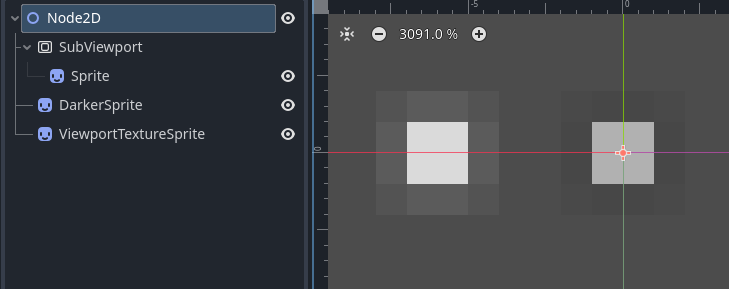
[gd_scene load_steps=3 format=3 uid="uid://b7f5flni7mks3"]

[ext_resource type="Texture2D" uid="uid://bpoefbef82uie" path="res://Art/blurred_laser.png" id="1_58y1e"]

[sub_resource type="ViewportTexture" id="ViewportTexture_oyi3a"]
viewport_path = NodePath("SubViewport")

[node name="Node2D" type="Node2D"]

[node name="SubViewport" type="SubViewport" parent="."]
transparent_bg = true
size = Vector2i(100, 100)

[node name="Sprite" type="Sprite2D" parent="SubViewport"]
position = Vector2(50, 50)
texture = ExtResource("1_58y1e")

[node name="DarkerSprite" type="Sprite2D" parent="."]
texture = SubResource("ViewportTexture_oyi3a")

[node name="ViewportTextureSprite" type="Sprite2D" parent="."]
position = Vector2(-6, 0)
texture = ExtResource("1_58y1e")
Here are some of the relevant discussions I’ve found.
viewport texture using transparency is darker colour (or brighter with premult on) · Issue #88603 · godotengine/godot · GitHub suggests changing the renderer to compatibility mode. I can’t do this, I neeed some of the features in Forward+ like particle trails.
Transparent color become different when inside sub viewport · Issue #32615 · godotengine/godot · GitHub suggests using a material with blend mode = Premult Alpha on the ViewportContainer. But I’m not using a ViewportContainer and Subviewports do not have a material parameter. I tried putting doing this on the “Sprite” and actually this does work for this case. However, in my use case I am actually using a GPUParticles2D node instead of just the Sprite2D, and in that case using the material with blend mode = Premult Alpha on the GPUParticles2D lightens all the colors to white for some reason.
Another suggestion I saw somewhere would be to change the background color for the SubViewport, but there no longer is an option in Project Settings for this.
Any help? Thanks so much.