Technical discussion (tips) on designing a bullet hell

Godot Version

Godot 4.5

Question

I’m trying to design a bullet hell, but there are so many systems I cannot seem to wrap my head around, I’m not a total beginner (atleast in programming in general), so I feel a bit stupid for not understanding it.

  1. Bullets and Bullet Spawners
    This seems simple, you have a node that instantiates a packed scene (being a bullet), and that bullet flies in whatever direction you tell it to.
    But what if the spawner shoots multiple streams of bullets? That sounds like a good excuse for a resource, so now I put all the data regarding the spawner into the resource, and now that works.
    But now what if you want it to rotate? That’s not really a behaviour that relies on the bullets, so I feel like I need to make that a component, but now I have to do a bunch of extra stuff for pooling the spawners and it’s no longer “assign resource, move to position”
    So hypothetically if I do move that rotation back into the resource, that fixes it, but now what if I want the spawner to orbit a target node? I’m now basically at where I was before, how many spawners are realistically going to do that? Is that worth putting into the resource? If not alot of spawners are doing it then is it okay to not pool them in that case?
    _
    This sort of conundrum applies to bullets as well, if not even more so, because you can’t give them unique logic and need to shove it all into a resource if you want to pool them well. Which kind of makes working with it a pain I’d imagine?

  2. Enemies
    You would think this would also be simple, as enemies are glorified bullet spawner holders with health, but surprisingly it’s also not.
    Typically enemies don’t just, appear on the screen, they descend, or fly in, from one of the out of bounds regions of the game, do things, and then fly out.
    Given how these paths may be curvy, the option is surely to use Path2D, but since that Path2D is baked onto the enemy, it just ends up moving with it. So, I guess you could manually move the path out of the enemy, but even then, how do you work with the path? The enemy needs to stop at some point, what if the enemy moves in other ways? You can’t just travel it along the path the entire time or else it never has a chance to be a threat. But obviously not every enemy just has an “intro path”, stops, attacks, and then uses an “exit path”, some could have mid-stage behaviour like entering on the left side, then going to the right, then going back to the left, and then leaving.
    Which sort of leads me to

  3. Sequencing
    Everything above is mostly resolved if I figure out how to make a decent sequencer, which I have honestly no real plans for unlike the other things. My main idea is to just abuse the AnimationPlayer and it’s call method functionality. Which seems fine? But I have no clue how to apply it in the case of an enemy.
    Which comes to kind of my main issue in tying everything together
    Would the AnimationPlayer be a scene of itself? If I had 2 enemies, with identical stats and bullet spawners, but different paths, having them be different scenes seems kind of wasteful? So then the solution is to give them a AnimationPlayer path scene whenever I create them, which meeeeeeans

In the top level, the stage, there is an AnimationPlayer that controls the stage flow, you can spawn enemies by adding a “call method” key and passing in 4 Objects, the enemy you want to spawn, the path scene that you want the enemy to follow, the bullet the enemy shoots, and the resource for the spawner associated with it.
This is, quite cumbersome I think? Needing to manage arguments in the Key editor isn’t exactly fun.
Is there some obvious thing I’m missing?

I apologize for how long this is, but while I was searching for solutions the only things I could find were ancient unity tutorials, ancient open source projects that hard coded the direction bullets went in (which is fine for a free example!) and pretty much nothing else of note. Seemingly the only thing people have to say on this is to how to optimize bullets, which while fun is not exactly the part I think is particularly hard.
Hopefully by this being rather comprehensive someone in the future will have an easier time than me.

Aren’t there some BulletML parsers available for Godot?

From a quick search there seems to be 2 that I can find and both of them are marked as prototypes and being quite old. I could probably get them working if they’re broken, but I can’t particularly say I’m fond of XML being used, since it’s just for bullet patterns I could probably stomach it. Doesn’t seem to be a solution to the general overall sequencing problem though, specifically with enemy pathing, as giving linear directions doesn’t result in particularly nice and smooth enemies.
I could extend BulletML but I feel like at some point making a full stage with XML will make me wish I chose to async hardcode everything.

Well it doesn’t have to be XML, but you can take the semantics of how BulletML specifies the patterns and expand upon it, adding circular or spline paths etc.

Using tweens may be a good idea for executing sequences.

How do tweens fit into this?

They can do sequencing. Easier to manage from code than animation player keyframes.

Sorry but could you give me a code example of what you mean? I’m aware of how tweens work, but I’m confused as to how to apply it to this

Read the Tween reference in the docs.

“This” being what?

Among other things, you can sequence calls with tweens. It’s more convenient than sequencing them with animation players.

I think I understand after trying it? But even this is kind of awful to work with.
For enemy sequencing it works, okay, though trying to do complex things like a hook movement path is probably going to be annoying, and trying to reuse various patterns is going to be equally so.
For stage sequencing I don’t think it works at all, if the enemy is a scene then I need to do multiple lines of code just to spawn that scene, and while yes I could make a helper method, that only really helps if every enemy is static

If I have an “Drop Down” enemy that moves down 100 units relative to it’s starting position, that 100 units is fixed, I can add a variable to fix that, but since I can’t just use a constructor because it’s a scene, I seemingly need to have a helper method for every single enemy I add?

I’m trying to design it in a relatively modular way, it should be relatively easy to make movement paths and sequencing a stage so I don’t have to spend 2 hours sequencing an entire stage just to realize it’s not actually that fun, and then dig through hundreds of lines of tween method calls.
Unfortunately I can’t seem to find any better way, and I’m starting to doubt there is actually a better way, as I’m still rather unsure of the exact workflow I should be taking with this given that there’s really no online resource for the actual complexities of a bullet hell other than the surface level things.

Umm, no, I didn’t mean to hardcode every tween. That’d be insane. You still need some data format to drive the system. A sequencer should execute the sequence, not hardcode it. And object motion itself is not the part of the sequence, only spawning is. It’s exactly like playing music from a music sheet. Each note is in the sequence, but each waveform sample is not. It’s handled independently by the audio system, not the sequencer.

Well there’s your chance to get creative and solve problems on your own :wink:

Yes, I’m aware it would be better if it were data driven, and yes I’m aware that “This is my chance to get creative and solve it myself”
I have been trying to solve it myself, for a while now, I am asking in this help forum for help, and being told to “solve it myself” with no real pointers is kind of not that helpful?

It’s not really clear from your original post what are you actually struggling with. Without a specific question or the exact specification of your needs - you can’t expect to get specific suggestions.

Broadly speaking, for a generalized solution you’ll need to establish a sequence data format, be it something close to BulletML or something simpler, and you’ll need a code that parses and “plays” the sequence(s) aka the sequencer. The sequence can be as simple as an array of timestamped commands, specified as text file or a resource object. The sequencer implementation can vary, depending on the specifics and your personal inclinations. In theory, it can be done with either animation players, tweens, coroutines or a combination of those.

You can run multiple sequencers, for example each firing enemy can run a sequencer for its bullet patterns.

Start with a simple sequencer that prints timed texts, and develop from there.

sequence data:

var sequence = [
	[0.5, "hello"],
	[1.5, "world"],
]

tween-based sequencer implementation:

func play_sequence(seq: Array) -> void:
	var t: Tween = create_tween()
	for e in seq:
		t.tween_interval(e[0])
		t.tween_callback(func(): print(e[1]))

coroutine-based sequencer implementation:

func play_sequence(seq: Array) -> void:
	for e in seq:
		await get_tree().create_timer(e[0]).timeout
		print(e[1])
1 Like

Your explanation is helpful, but I suppose I haven’t properly explained.

I guess my specific struggle is stage sequencing and it’s effects.
Assume you have a basic stage where you want a wave of enemies to spawn 5 seconds after the stage starts.
Assuming the stage sequencer is very minimally just

“At x seconds, do this function”

How do you account for every way an enemy can be, every movement?

“At x second, spawn enemy scene” wouldn’t really be feasible.
If the enemy scene is static for the most part, if you wanted to change the movement from a drop down to a zig zag, do you have a massive enum for every type of movement? What if you wanted to have the enemy drop down more, that would then require you to specify the amount it drops down, but the zig zag movement would have it’s own set of parameters for how far it goes and how much strength the zig zag effect actually has.
What if you wanted to change the bullet? The bullet spawner?
The solution would be to not have the enemy and it’s data as a scene, but to separate it and let the sequencer add the data itself.

But then the call to spawn an enemy in the sequencer looks something like

SpawnEnemy(enemyScene, movementType, movementTypeParameter1?, movementTypeParameter2?, (etc), spawnPosition, spawnRotation, bulletSpawnerScene, bulletScene)

Which seems kind of enormous, but even the movement type has a flaw, what if you wanted a drop down that then zig zags out, do you split the entrance movement and exit movement into their own new parameters? What if you want the enemy to have the entrance movement in, move around to the right, and then use the exit movement out, you’d have to code an entire new movement for that.
A simple SpawnEnemy function seems impossible with this kind of free form use.

Which kind of ends up with you needing to basically hard code the behaviour for every single enemy? I don’t really see how you could do this otherwise, this is really where my struggle with trying to visualize it comes in.
Assuming you make it like BulletML, I don’t even feel like that solves anything, a single enemy would be massive if you needed to not only define the exact enemy behaviour over the course of its life, but also it’s bullet spawners properties. You can’t even re-use any of the data because even though the movement may be identical, the other one could need the movement to have a different strength, or need a different spawner.

Enemy behavior is a separate thing from sequencing.

But you can still sequence the enemy behavior if you sequence commands to the enemy.

So the problem then boils down to designing a system of commands that tell the enemy how to behave. Again, you’ll need to be specific about the range and type of enemy behaviors. Here, the granularity will also matter. You can command on high level or you can explicitly specify waypoints etc…

Best to start with making a list of typical enemy behavior scenarios and then see how this can be parametrized and generalized into a command/sequencing system.

1 Like

I think you may be over thinking this.

From your original post you seem to need the following:

  • Bullets
  • Guns
  • Enemies
  • Movement

Each of these needs a generator.

  • Bullet generator (controlling bullet damage, style, path, impacts etc)
  • Gun generator (controlling what bullets are created)
  • Enemy generator (controlling enemy types and gun or guns they have)
  • Movement generator (Assuming the same enemy type can have different behaviours)

Now you need levels with waves of enemies.

  • Level generator
  • Level wave generator

Then you need:
Game manager - controls which level you are on and when levels are completed
Level manager - controls timing of waves

Then finally you need to be able to load levels. Might look something like:
level1.json

{
   "wave_1": {
        "enemy_type_1": {
             "quantity": 3,
             "movement_type": "zig_zag",
             "guns" : "shot_guns",
              "bullets": "shells",
        }
   }
}

Now personally, I would leave this up to the generators. So levels are auto generated. For instance you might have an array of all_enemy types, and at level 1 just use the first option, at level 2 just use the first two options. At level 1 have 1 wave, same with bullets and motion types etc.

I think that is what @normalized meant when he said:

How you generate this and how complex it becomes and how you manage it is completely up to you.

In the game I am working on everything is autogenerated. Making the mission generators has been complex and genuinely a coding delight. It has been challenging and I have refactored it many times. Generating the matching mission targets has also been challenging, and enabling the different progression checkers to check for different target completions was also tough. But it is getting there!

How complex you make it will be up to you. For instance perhaps you different enemy types could have fixed motions, so spiders always move like this, and fire-demons always behave like this etc. You could do the same with the same enemy types having the same guns, and each gun always fires the same type of bullets etc.

Here is my own mission generating function:


func generate_mission() -> void:
	# Mission data
	MissionSettings.mission_type = generate_mission_type()
	MissionSettings.mission_difficulty = generate_mission_difficulty()
	MissionSettings.mission_attempts = 0
	
	
	# Load mission specific script
	var mission_script_path = MISSION_SCRIPT_PATH_TEMPLATE % MissionSettings.mission_type
	var mission_generator_script = load(mission_script_path)
	mission_script = mission_generator_script.new()
	mission_script.initiate_script()
	
	# Set mission data
	MissionSettings.mission_brief = mission_script.generate_mission_brief()
	MissionSettings.mission_targets = mission_script.generate_mission_targets()
	MissionSettings.mission_machines = mission_script.generate_mission_machines()
	MissionSettings.mission_buildings = mission_script.generate_mission_buildings()
	MissionSettings.mission_enemies = mission_script.generate_mission_enemies()
	MissionSettings.mission_debrief = mission_script.generate_mission_debrief()

And each of my mission types like Rescue, Defend, Escort, Repair, Collect, etc are dedicated scripts loaded when needed.

There is no ‘right way’ to do this. Have fun with it!

2 Likes

Sorry to double post but this bit is essential.

I spent an age creating my mission types, enemy types, building types, machine types, etc etc. This was sooooo important to get straight first. Then I could list all the different target types I might have, time based targets, volume based targets etc. And I prototyped all of them, tested all of the enemies, buildings, allies etc.

This took ages but really made the auto generation possible.

1 Like

Maybe I am overthinking it, but I’m decently certain these are all things I’d need.
I’m not really that interested in autogeneration of stages as I’d prefer if the player went through an assortment of handmade stages for my type of game.

Even in this example:

While it reads quite nicely, it seems to have the aforementioned movement problem.
It would be, so nice if every enemy could just use the exact same template movement, but I feel this would make them look quite cheap and take away from the experience.
Which basically takes me back to the point of needing to hardcode the movement, as much as I love json I don’t think I’d particularly enjoy manually writing a complex sequence of movements.
The enemy behaviour itself would need to be basically directly linked to the movement, as I’d rather not have it fire randomly, but at certain points its lifetime appropriate to the movement. Which would also require it to be capable of firing, well, anything really, I couldn’t limit it to a specific spawner.
In my case of an enemy that drops down, fires a burst of 12 bullets in a ring, and then moves to the right 100 units, and during that movement fires a bullet that aims at the player every 10 units of movement. Which, sounds like quite a lot, but is kind of necessary if I want to make actually interesting designs.
Which leaves me to believe my solution to all of this is basically just the aforementioned scripting language where I write everything that happens in a stage manually, which would be huge, time consuming, and just kind of annoying. But I don’t really see any other way this can be done in the ways I need so I think I just have to bite the metaphorical bullet for now.

Well no. Your movement generator would do all that. All you need to store for the enemy is the movement-type you want. Lets say you called the movement you described as ‘ring_right’ as opposed to ‘ring_left’ or ‘ring_down’, your movement generator could create that movement or any other movement.

At some point you are going to have to code the movement, but once that movement type is coded, you can apply it to any enemy. It sounds like your movement generator would also create ‘shooting_windows’, in which the enemy can fire whatever gun or bullet it currently has available.

And no, that movement does not sound like alot. A couple of variables like drop_distance, direction_after_drop, distance_to_move and shooting_interval and your nearly there.

Anyway, I hope you get there in the end.

Best wishes and good luck with it.

For this, you can simply make movement and firing sequencers with a set of simple commands. It’s sorta like very simplified scripting. Logo turtle style of commands may work well for both movement and firing in a bullet hell game. Note that BulletML uses turtle-like semantics as well.

To synchronize movement and firing - add a command that calls a firing sequence.

1 Like

bullet_hell

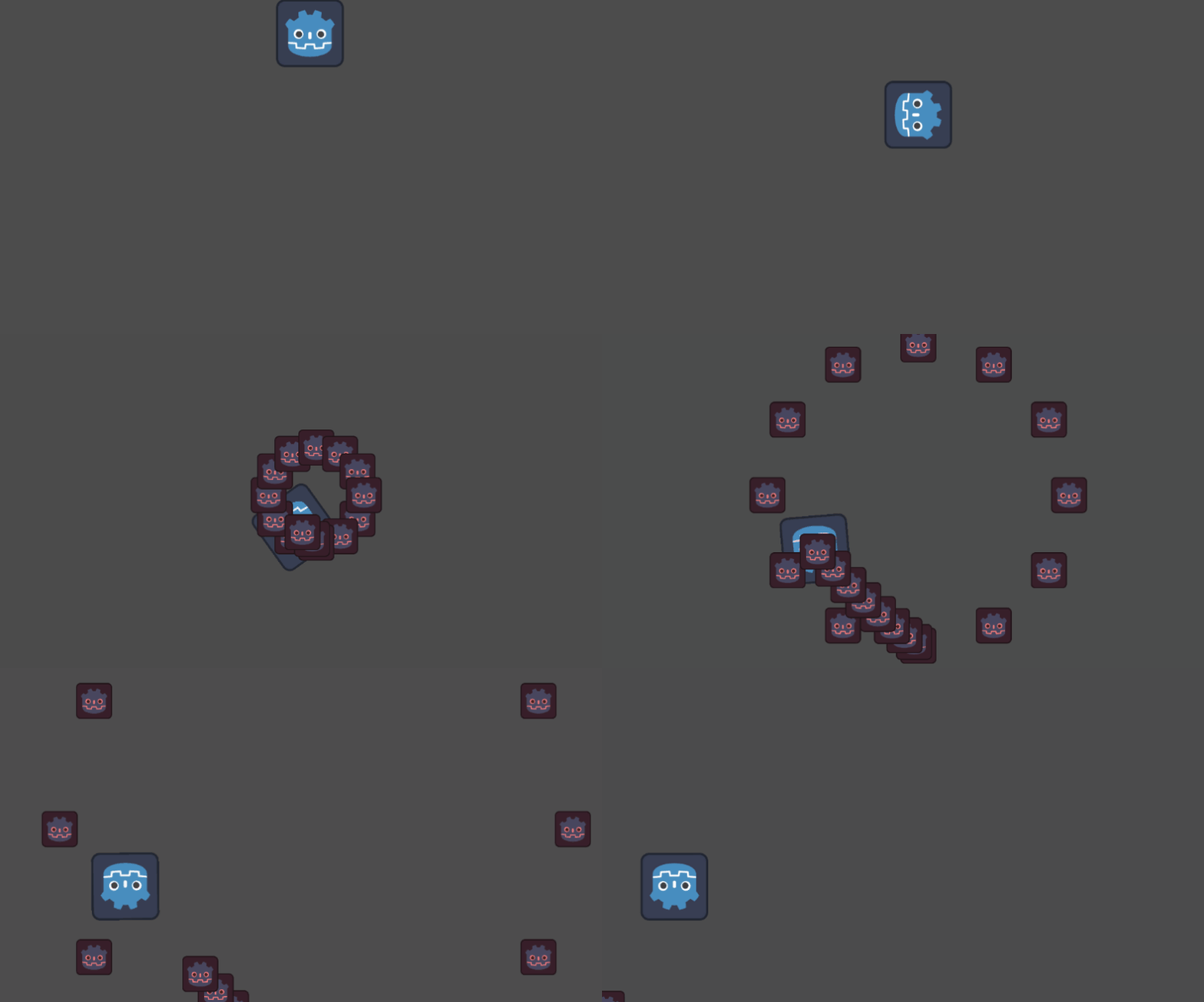
So here you go. Less than 100 loc demo (including string based sequences) capable of executing the use case you mentioned. The movement/bullet sequencer itself is less than 50 loc. It’s rather basic but already quite powerful. It can do nested loops and is easily extendable with new commands.

class_name BulletHellEnemy extends Sprite2D

var direction_wanted := Vector2(1.0, 0.0)
var vel := 0.0
var agility := 3.0;
var aim := 0.0;

func _process(dt):
	var direction_current = Vector2.from_angle(global_rotation)
	global_rotation = direction_current.slerp(direction_wanted, agility * dt).angle()
	global_position += global_transform.x * vel * dt

	if Input.is_action_just_pressed("ui_accept"):
		play_sequence(move_sequence.split("\n", false), commands_move)


func fire_bullet(bullet_vel: float) -> void:
	var b = preload("res://bullet_hell_bullet.tscn").instantiate()
	get_parent().add_child(b)
	b.global_position = global_position
	b.vel = Vector2.from_angle(aim) * bullet_vel
	
	
@export_multiline var move_sequence := """
agility 20.0
direction 90
velocity 250
wait 1.0
agility 3.0
fire_sequence fire1
direction 180
fire_sequence fire2
wait 2.0
velocity 0
"""

@export_multiline var fire1 = """
aim 0
repeat 12
	rotate 30
	fire 300
	#wait 0.003
end
"""

@export_multiline var fire2 = """
aim 90
wait 0.3
repeat 10
	fire 300
	wait 0.1
end
"""

var commands_move = { 
	"direction": func(args): direction_wanted = Vector2.from_angle(deg_to_rad(args[0].to_float())),
	"rotate": func(args): direction_wanted = direction_wanted.rotated(deg_to_rad(args[0].to_float())),
	"agility": func(args): agility = args[0].to_float(),
	"velocity": func(args): vel = args[0].to_float(),
	"fire_sequence": func(args): play_sequence(get(args[0]).split("\n", false), commands_fire),
}

var commands_fire = {
	"aim": func(args): aim = deg_to_rad(args[0].to_float()),
	"aim_player": func(args): pass,
	"rotate": func(args): aim = wrap(aim + deg_to_rad(args[0].to_float()), -PI, PI),
	"fire": func(args): fire_bullet(args[0].to_float()),
}

func play_sequence(lines: PackedStringArray, commands = {}, line_index = 0) -> int:
	while line_index < lines.size():
		var line = lines[line_index].strip_edges()
		var command = line.split(" ", false)[0]
		var args = line.split(" ", false).slice(1)
		match command:
			"repeat":
				var continue_after_line
				for i in args[0].to_int():
					continue_after_line = await play_sequence(lines, commands, line_index + 1)
				line_index = continue_after_line
			"end":
				return line_index
			"wait":
				await get_tree().create_timer(args[0].to_float()).timeout
			_:
				if command in commands:
					commands[command].call(args)
		line_index += 1
	return line_index
2 Likes