Teleport closest node?

Ok, so what that means is it’s on line 3 of Inven_slot.gd.

@onready var item: Item = $“../Item”

So $“../Item” is an object made from the New_Item.gd script. And the item variable is expecting an object made from the Inven_slot.gd script.

So it looks like you called the Inven_slot.gd script the Item class.

Change line 1 of that script to read:

class_name InventorySlot extends Area2D

Then change the first line of the New_Item.gd script to read:

class_name Item extends Node2D

That should solve that error.


A few other things:

  1. There’s no reason to shorten names like “Inventory” to “Inven” in either script names or variable names. It’s a bad habit that just makes you code more confusing over time.
  2. Please format your code by pressing Ctrl+E or using thre preformat button in the toolbar. It makes it a lot easier for us to help you if we don’t have to retype your code. (This is why you got one line of code this time instead of a full file from me.)
  3. As you’ve probably already realized, copying and pasting the whole error from the beginning is the way to go. Saves time.

Okay, now it’s giving me the error

E 0:00:00:727 Item.@implicit_ready: Trying to assign value of type ‘New_Item.gd’ to a variable of type ‘Inven_slot.gd’.
Inven_slot.gd:3 @ Item.@implicit_ready()
Inven_slot.gd:3 @ @implicit_ready()

Also, thanks for the advice.

Please post both files (and format them).

```gd
#Code here
```

Will look like:

#Code here

May me a bad question. . . . How do I do said task? Sorry.

That’s ok. Do this for each of the two scripts. Assuming you’re on a computer:

  1. Select the entire text of your script.
  2. Right-click and select Copy.
  3. Make a new forum post.
  4. Click the image button in the toolbar above the text. It looks like this:
    image
  5. In between the ``` marks, delete the words “type or paste code here”.
  6. Replace that text by pasting the code you copied from step 2.

Like this?

class_name Item extends Node2D
var mouse_is_in = 0

func _ready() -> void:
	pass


func _process(_delta) -> void:
	if mouse_is_in == 1:
		scale = Vector2(0.22, 0.22)
		if Input.is_action_pressed("Click"):
			self.global_position = get_global_mouse_position()
	if mouse_is_in == 0:
		scale = Vector2(0.2, 0.2)


func _on_area_2d_body_entered(body) -> void:
	print("Entered")
	if Input.is_action_pressed("Click"):
		self.global_position = get_global_mouse_position()


func _on_area_2d_mouse_entered() -> void:
	mouse_is_in += 1


func _on_area_2d_mouse_exited() -> void:
	mouse_is_in = 0

@Perry_Brigman please don’t create new topics to share your code, you can do that within the same thread as a reply. I moved your post here.

Yes, now where’s the other script?

Ohhh. I thought I needed to make a new topic. Sorry.

class_name InventorySlot extends Area2D
var is_in = 0
@onready var item: Item = $"../Item"

func _on_area_entered(area: Area2D) -> void:
	is_in += 1


func _on_area_exited(area: Area2D) -> void:
	is_in = 0

func _process(_body) -> void:
	if is_in == 1:
		if !Input.is_action_pressed("Click"):
			print("if works")
			is_in = 0
			item.global_position = get_global_position()

Ok, so sibling node called Item is not an Item, but an InventorySlot So change it to be an Item.

class_name Item extends Area2D
var is_in = 0
@onready var item: Item = $"../Item"

func _on_area_entered(area: Area2D) -> void:
	is_in += 1


func _on_area_exited(area: Area2D) -> void:
	is_in = 0

func _process(_body) -> void:
	if is_in == 1:
		if !Input.is_action_pressed("Click"):
			print("if works")
			is_in = 0
			item.global_position = get_global_position()

I belive this is what you meant. This is the inventory slot script

Ok, so class_name is a keyword used to name an object. It seems that you have named the item script InventoySlot, and the inventory slot script Item. If you swap the names to match what the script is, that should resolve your problem.

It’s working again, but when I duplicate the item node and then run it, they’re still like teleporting to each other.

How are you duplicating the node?

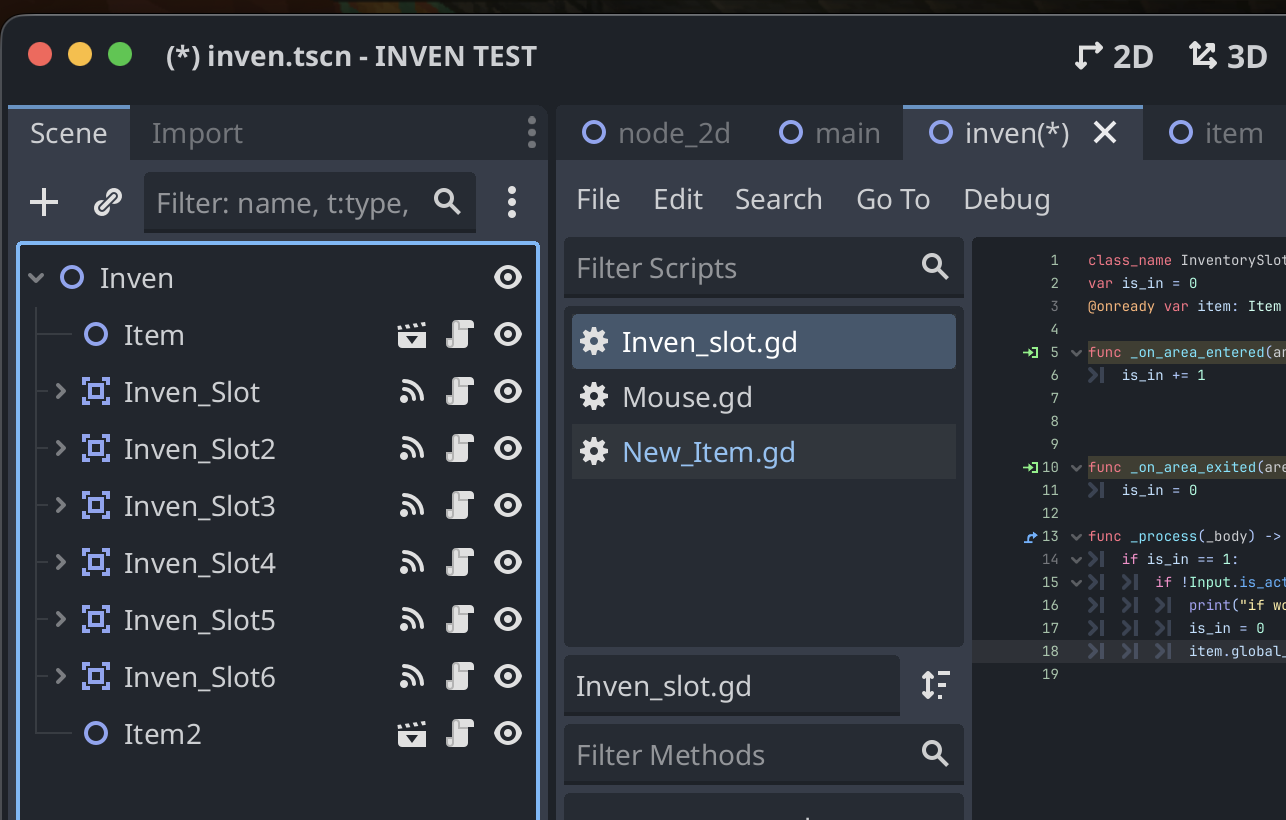
I’m just copying and pasting it in the Inventory scene. Here’s a screenshot.

Ok, so the problem is you are hard-coding the reference to the first Item node here:

@onready var item: Item = $"../Item"

So how come you made that decision?

It wasn’t really a decision. It’s just the only way I know to reference such a thing.

I would recommend starting with a beginner’s tutorial. It will be a lot easier for you to progress if you learn some more basics first.