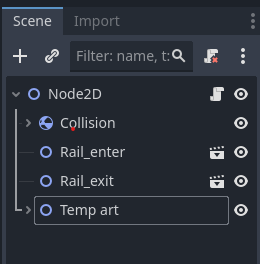
Trying to send a signal from one scene to the other and it isn't being received

I feel like this should be really simple but I just cant seem to get it to work.

I’m making a pinball game and trying to make a rail system that has different collision, so I used one node for an entrance, one for an exit, and one for the physics based, rigid body 2d, ball.

here is the code I got

rail_entrence

extends Node2D

signal rail_enter
signal trans
	
	
func _on_rail_enter():
	emit_signal("trans")
	print("rail entered")


func _on_area_2d_body_entered(body: Node2D) -> void:
	emit_signal("rail_enter")
	print("body entered")

rail_exit

extends Node2D

signal rail_exit

signal trans

func _on_rail_exit():
	emit_signal("trans")
	print("rail exit")

func _on_area_2d_body_entered(body: Node2D) -> void:
	emit_signal("rail_exit")
	print("body exit")

Ball

extends Node2D

func _on_Rail_exit_rail_exit() -> void:
	$Ball2.set_collision_layer_value(1,true)
	$Ball2.set_collision_layer_value(3,false)
	$Ball2.set_collision_mask_value(1,true)
	$Ball2.set_collision_mask_value(3,false)


func _on_Rail_exit_trans() -> void:
	$Ball2.set_deferred("freeze", true)
	await get_tree().create_timer(1.0).timeout
	$Ball2.set_deferred("freeze", false)
	

func _on_Rail_entrence_trans() -> void:
	$Ball2.set_deferred("freeze", true)
	await get_tree().create_timer(1.0).timeout
	$Ball2.set_deferred("freeze", false)


func _on_Rail_entrence_rail_enter() -> void:
	print("Rail entered: received")
	$Ball2.set_collision_layer_value(1,false)
	$Ball2.set_collision_layer_value(3,true)
	$Ball2.set_collision_mask_value(1,false)
	$Ball2.set_collision_mask_value(3,true)

The Idea is that I have a separate collision shapes on layer 3 and the game would take a second, change collision layers, and then continue down the path, then hit the exit and change collision layers back but the “Rail entered: received” never shows. I’ve tried many different things and I want to see what im doing wrong with signals.

Note:
I have the rail_entrence and the rail_exit in the main game scene so I should be able to receive the signal from the rail test node that is the rail_entrence, the rail_exit, and the 3rd layer frozen rigidbody2d collision.

IDK but any help would be greatly appreciated.
I dont see any part where you connect the signal to the function. You just seem to emit it without having any connections.

1 Like

I have them connected through the right side, node menu thing.

Still, even if I do a _ready func with connections to the signals, the “Rail entered: received” never displays meanwhile the other two checks do display.

My connection code

extends Node2D

func _ready() -> void:
	$Rail_entrence.connect("rail_enter" , _on_rail_enter)
	$Rail_entrence.connect("trans" , _on_trans)
	$Rail_exit.connect("trans", _on_trans)
	$Rail_exit.connect("rail_exit" , _on_rail_exit)


func _on_rail_exit() -> void:
	$Ball2.set_collision_layer_value(1,true)
	$Ball2.set_collision_layer_value(3,false)
	$Ball2.set_collision_mask_value(1,true)
	$Ball2.set_collision_mask_value(3,false)


func _on_trans() -> void:
	$Ball2.set_deferred("freeze", true)
	await get_tree().create_timer(1.0).timeout
	$Ball2.set_deferred("freeze", false)


func _on_rail_enter() -> void:
	print("Rail entered: recived")
	$Ball2.set_collision_layer_value(1,false)
	$Ball2.set_collision_layer_value(3,true)
	$Ball2.set_collision_mask_value(1,false)
	$Ball2.set_collision_mask_value(3,true)

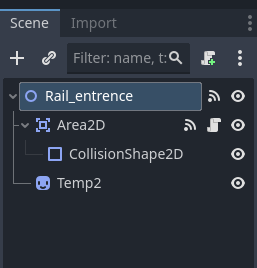
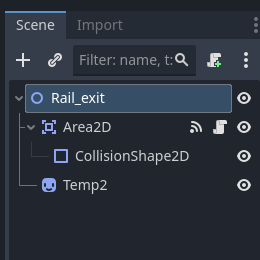
Your rail entrance and exit nodes should be Area2D nodes, not Node2D. Node2D doesn’t have the _on_area_entered “pre-built” function (or are they called virtual methods?)

Can you share a screenshot of your scene tree in which these signals should be acting?

2 Likes

Area2D has 3 n_entered signals.
One of them is shape_entered which is triggered by a Shape2D entering the area, another is area_entered which takes an Area2D as a parameter and the other is body_entered which takes a class derived from PhysicsBody2D (or a TileMap) as a parameter.
body_entered is what the OP is using so therefore he needs to change the type to PhysicsBody2D (or TileMap)

#func _on_area_2d_body_entered(body: Node2D) -> void:
func _on_area_2d_body_entered(body: PhysicsBody2D) -> void:
	emit_signal("rail_enter")
	print("body entered")

OP, I also recommend changing to the new style of signal handling. For example:

func _on_rail_enter():
	#emit_signal("trans")
    trans.emit()
	print("rail entered")

And also:

func _ready() -> void:
	#$Rail_entrence.connect("rail_enter" , _on_rail_enter)
	#$Rail_entrence.connect("trans" , _on_trans)
	#$Rail_exit.connect("trans", _on_trans)
	#$Rail_exit.connect("rail_exit" , _on_rail_exit)
	$Rail_entrence.rail_enter.connect(_on_rail_enter)
	$Rail_entrence.trans.connect(_on_trans)
	$Rail_exit.trans.connect(_on_trans)
	$Rail_exit.rail_exit.connect(_on_rail_exit)

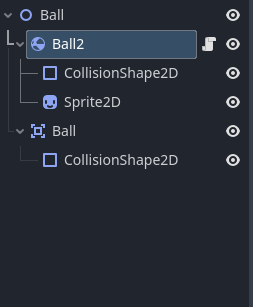
So you said your ball is a RigidBody2D. But, it is not. You may have created it as one, but when you attached your script, you changed it to a Node2D.

Change the top of the script to:

extends RigidBody2D

Then change the first line of your entrance and exit to:

extends Area2D

Things should start working if you set the connections up correctly.

1 Like

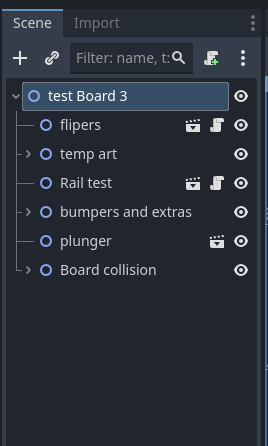
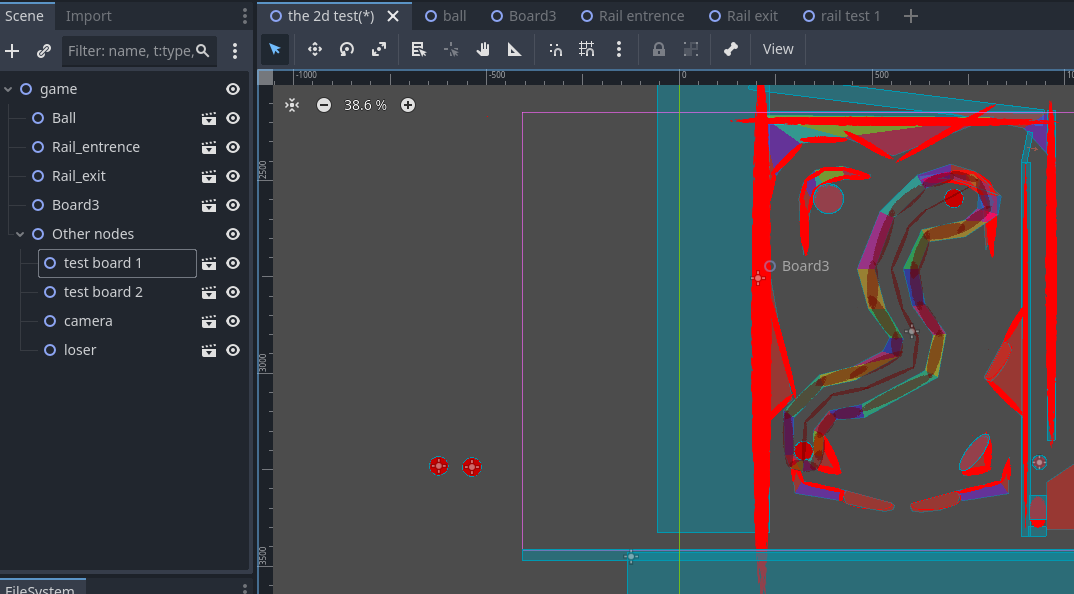
Ok, I’ve updated the code however I think the fact I have been making a scene for every asset is getting in the way of the code. Josh_W mentioned to show the scene tree so here’s that:

However the current problem is again, the ball can’t find the signals
exact error: E 0:00:00:583 ball.gd:8 @ _ready(): Node not found: “Rail_entrence” (relative to “/root/game/Ball/Ball2”).
<C++ Error> Method/function failed. Returning: nullptr
<C++ Source> scene/main/node.cpp:1907 @ get_node()
ball.gd:8 @ _ready()

1 Like

Yes, making all these assets is quite a burden that can be relieved to make things more straightforward. Having Ball be a parent to Ball and Ball2 will lead to many confusions, I feel similar to this one.

Anyway, we’re gonna connect these signals without changing anything whether anyone likes it or not.

Let’s start at rail_entrence

Firstly, the node needs a script. Then, connect the on_body_entered signal from each Area2D node to the rail_entrence node. For all connections, they will be done in the inspector window.

While you are in the script for rail_entrence, add your rail_enter and trans signals, and in the connected signal function body entered(…) add `rail_enter.emit()’

Next, to the ball node, attach a script to that.

Now, in the game scene tree, click on rail_entrence and connect the rail_enter signal you just made to the Ball node. Now the rail enter signal should be connected to the ball, and you can do whatever you’d like to happen to the ball when it enters the rail.

You’re going to have to keep connecting signals from the assets children to the asset, then in the game scene connect the custom asset signals to the other asset you want to interact with.

I have connected everything through the nodes panel and every function has the green symbol next to it to indicate it is connect and when i run it, the first action of the ball node, print(“Rail entered: recived”), never is outputed, even after checking the timing that could possible break it but no it never messaged

The way I would try is by auto loading a variable and referencing it in both scenes

1 Like

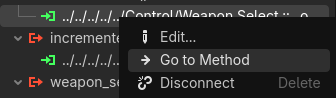
Double check your signals to make sure they’re sorted out right, you can right click on the connected signal and it takes you right to the relevant gd file and to the exact method

image

In your root scene tree, I don’t see the icons that display scripts or signals being connected somewhere, there could be a disconnect in how your nodes are communicating with one another.

Also it’s best practice, like RosiestSum suggested, to have @onready var for the nodes you would like to connect in code, that way you can reference them. Your error;

ball.gd:8 @ _ready(): Node not found: “Rail_entrence” (relative to “/root/game/Ball/Ball2”).

Is because you don’t have the @onready var for the script to see the “Rail_entrence” node.

In your Ball script, right click your rail_entrence area 3d node and select “Access as Unique Name” then drag and drop the node in your Ball script, hold CTRL before you drop to create the @onready var

It might not fix the signaling problem, but your error code should clear up