Godot Version
4.5.1
Question
I’m very new to Godot and I’m trying to understand orphan nodes and memory leaks.
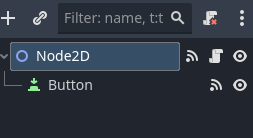
Here I have a very simple scene that contains a button
The only thing the button does is reloads the scene
extends Node2D

func _on_button_pressed() -> void:
	get_tree().change_scene_to_file("res://scenes/1button.tscn")

func _on_tree_entered() -> void:
	print("_on_tree_entered")
	print_orphan_nodes()

func _exit_tree() -> void:
	print("_exit_tree")

func _on_tree_exiting() -> void:
	print("_on_tree_exiting")
	print_orphan_nodes()

func _on_tree_exited() -> void:
	print("_on_tree_exited")
	print_orphan_nodes()
When I press the button and reload the scene, Debugger→ Monitor shows zero orphan nodes, which I believe is correct.
But if I look at the console output, I get:
_on_tree_entered
32581354875 - Stray Node: root/Node2D/Button (Type: Button) (Source:)
_exit_tree
_on_tree_exiting
32581354875 - Stray Node: root/Node2D/Button (Type: Button) (Source:)
39963329935 - Stray Node: Node2D/Button (Type: Button) (Source:)
39946552723 - Stray Node: Node2D (Type: Node2D) (Source:res://scenes/1_button.gd)
_on_tree_exited
32564577658 - Stray Node: Node2D (Type: Node2D) (Source:res://scenes/1_button.gd)
32581354875 - Stray Node: Node2D/Button (Type: Button) (Source:)
39963329935 - Stray Node: Node2D/Button (Type: Button) (Source:)
39946552723 - Stray Node: Node2D (Type: Node2D) (Source:res://scenes/1_button.gd)
_on_tree_entered
39963329935 - Stray Node: root/Node2D/Button (Type: Button) (Source:)
From what I’m able to understand with my very limited knowledge of Godot, there shouldn’t be any orphan nodes, since I didn’t instantiate any during runtime and I didn’t remove any nodes from the scene tree.
So with that said, I have several questions:
- Why is the button a stray node? It was added as a child in the editor.
- Why did the number of stray nodes increase to 4 in _on_tree_exited()?
- Which one is displaying the correct information, Debugger Monitor or print_orphan_nodes()? And which one should I rely on to check for memory leaks since they are each giving me different information?
And please correct any misunderstandings I might have. Thanks!
All those orphans are made by the engine while scene swapping. You’re just printing stuff at the moment between nodes being removed from the tree (thus orphaned) and actually being deallocated.
The orphan printed from _on_tree_entered() is node that is created but not yet added to the scene tree.
If you print orphans in _ready() you’ll see there are none because engine deleted them (or added them to the tree) by that time.
1 Like
I see, but why are there 2 orphan button nodes?
_on_tree_exiting
32581354875 - Stray Node: root/Node2D/Button (Type: Button) (Source:)
39963329935 - Stray Node: Node2D/Button (Type: Button) (Source:)
Same reason. The engine might have already loaded/created new scene’s nodes but haven’t swapped the scene yet. You’re printing at the moment when both; old and new node exists, but one is just removed from the tree but not freed while other was created but hasn’t been added yet. Try to change to a different scene with different node types, and compare what gets printed.
1 Like
Oh, so cleaning up the old scene happens in parallel with the new scene loading in. Didn’t know that. Thanks.
I wouldn’t call it “in parallel” but new nodes will all be instantiated and live as orphans at the moment the removal of old nodes will have started.
You can look at SceneTree::change_scene_to_file() in engine source code. It loads the packed scene resource and then calls SceneTree::change_scene_to_packed(). This in turn instantiates the packed scene and then calls SceneTree:change_scene_to_node(). This last function, removes the current nodes from the tree but doesn’t delete them yet. The exit tree callbacks are called in succession as nodes are being removed. So each exit tree callback will now see as orphans: all of the new scene nodes, and all nodes of the old scene that have already been removed.
The function then assigns the top node of the new scene to SceneTree::pending_new_scene_id. The swap still didn’t actually happen. The tree is now empty but both sets of nodes still live as orphans. The actual swap occurs at the next iteration of SceneTree::process() which calls SceneTree::_flush_scene_change() that finally calls memfree() on old orphaned nodes and adds new orphaned nodes to the tree. The enter tree callbacks are now called in succession as nodes are added. Each such callback will see as orphans all of the new scene nodes that are still remaining to be added to the tree.
If you were able to follow the above, you’ll see that your printouts exactly match the described situation at each point.
2 Likes
Thank you very much for this detailed explanation. I learned a lot!
1 Like