Godot Version
4.2.1 stable
Question
How to make a script of the instantiated object unique
or at least:
How to make an object unique
4.2.1 stable
How to make a script of the instantiated object unique
or at least:
How to make an object unique
Need more info.
Scripts are never unique.
A concrete example would help. It depends on the object and if it has resources.
I am curious as well, but to help explain their question better.
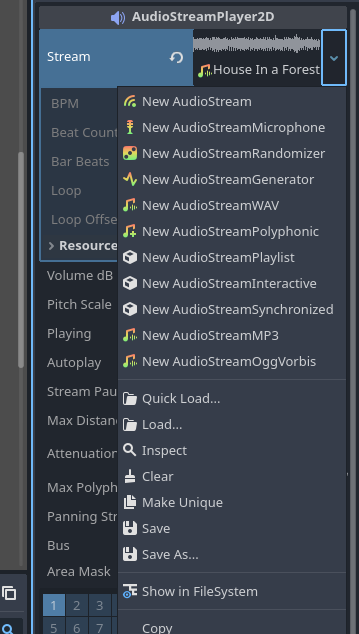
Example, I am coding and I create an AudioStreamPlayer2D and add it as a child of a Node all in code. I want to assign an audio file to the AudioStreamPlayer2D node and then make it unique so I can loop the audio for example. Normally when I do this in the editor, it will actually save the entire audio file into the scene data when I make it unique.
Is it possible to code this and how does the logic work in real-time when normally the editor stores all the file data directly?
I don’t understand what you are trying to make unique. The AudioStreamPlayer2D already is unique. You literally just made it in the code. It is its own object.
You could do something like:
const audio_stream = prelaod("path/to/file.mp3")

func make_player() -> void:
	var player = AudioStreamPlayer2D.new()
	add_child(player)
	player.stream = audio_stream
	player.play()
I am referring to this, in the editor, you can’t loop this audio object until you “Make Unique” of the audio file. This simply changes the reference to the audio file from a resource location to actually being embedded into the scene file.
Does it work if you call duplicate() on your AudioStream resource?
Note that this will indeed also duplicate the audio samples and take up the memory twice, so only use it if you really need a looped and a non-looped version of the same AudioStream. Otherwise, just enable looping on the existing one.
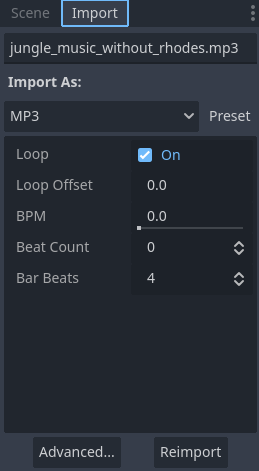
That is the hard way to solve the looping problem. The easy way is just to mark the song as loopable on the Import tab and Reimport it.
It might be, but it was just an example of an object in which “make unique” is used for some other purpose, in this case, looping audio of the stream.
I still have not found a way to make a AudioStreamPlayer2D play a looping stream without first being “unique”. That’s not what the OP needs it for (I’m assuming  ), but it was an example that I remember from the tutorial that might better show what the OP is asking for.
This is how it was done in the tutorial: Finishing up — Godot Engine (stable) documentation in English
How would you make it “looping” though? I haven’t found anyway to access the “Loop” boolean for the stream. 
[edit] I did find a way in the editor, it seems if you just enable “Looping” under Parameters and then you don’t need it to be unique in the editor. So, that works also, still have not found a way to access this in code just yet, but beyond the scope of what the OP is asking for. 
Someone can correct me if I am wrong, I am a newbie to Godot at the moment.  @thomastc earlier already posted that you need to use duplicate(), so to make this into example code.
The first object is the original and the duplicate object is a unique copy of the original. So while I don’t believe there is a function in godot that makes “unique” objects like you see in the editor, I think the closet thing to code is the duplicate() function.
func make_unique_object():
	var sprite = Sprite2D.new()
	sprite.name = "SpriteOriginal"
	add_child(sprite)

	var sprite_unique = sprite.duplicate()
	sprite_unique.name = "SpriteDuplicate"
	add_child(sprite_unique)
Fun fact: calling duplicate() is exactly the same, because it’s what the editor does as well. See the code here: godot/editor/inspector/editor_resource_picker.cpp at e67074d0abe9b69f3d1944293342f0664e34c946 · godotengine/godot · GitHub
Interesting. 
So then that duplicate is encoded directly into the scene, explains why you have to be careful with that in the editor or you’ll blow up the file size of those scene files.
You’ve hijacked someone else’s thread. My reply was to solicit specific use cases because the answer depends. I don’t have a problem answering your question, but despite my initial post you seem to think there’s a simple answer to the question.
duplicate() can do what you want, but depending on the thing you are duplicating, it may not work because you need a deep duplication. Also, duplicate() has performance implications. If you aren’t changing any values, you’re better off using new() rather than duplicate() - depending on the object.
While we are on the subject, you asked a question that was based on information assuming that there was only one way to do something. While you can duplicate a resource and change a value like loop - it’s not a good practice to get into unless that is the best solution.
The best solution for looping audio is to mark it as looping upon import. Then you do not need two copies of it floating around in memory just to loop it. You also don’t need to follow all those steps.
Your question about how to do it in code is irrelevant if you import the sound correctly. However if you want to set it, you have to know what kind of music file it is and set it in the resource - not the player.
That was never my intention, but the first response to OP was to ask for an example. OP hasn’t responded yet, so I’m not sure if they are referring to what is in the editor or tutorial examples? That’s why I tried to steer my responses back to what the OP is asking for, code example wise anyway.
I do appreciate you taking the time to answer my off-topic questions about stuff unrelated to what the OP is asking. Hopefully, when OP comes back, they can clarify their question further or perhaps there has been enough chatter in this topic to answer their question to their satisfaction.
People on these forums live all over the world. Sometimes people post and then go to bed. It can take 12-24 hours before someone replies to a post on here.
I appreciate the fact you were trying to help, but in the end you’re just making assumptions.
No problem. Next time though, just make your own post. Then you can start from the beginning explaining what you want to know and you don’t have to worry about someone else’s question.
Maybe, but if not think about how annoyed you would be if someone hijacked your post and you had to read all the answers just to find out that it had nothing to do with your problem. Especially if you had to run each post through Google translate. (I do not know that OP has to do that, just saying for instance.)