Godot Version
4.5.1
Question
I’m trying to deploy the godot websocket chat example to an external hosting service (Railway + Docker). The end goal is to run a browser game but with a server authority. The only changes I’ve made to the demo are:
# server.gd

# ... existing code

func _ready() -> void:
	var port := int(OS.get_environment("PORT"))
	if !port:
		print("no port im a client")
	else:
		print("port found", port, "im a server")
		_on_listen_toggled(true)


func _on_listen_toggled(pressed: bool) -> void:
	var port := int(OS.get_environment("PORT"))

    # ... existing code
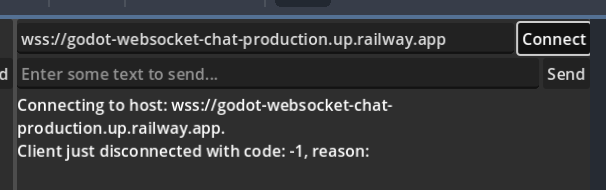
The client is able to connect to “wss://echo.websocket.org” so i know ssl websockets is working locally. But when i try to connect to my railway instance i get:
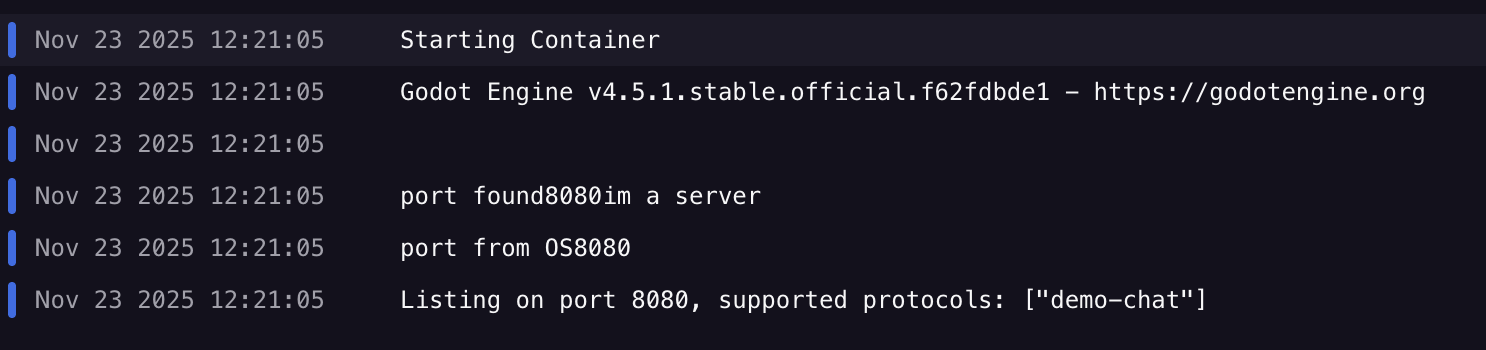
On build, Railway outputs:
My docker file looks like this:
# Use the official slim Ubuntu image (smaller than full ubuntu:22.04)
FROM ubuntu:22.04

# Install only what we need
RUN apt-get update && \
    apt-get install -y --no-install-recommends \
    ca-certificates \
    wget \
    unzip \
    fontconfig \
    && rm -rf /var/lib/apt/lists/*

RUN wget -O godot.zip \
    "https://downloads.godotengine.org/?version=4.5.1&flavor=stable&slug=linux.x86_64.zip&platform=linux.64" \
    && unzip godot.zip \
    && mv Godot_v4.5.1-stable_linux.x86_64 /usr/local/bin/godot \
    && chmod +x /usr/local/bin/godot \
    && rm godot.zip

# Copy your project files into the container
WORKDIR /app
COPY . .

EXPOSE $PORT

# Run the server headless
CMD ["/usr/local/bin/godot", "--headless", "server.tscn"]
I’ve realized Railway gives my project it’s own port (8080 from the output above), so i just use whatever it needs with $PORT.
Is Railway preventing my connection from happening? Or am I doing something small wrong?