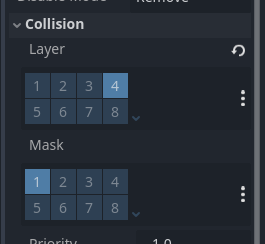
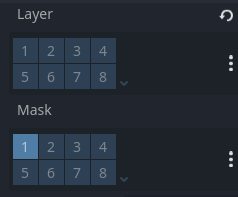
And I see it happen just enough for me to be confused on what I should be doing. Should I always be setting both the layer and the mask? are there certain scenarios/set ups where its technically more efficient to only set one or the other? am I just seeing bugs in other peoples code and mistaking it for a feature?
Layers and Masks are like two-way communication. While you can set both, you can also just set one. In the image you sent, what it simply means is that, ‘I’m not assigned to any layer, so I don’t want anything to detect me, but I want to detect objects on layer 1(mask)’
When you mark a Layer, the object is on that layer.
When you mark a Mask, the object can see that layer.
If you are using a signal like body_entered() or area_entered(), for example to detect something with an Area2D, Area3D, RayCast2D, RayCast3D, ShapeCast2D or ShapeCast3D you want to set the Mask.
If you are setting up something to be detected, like a target, enemy, player, wall, etc. you want to set the Layer.
If you want two objects to collide, for example you want the player to not fall through the floor, they both have to have a Layer in common, but neither needs a Mask.
Since Layer and Mask 1 is automatically on for everything, I always call that the Enviornment layer (wall and floors) because that way nothing passes through them unless I set it that way. But you can turn off the layer 1 mask for walls and floors. They will still collide.
P.S. I found it very confusing at first too because most people doing tutorials don’t actually seem to understand how they work - they just know what has worked for them in the past.
A CharacterBody2D/3D is typically the root node. Area2D/3Ds can go either way. They can either be the root node, like for a projectile, or they can be a part of something larger, like hurt boxes, hit boxes, visual range of an enemy, etc. It’s whatever makes sense for your project.
Ok, well is the platform also the player? If so, use CharacterBody2D and move_and_slide(). If you’re just trying to test if you can move it, try it without the player input.
Ok well for future reference a moving platform in gaming is typically considered something the player-controlled character jumps on and rides. TBH I forgot that you had posted your game above. So, for a breakout style game: