Post the complete code and a snapshot of signal connections in the inspector. And again: put print statements in your signal handlers to see what exactly gets called.
Do you have any autoloads/globals?
There’s no auto loads or globals. Apart from the code the only other thing added was a custom font through the project menu
extends Control

func _on_button_pressed() → void:
	get_tree().change_scene_to_file.call_deferred(“res://Settings Menu .tscn”)

func _on_button_2_pressed() → void:
	get_tree().change_scene_to_file.call_deferred(“res://Character Menu .tscn”)

func _on_button_3_pressed() → void:
	get_tree().change_scene_to_file.call_deferred(“res://Villain Menu .tscn”)

func _on_button_4_pressed() → void:
	get_tree().change_scene_to_file.call_deferred(“res://Environment Menu .tscn”)
Do everything I suggested in my previous post. Otherwise we can’t get far with this. As @gertkeno already noted, doing a deferred call shouldn’t be required here in a normal situation. There’s something else happening you aren’t aware of. To determine what it is we’ll need as much information as possible.
There’s no access to the signal in the inspector. It’s too truncated to see anything.
The inspector panel can be widened.
Doesn’t seem to be able to be widened on mobile from what I can make out. If I have any further errors I’ll just stick to using call deferred
This thread is becoming psychoactive.
Right. I’m about to start a completely new project and have absolutely no code written yet. I haven’t even created the project yet. My original question was ‘What’s the best way to avoid an inside tree error?’ In other posts people have suggested things such as call_deferred, putting in a delay of a few seconds or delaying until an event such as screen render. What is generally better irrespective of what the code will do.
The issue is that it should not be required for you to use call deferred to simply add a new scene to your scene tree.
That’s why people kept asking you questions, to try and figure out what might cause the error to come up for you when, for most other people, this is a non-issue.
Other people have had inside tree errors for their code. I’m asking in general what is the best way to avoid it no matter what the code does. This has always been a general question, not a specific case which is where everyone seems to be getting hung up.
Don’t access methods/properties that require the node to be in the scene tree on nodes that are not in the scene tree.
Btw it’s not “inside tree” error. It’s “outside tree” error. The error means that the engine expects the node to be in the tree but it’s not.
You got an answer to that question in my very first message already.
It’s simple. Stop doing things the way you’re doing them.
Also, all those other suggestions people made were for specific reasons. This is not a common error. In a project that is as simple as you claim, this should not be happening. So stop doing whatever it is you’re doing that’s causing the problem.
You’re right, generic advice is a lot easier to write.
I don’t know what’s causing the problem. All I’ve done is code some buttons. Here’s another menu with only one button coded to return to the Main menu. Gives me the same error.
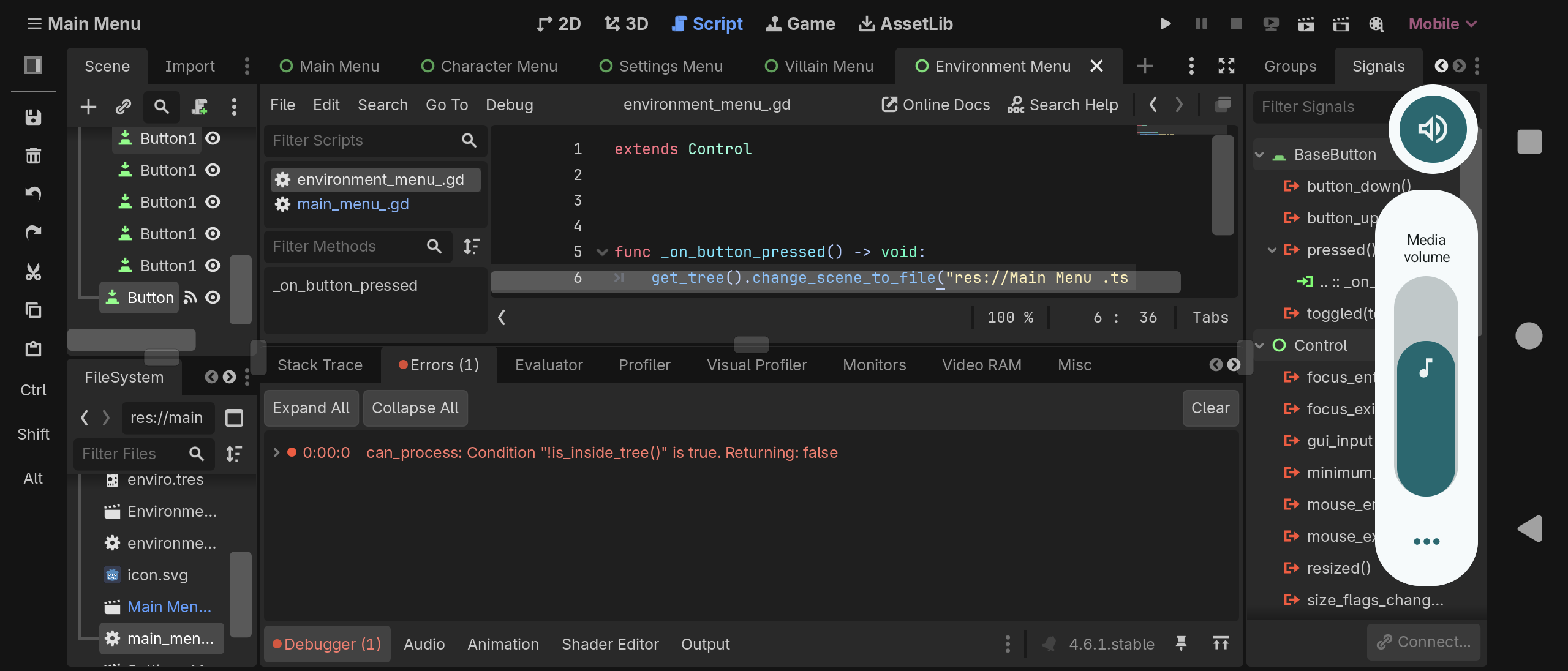
That is the complete script showing except for the last few characters of the scene change path. Is there something missing from here that should be coded before the function?
Somehow that function is being called before the node is added to the tree (or after it is removed from the tree). It’s impossible for anyone to know why that is happening without more information.
Could it be due to touchscreen as all the issues are with changing scene? There really isn’t anything else apart from the code I’ve already shown.
Well your screenshot is slightly more informative than last time. And I know you don’t think it’s important to show us a few letters of your filename, but we can see more than before, and it looks like the problem may be that you have a typo. But since I cannot see everything, it’s hard to say. I get that it’s hard to do screenshots of the editor on a phone.
I’d like to call attention to your one line functions. Which, I missed because (and I know you’re not going to believe this, but…) you did not properly format your code in your post. You know how when you look at web pages so often you just kinda ignore all the advertisements on them? It’s called ad blindness. So many people post unformatted code on here, that I have unformatted code blindness. Seriously - not a joke. Remember in my first post when I told you that the template showed you how to do that? It preserves formatting, and makes the code much easier to read. Especially for those of us who are experienced in looking at it.
extends Control
func _on_button_pressed() → void:
get_tree().change_scene_to_file.call_deferred(“res://Settings Menu .tscn”)
func _on_button_2_pressed() → void:
get_tree().change_scene_to_file.call_deferred(“res://Character Menu .tscn”)
func _on_button_3_pressed() → void:
get_tree().change_scene_to_file.call_deferred(“res://Villain Menu .tscn”)
func _on_button_4_pressed() → void:
get_tree().change_scene_to_file.call_deferred(“res://Environment Menu .tscn”)
You have the same problem in your newest screenshot, but the code is parsed as GDScript and so it jumps right out at me when properly formatted in your screenshot.
extends Control

func _on_button_pressed() → void:
	get_tree().change_scene_to_file.call_deferred(“res://Main Menu .ts
See it yet?
Every single filename is referenced with a space at the end of it, as well as a space inside it.
Potential Solution
Try renaming "Main Menu .tscn" to "main_menu.tscn" and see if the problem goes away.
I cannot stress this enough.
If this solves the problem, then the answer to how to stop the problem in the future was to look at what you did in the past.
And if it doesn’t solve the problem, well, it solved multiple future problems for you when you tried to export your game.
Thanks for the tip. Unfortunately it didn’t solve the current issue.
That’s ok. It eliminated a possibility, gave us more information, and prevented issues in the future.
Try this. Use this code. Copy and paste the whole thing and paste it over the code you have for your button. (Don’t just type it in or copy a single line.) Whole file.
extends Control


func _on_button_pressed() -> void:
	print("Breakpoint")
	get_tree().change_scene_to_file("res://main_menu.tscn")
Then:
- Put a breakpoint on the print line. (On a computer you just click in the margin to the left of line number, so try touching it.) A red dot will appear next to the line if you did it right.
- Run the game.
- The game will pause at the breakpoint. See if the error shows up in the debugger window.
- Press the continue button.

- See if the error appears in the debugger window.
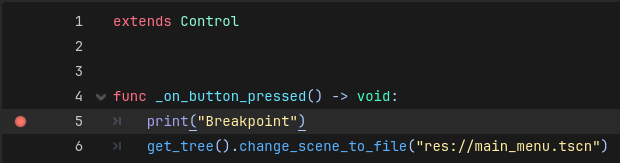
If the error appears before you press the continue button, it is not related to you code. If it does, it is related to your code. I know you think it is because of the call_deferred() appearing to fix your problem, but this will give us another data point. (I also fixed a number of invisible formatting errors in the code I gave you just in case that was the problem.)