I am a learner and I want to delete this weapon. But there is a alert “Cannot operate on a node from a foreign scene.” How can I edit this node?
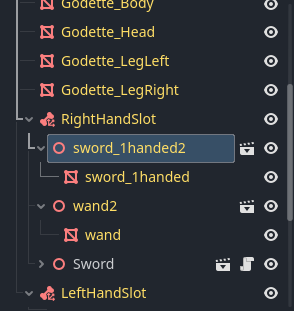
You can’t.
The yellow color of the node name indicates that it is part of either the model you imported or the scene you inherited from. If it’s part of the model, you’d need to open it up in Blender and remove it there. If it’s an inherited scene, go to that scene and delete it there.
If neither of those is an option for you, just hide it.
1 Like
The way I structure my code, I never run into this. In theory, however, you should be able to make the entire parent scene local, which will make the children local. Then you can free the children individually.
In theory.
1 Like
Agreed, this would also work for blender imports
So I went to try this theory out. You can do the following:
- Right-click on the
.glbfile and select New Inherited Scene. - Click the scene icon next to the root node.

- Select Open Anyway in the dialog that opens.
- Right-click on the root node and select Copy.
- Click the Add a New Scene button (or do it from the scene menu.)
- Click the Paste From Clipboard button.
- Save the new scene.
You now have a copy that is imported, but not tied to the import. You can now delete nodes at will.
CAUTION: If you ever need to re-import this model for any reason you will have to do all this again, then copy over any changes you made to the model. And/or cherry-pick changes. As long as that’s not an issue, you should be fine.