Why does my particle rotate forward and then backwards?

Godot Version

v4.4.1.stable.official [49a5bc7b6]

Question

I’m trying to understand how ParticleProcessMaterials’ Angular Velocity’s Curve works.

I have the following settings:
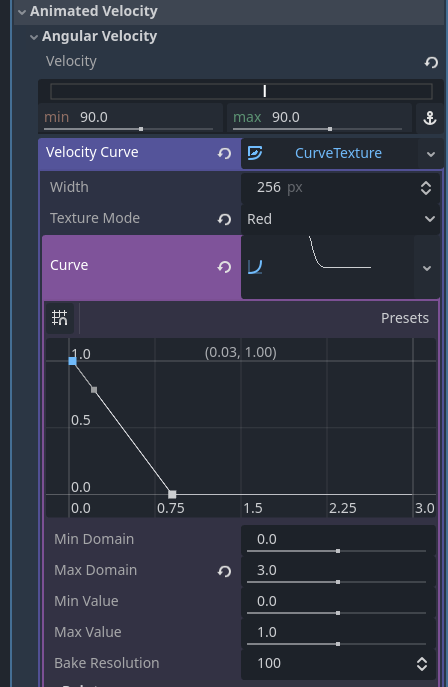
This documentation states

If the Curve is also set, the value of the property will be multiplied by the value of the curve at the current point in a particle’s lifetime. Use the curve to change a property over the particle lifetime. Very complex behavior can be expressed this way.

Question 1: The Domain or X axis here, is this in seconds or does it range from 0 to 1 where 1 is the the end of the particles lifespan?

Question 2: Why with the settings above, does my particle spin one way, and then spin back the other way? As I understand the documentation and my graph above the angualar velocity should start at 90, then then slow down to 0 by some point. That should not cause any reversal of the direction of rotation…

Note 1: In this video I have the livespan of the particle set to 2.5 seconds.
Note 2: The particle are set up as a one shot, and I am triggering them inside the first call to _process by calling particles.restart()

1 Like

I’ve been having the same issue, and I’ve seen the issue posted in 2 other spots too, no solution. I kind of fixed it by removing the curve and adding a new one back, but it’s very janky. Sometimes it feels like the curve is still acting on the particle system after I’ve cleared it… This is probably a bug.

It’s a feature :smiley:
The shader doesn’t really accumulate rotation over lifetime. It calculates it from the current velocity value. So if the velocity is animated across lifetime, the rotation won’t properly reflect that. This may appear as unwanted rotation “backwards” or “forward”, depending on whether the velocity increases or decreases.

So in practice the animated angular velocity is not really functional in this respect.

Can be fixed by converting the material into shader and injecting your own code that accumulates rotation. Some care needs to be taken to not break other things that affect the rotation. The exact fix will depend on the specific use case.

A simple workaround without going into the shader is to animate the angle instead of angular velocity.