I want to program enemy spawner. added timer. decided to test it, by using print() command. nothing pops up. my code:
extends Node

func _ready():
	var timer = get_node("Timer")
	timer.start()

func _on_timer_timeout():
print("hi")I want to program enemy spawner. added timer. decided to test it, by using print() command. nothing pops up. my code:
extends Node
func _ready():
var timer = get_node("Timer")
timer.start()
func _on_timer_timeout():
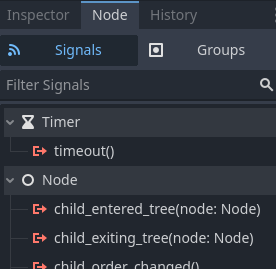
print("hi")You need to connect to the timer timeout signal.
func _ready():
	var timer = get_node("Timer")
	timer.timeout.connect(_on_timer_timeout)
	timer.start()


func _on_timer_timeout():
	print("hi")
If the timer node already exists as implied by your code, you can connect it in the editor too, although recently I have begun to prefer connecting signals via code directly myself.
Here is the timer signal in the docs:
You can also do it like this:
extends Node2D

@onready var timer: Timer = $Timer

func _ready():
	timer.start()
	await timer.timeout
	print("hi")
Or create one on the fly and await the timeout signal like this:
extends Node2D

func _ready():
	await get_tree().create_timer(1.0).timeout
	print("hi")
even better is to !
func create_timer(time: float) -> Timer:
	var timer := Timer.new()
	timer.wait_time = time
	timer.one_shot = true # or autostart
	return timer
and you need to add the timer in ready
func _ready() -> void:
	var eg_timer := create_timer(eg_timer_waitime) # pass a time to it
	add_child(eg_timer)
	eg_timer.timeout.connect()
	eg_timer.start()
and you can go deeper with a _create_timers() func that does all the things in _ready if you love your timers or have a complex scene