Godot Version
4.5
Question
Hi everyone, I have a little bird spite controlled by the player that I want to die if it hits the top or bottom of the window. to do this I have a simple if statement in the _physics_process() function to check the sprites position and compare to the window size.
    #the player dies if they go to far above or below the window area
    if to_global($BirdSprite.get_rect().position).y > Global.win_size.y or to_global($BirdSprite.get_rect().position).y < 0:#-(sprite_size.y + 10):
        print(to_global($BirdSprite.get_rect().position).y)
        print($BirdSprite.get_rect().position.y)
        print('death')#death_animation()
        get_tree().reload_current_scene()
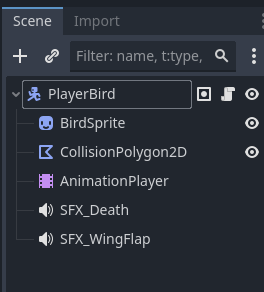
This works fine for the bottom of the window but for the top the bird dies before ever hitting the top of the window and when I check the birds position with a print statement it give the number I would expect if it were actually at the top (about -1). So my question is why is the windows 0 y position registering below the actual top of the visible window.
Thanks in advance.