I scrapped my Navigation nodes and used A* mapping for platformer pathfinding.
I found this great tutorial by TheSolarString and finally made an A* level map, instead of relying on Navigation nodes. The code I copied from the tutorial was in C# but I tried my best to translate it to GDScript. Here’s a look at how my A* level map turned out.
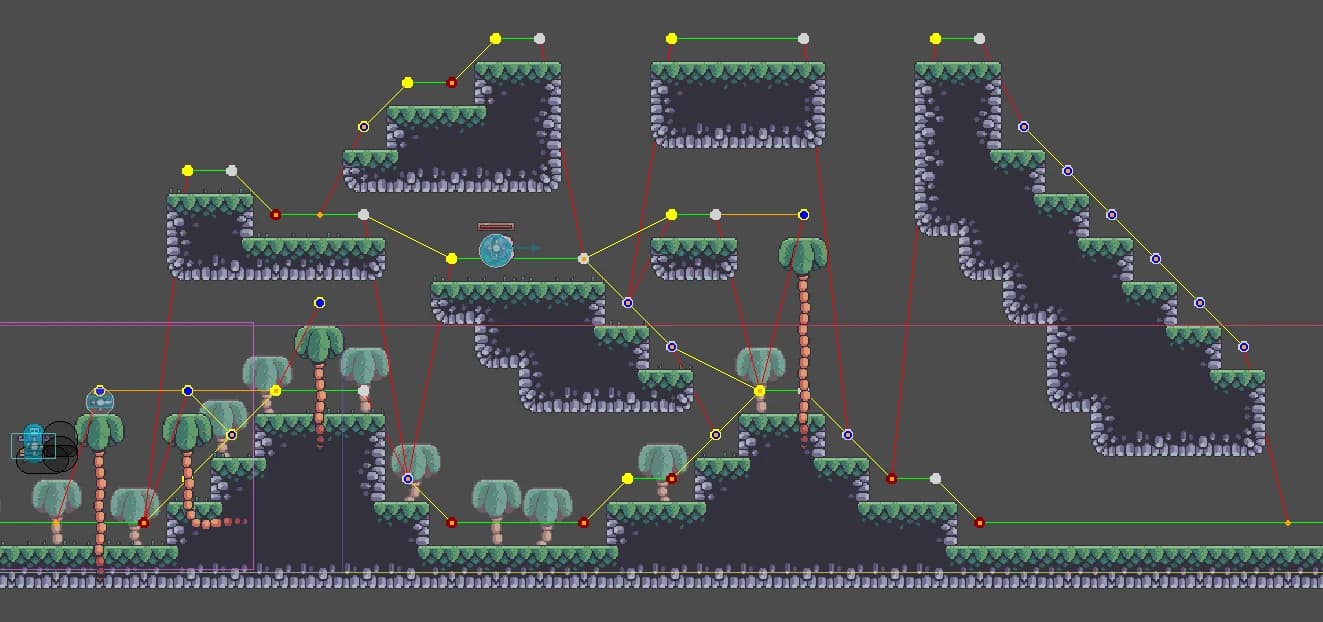
I’m using this asset pack by Pixel Frog from itch.io. The dots are PackedScene instances of a Sprite2D, being modulated to indicate their properties (left edge, right edge, left wall, right wall, fall point). The lines are the connections. The red lines are unidirectional A* path connections for falling from tiles not reachable by jump height. I am so happy about how this turned out and would love to share the translated code of the A* Map Generator. Keep in mind, though, that the TileMapLayer this script is connected to should only contain the walkable tiles, and all other tiles in it should be empty (the trees you see in mine are on a different TileMapLayer, except for the foreground treetops which are in the same TileMapLayer node as the ground tiles).
Here’s the code for the A* Map Generator in GDScript:
@tool
extends TileMapLayer

class PointInfo:
	var IsFallTile := false
	var IsLeftEdge := false
	var IsRightEdge := false
	var IsLeftWall := false
	var IsRightWall := false
	var IsPositionPoint := false
	var PointID: int
	var Position: Vector2

	func _init(pointID : int, _position : Vector2):
		PointID = pointID
		Position = _position
		pass

	func to_dict() -> Dictionary:
		return {
			"IsFallTile": IsFallTile,
			"IsLeftEdge": IsLeftEdge,
			"IsRightEdge": IsRightEdge,
			"IsLeftWall": IsLeftWall,
			"IsRightWall": IsRightWall,
			"IsPositionPoint": IsPositionPoint,
			"PointID": PointID,
			"Position": [Position.x, Position.y] # Serialize Vector2 as array
		}

@export_category("Navigation")
@export var ShowDebugGraph = true
@export var JumpDistance := 3
@export var JumpHeight := 2

const CELL_IS_EMPTY = -1
const MAX_TILE_FALL_SCAN_DEPTH = 500

var _astarGraph := AStar2D.new()
var _usedTiles : Array[Vector2i]
var _graphPoint : PackedScene
var _pointInfoList : Array[PointInfo]

func _ready():
	#if Engine.is_editor_hint():
	_graphPoint = preload("res://scenes/levels/graph_point.tscn")
	_usedTiles = get_used_cells()
	BuildGraph()

func _draw():
	if ShowDebugGraph:
		ConnectPoints()

func BuildGraph() -> void:
	AddGraphPoints()

func DrawDebugLine(to : Vector2, from : Vector2, color : Color) -> void:
	if ShowDebugGraph:
		draw_line(to, from, color)

func AddGraphPoints() -> void:
	for tile in _usedTiles:
		AddLeftEdgePoint(tile)
		AddRightEdgePoint(tile)
		AddLeftWallPoint(tile)
		AddRightWallPoint(tile)
	for tile in _usedTiles:
		AddFallPoint(tile)

func TileAlreadyExistInGraph(tile: Vector2i) -> int:
	var localPos = map_to_local(tile)
	if _astarGraph.get_point_count() > 0:
		var pointId = _astarGraph.get_closest_point(localPos)

		if _astarGraph.get_point_position(pointId) == localPos:
			return pointId
	return -1

func AddVisualPoint(tile: Vector2i, color = null, _scale: float = 1.0) -> void:
	if not ShowDebugGraph: return

	var visualPoint : Sprite2D = _graphPoint.instantiate() as Sprite2D

	if color:
		visualPoint.modulate = color

	if _scale != 1.0 and _scale > 0.1:
		visualPoint.scale = Vector2(_scale, _scale)

	visualPoint.position = map_to_local(tile)
	add_child(visualPoint)

func GetPointInfo(tile: Vector2i) -> PointInfo:
	for pointInfo in _pointInfoList:
		if pointInfo.Position == map_to_local(tile):
			return pointInfo
	return null

# ================================= Connect Graph Points =============================== #

func ConnectPoints():
	for p1 in _pointInfoList:
		ConnectHorizontalPoints(p1)
		ConnectJumpPoints(p1)
		ConnectFallPoints(p1)

func ConnectFallPoints(p1 : PointInfo):
	if p1.IsLeftEdge || p1.IsRightEdge:
		var tilePos = local_to_map(p1.Position)
		tilePos.y += 1

		var fallPoint = FindFallPoint(tilePos)
		if fallPoint:
			var pointInfo = GetPointInfo(fallPoint)
			var p1Map := local_to_map(p1.Position)
			var p2Map := local_to_map(pointInfo.Position)

			if p1Map.distance_to(p2Map) <= JumpHeight:
				_astarGraph.connect_points(p1.PointID, pointInfo.PointID)
				DrawDebugLine(p1.Position, pointInfo.Position, Color.YELLOW)
			else:
				_astarGraph.connect_points(p1.PointID, pointInfo.PointID, false)
				DrawDebugLine(p1.Position, pointInfo.Position, Color.RED)

func ConnectJumpPoints(p1 : PointInfo):
	for p2 in _pointInfoList:
		ConnectHorizontalPlatformJumps(p1, p2)
		ConnectDiagonalJumpRightEdgeToLeftEdge(p1, p2)
		ConnectDiagonalJumpLeftEdgeToRightEdge(p1, p2)
	pass

func ConnectDiagonalJumpRightEdgeToLeftEdge(p1 : PointInfo, p2 : PointInfo):
	if p1.IsRightEdge:
		var p1Map := local_to_map(p1.Position)
		var p2Map := local_to_map(p2.Position)

		if p2.IsLeftEdge \
			&& p2.Position.x > p1.Position.x \
			&& p2.Position.y > p1.Position.y \
			&& abs(p2Map.y - p1Map.y) < JumpHeight \
			&& abs(p2Map.x - p1Map.x) < JumpDistance:

			_astarGraph.connect_points(p1.PointID, p2.PointID)
			DrawDebugLine(p1.Position, p2.Position, Color.YELLOW)

func ConnectDiagonalJumpLeftEdgeToRightEdge(p1 : PointInfo, p2 : PointInfo):
	if p1.IsLeftEdge:
		var p1Map := local_to_map(p1.Position)
		var p2Map := local_to_map(p2.Position)

		if p2.IsRightEdge \
			&& p2.Position.x < p1.Position.x \
			&& p2.Position.y > p1.Position.y \
			&& abs(p2Map.y - p1Map.y) < JumpHeight \
			&& abs(p2Map.x - p1Map.x) < JumpDistance:

			_astarGraph.connect_points(p1.PointID, p2.PointID)
			DrawDebugLine(p1.Position, p2.Position, Color.YELLOW)

func ConnectHorizontalPlatformJumps(p1 : PointInfo, p2 : PointInfo):
	if p1.PointID == p2.PointID:
		return

	if p2.Position.y == p1.Position.y && p1.IsRightEdge && p2.IsLeftEdge:
		if p2.Position.x > p1.Position.x:
			var p1Map = local_to_map(p1.Position)
			var p2Map = local_to_map(p2.Position)

			if abs(p2Map.x - p1Map.x) < JumpDistance:
				_astarGraph.connect_points(p1.PointID, p2.PointID)
				DrawDebugLine(p1.Position, p2.Position, Color.ORANGE)

func ConnectHorizontalPoints(p1 : PointInfo):
	if p1.IsLeftEdge || p1.IsLeftWall || p1.IsFallTile:
		var closest : PointInfo = null
		for p2 in _pointInfoList:
			if p1.PointID == p2.PointID:
				continue
			if (p2.IsRightEdge || p2.IsRightWall || p2.IsFallTile) && p2.Position.y == p1.Position.y && p2.Position.x > p1.Position.x:
				if not closest:
					closest = PointInfo.new(p2.PointID, p2.Position)
				if p2.Position.x < closest.Position.x:
					closest.Position = p2.Position
					closest.PointID = p2.PointID

		if closest:
			if not HorizontalConnectionCannotBeMade(p1.Position, closest.Position):
				_astarGraph.connect_points(p1.PointID, closest.PointID)
				DrawDebugLine(p1.Position, closest.Position, Color.GREEN)

func HorizontalConnectionCannotBeMade(p1 : Vector2, p2 : Vector2) -> bool:
	var startScan : Vector2i = local_to_map(p1)
	var endScan : Vector2i = local_to_map(p2)

	for i in range(startScan.x, endScan.x):
		if get_cell_source_id(Vector2i(i, startScan.y)) != CELL_IS_EMPTY || get_cell_source_id(Vector2i(i, startScan.y + 1)) == CELL_IS_EMPTY:
			return true
	return false

# ====================================================================================== #

# =================================== Tile Fall Points ================================= #
func GetStartScanTileForFallPoint(tile: Vector2i):
	var tileAbove = Vector2i(tile.x, tile.y - 1)
	var point = GetPointInfo(tileAbove)

	if point == null: return null

	var tileScan = Vector2i.ZERO

	if point.IsLeftEdge:
		tileScan = Vector2i(tile.x - 1, tile.y - 1)
		return tileScan
	elif point.IsRightEdge:
		tileScan = Vector2i(tile.x + 1, tile.y - 1)
		return tileScan
	return null
# ====================================================================================== #

func FindFallPoint(tile: Vector2i):
	var scan = GetStartScanTileForFallPoint(tile)
	if scan == null: return null

	var tileScan = Vector2i(scan)
	var fallTile : Vector2i

	for i in range(1, MAX_TILE_FALL_SCAN_DEPTH + 1):
		if get_cell_source_id(Vector2i(tileScan.x, tileScan.y + 1)) != CELL_IS_EMPTY:
			fallTile = tileScan
			break
		tileScan.y += 1
	return fallTile

func AddFallPoint(tile: Vector2i):
	var fallTile = FindFallPoint(tile)
	if fallTile == null: return
	var fallTileLocal = Vector2i(map_to_local(fallTile))
	var existingPointId = TileAlreadyExistInGraph(fallTile)

	if existingPointId == -1:
		var pointId = _astarGraph.get_available_point_id()
		var pointInfo = PointInfo.new(pointId, fallTileLocal)
		pointInfo.IsFallTile = true
		_pointInfoList.append(pointInfo)
		_astarGraph.add_point(pointId, fallTileLocal)
		AddVisualPoint(fallTile, Color.ORANGE, 0.5)
	else:
		single(_pointInfoList, func(p): return p.PointID == existingPointId).IsFallTile = true
		AddVisualPoint(fallTile, Color.ORANGE, 0.4)

# ================================== Tile Edge & Wall Graph Points ===================== #
func AddLeftEdgePoint(tile: Vector2i) -> void:
	if TileAboveExists(tile):
		return
	if get_cell_source_id(Vector2i(tile.x - 1, tile.y)) == CELL_IS_EMPTY:
		var tileAbove = Vector2i(tile.x, tile.y - 1)
		var existingPointId = TileAlreadyExistInGraph(tileAbove)

		if existingPointId == -1:
			var pointId = _astarGraph.get_available_point_id()
			var pointInfo = PointInfo.new(pointId, Vector2i(map_to_local(tileAbove)))
			pointInfo.IsLeftEdge = true
			_pointInfoList.append(pointInfo)
			_astarGraph.add_point(pointId, Vector2i(map_to_local(tileAbove)))
			AddVisualPoint(tileAbove, Color.YELLOW)
		else:
			single(_pointInfoList, func(p): return p.PointID == existingPointId).IsLeftEdge = true
			AddVisualPoint(tileAbove, Color.BLUE, 0.75)

func AddRightEdgePoint(tile: Vector2i) -> void:
	if TileAboveExists(tile):
		return
	if get_cell_source_id(Vector2i(tile.x + 1, tile.y)) == CELL_IS_EMPTY:
		var tileAbove = Vector2i(tile.x, tile.y - 1)
		var existingPointId = TileAlreadyExistInGraph(tileAbove)

		if existingPointId == -1:
			var pointId = _astarGraph.get_available_point_id()
			var pointInfo = PointInfo.new(pointId, Vector2i(map_to_local(tileAbove)))
			pointInfo.IsRightEdge = true
			_pointInfoList.append(pointInfo)
			_astarGraph.add_point(pointId, Vector2i(map_to_local(tileAbove)))
			AddVisualPoint(tileAbove, Color.LIGHT_GRAY)
		else:
			single(_pointInfoList, func(p): return p.PointID == existingPointId).IsRightEdge = true
			AddVisualPoint(tileAbove, Color.BLUE, 0.75)

func AddLeftWallPoint(tile: Vector2i) -> void:
	if TileAboveExists(tile):
		return
	if get_cell_source_id(Vector2i(tile.x - 1, tile.y - 1)) != CELL_IS_EMPTY:
		var tileAbove = Vector2i(tile.x, tile.y - 1)
		var existingPointId = TileAlreadyExistInGraph(tileAbove)

		if existingPointId == -1:
			var pointId = _astarGraph.get_available_point_id()
			var pointInfo = PointInfo.new(pointId, Vector2i(map_to_local(tileAbove)))
			pointInfo.IsLeftWall = true
			_pointInfoList.append(pointInfo)
			_astarGraph.add_point(pointId, Vector2i(map_to_local(tileAbove)))
			AddVisualPoint(tileAbove, Color.DARK_RED)
		else:
			single(_pointInfoList, func(p): return p.PointID == existingPointId).IsLeftWall = true
			AddVisualPoint(tileAbove, Color.BLUE, 0.75)

func AddRightWallPoint(tile: Vector2i) -> void:
	if TileAboveExists(tile):
		return
	if get_cell_source_id(Vector2i(tile.x + 1, tile.y - 1)) != CELL_IS_EMPTY:
		var tileAbove = Vector2i(tile.x, tile.y - 1)
		var existingPointId = TileAlreadyExistInGraph(tileAbove)

		if existingPointId == -1:
			var pointId = _astarGraph.get_available_point_id()
			var pointInfo = PointInfo.new(pointId, Vector2i(map_to_local(tileAbove)))
			pointInfo.IsRightWall = true
			_pointInfoList.append(pointInfo)
			_astarGraph.add_point(pointId, Vector2i(map_to_local(tileAbove)))
			AddVisualPoint(tileAbove, Color.DARK_RED)
		else:
			single(_pointInfoList, func(p): return p.PointID == existingPointId).IsRightWall = true
			AddVisualPoint(tileAbove, Color.BLUE, 0.75)

func TileAboveExists(tile: Vector2i) -> bool:
	if get_cell_source_id(Vector2i(tile.x, tile.y - 1)) == CELL_IS_EMPTY:
		return false

	return true
# ====================================================================================== #

# ======== Helpers ======== #
func single(array: Array, predicate: Callable) -> PointInfo:
	var result = null
	var found := false
	for element in array:
		if predicate.call(element):
			if found:
				push_error("single(): more than one matching element.")
				return null
			result = element
			found = true
	if not found:
		push_error("single(): no matching element.")
		return null
	return result
# ======================== #
P.S. I don’t know much about how to use tool scripts and I can’t seem to make this one auto update when I modify the TileMap. Feel free to modify this code as you see fit! (And also point out errors if there are any)