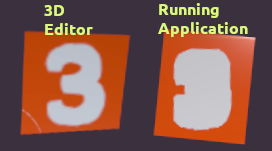
Have you ever seen this? It is a StandardMaterial3D material with a transparent .png image as the albedo ( the white number 3 ) used as the Material Overlay of a Mesh with the flat orange texture.
It looks great in the 3D Editor, but when i run the app, the number is all fat and bloated and unreadable.
I replaced the WorldEnvironment with a brand new unchanged one, and it still happens. I tried re-importing the texture with Fix Alpha Border both on and off, and it still happens. I also deleted my .godot folder and let it regenerate.
And the bug only happens when the application runs, not in the 3D editor, which is very weird.
This happened after an upgrade from 4.4.1 to 4.5.1. The 4.4.1 version works fine.
Some more info: If i turn on albedo Texture MSDF in the material editor, then I get the fat texture in the 3D editor as well. I don’t know what MSDF is, but it is almost as if the application is using it even though it is turned off in the editor. Strange.
The MSDF textures seem to look quite different between versions 4.4 and 4.5. They looked nice and crisp in 4.4, but they always look fat and unreadable in 4.5.
I added a line to set material.albedo_texture_msdf = false when i load my materials and that fixed it.