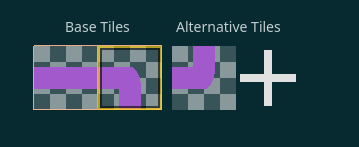
I have a tile set with different atlases. Inside of each atlas i have a normal tiles and alternative ones. How to get a texture of an alternative tile?
I know, that there’re 3 different coordinates for a tile, but in the documentation there hasn’t listed a way to directly get a tile and get a texture from it!
The only code i found is for getting a regular textures:
func get_texture(base_tile_coords: Vector2i, alt_index: int):
	var rect = body_textures.get_tile_texture_region(base_tile_coords)
	var img = main_texture.get_region(rect)
	var texture = ImageTexture.create_from_image(img)
	return texture
I may be off here, but I think the alternative tiles are not saved as a texture, but just computated from the original texture from the atlas. So you cannot find a texture of an alternative tile directly, because it’s not saved as a texture.. Again I’m not 100% sure.
But maybe you can try to get the alternative tile information (like flip, transpose, modulation etc.), and try to apply them to the original texture and save it like that.
EDIT:
I think you can apply flip and roation to the Image and then save it as a texture.
alternative tiles are not saved as a texture, but just computated from the original texture from the atlas
Hm, that makes sense!
But again, would be awesome if you could get the texture of an alternative tile (original texture + information applied).
But maybe you can try to get the alternative tile information (like flip, transpose, modulation etc.), and try to apply them to the original texture and save it like that.
Yeah, but you still would need to get an image from a texture first, but i understand your logic!
And here’s my realisation of creating an alternative tile texture in code:
func get_basic_image(base_tile_coords: Vector2i, should_flip_vertical: bool = false, should_flip_horizontal:bool = false) -> Image:
    # Gets full texture
	var main_texture = YourTileSetAtlasSource.texture.get_image()
    # Gets rectangular of a necessary tile
	var rect = YourTileSetAtlasSource.get_tile_texture_region(base_tile_coords)
	var img = main_texture.get_region(rect)
    # Image flips. You could get those from alternative tile info
	if should_flip_vertical:
		img.flip_y()
	if should_flip_horizontal:
		img.flip_x()

	return img
I wanted to try and instead of ‘manual’ creation of a flipped sprite (in my case, it was a sprite of a turning block (see IMG)) i could just set settings for a sprite to use it afterwards in each block of a snake.
Right now each copy of block keeps both turned and default textures. (Not really optimized, but at least i don’t need to create new files, heh)
The goal here is to build as optimized game as possible (well, maybe not 100% optimized, but i think you get the idea).
Microgoal - to not create specific textures for this (a. k. a. both flipped and not flipped) and to only have the snake.tres file containing body tilesource with 2 normal textures and one alternative