Godot Version
4.5.1
Question
The Problem
When I change the parameter of the AnimationTree to set dash = true and “other" = false, and I’ve previously attached the dash animation to the state machine, the player seems to freeze, like the sprite frame is stuck at frame 0. It might be a simple mistake, but I can’t figure out what’s causing it. That’s because I want to keep the AnimationTree node active. I could achieve the same result without keeping it active, but I wanted to know if there’s a way to do it this way.
Explanation
So I was trying to create a dash animation for my player, and instead of disabling the AnimationTree node by setting its active parameter to false, I wanted to place the animation directly inside the state machine like this:
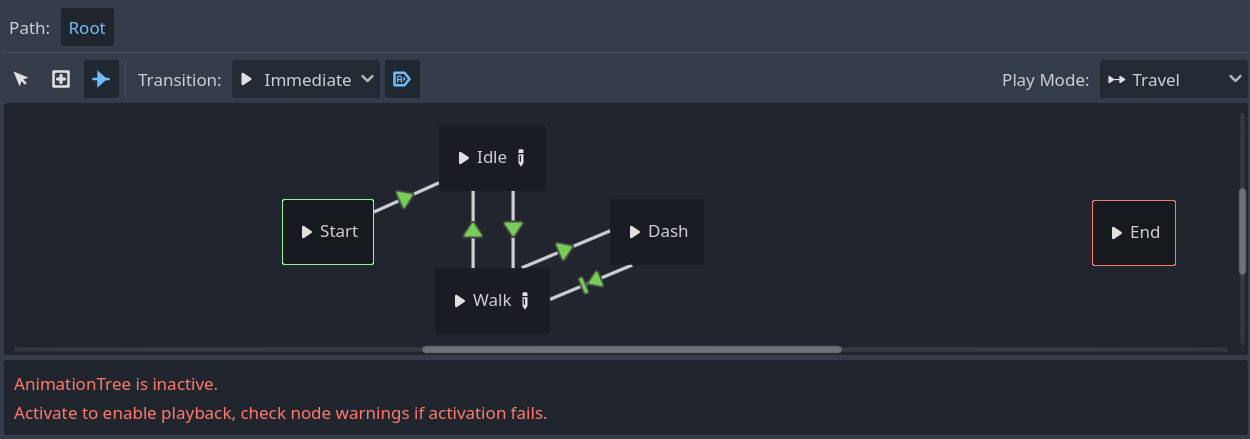
The connections between Walk state and Dash state are:
Walk → Dash when the dash condition is met (in auto mode).
Dash → Walk when the animation ends (also in auto mode, and without a specific condition to return to walk state, since I’ve already tried that and it didn’t work)."
Animation Tree Script (it’s bigger but I removed unnecessary code):
extends AnimationTree

@onready var player: CharacterBody2D = $".."
@onready var sprite_2d: Sprite2D = $"../Sprite2D"
@onready var interactions: Node2D = $"../Interactions"


func _ready() -> void:
	active = true
	interactions.player_hit.connect(_hit)


func _physics_process(_delta: float) -> void:
	if !player.can_move:
		return

	if player.is_dashing:
        #(I tried adding things to make it work but I failed)
		return

	sprite_2d.flip_h = (player.last_direction.x < 0)

	if player.velocity == Vector2.ZERO:
		change_parameter("idle")
		self["parameters/Idle/blend_position"] = player.last_direction
	else:
		change_parameter("walk")
		self["parameters/Walk/blend_position"] = player.last_direction


func change_parameter(active_cond: String):
	const conditions: Array[String] = ["idle", "walk", "dash"]
	for condition in conditions:
		self["parameters/conditions/" + condition] = (condition == active_cond)
Player Script (it’s bigger but I removed unnecessary code):
extends CharacterBody2D

@onready var main_scene: Node = get_tree().root.get_child(1)
@onready var shooting_component: Node2D = $"Shooting Component"
@onready var animation_tree: AnimationTree = $AnimationTree
@onready var animation_player: AnimationPlayer = $AnimationPlayer

@export_category("Stats")
@export var speed: int = 100
@export var health: int = 4
@export var dash_speed: int = 250
@export var dash_distance: int = 60
var max_health: int

var last_direction: Vector2
var can_move: bool = true
var can_be_hit: bool = true
var can_dash: bool = true
var is_dashing: bool = false
var pre_dash_pos: Vector2
var knockback_dir: Vector2
var knockback_strength: float


func _process(_delta: float) -> void:
	if Input.is_action_just_pressed("Dash") and can_dash:
		dash()


func _physics_process(_delta: float) -> void:
	_controller(_delta)
	move_and_slide()


func _controller(delta: float):
	if is_dashing:
		var colliding: KinematicCollision2D = move_and_collide(last_direction * dash_speed * delta)
		var distance: float = pre_dash_pos.distance_to(global_position)

		if colliding or distance > dash_distance:
			is_dashing = false
			$Dash2.visible = true
			#animation_tree.active = true
		return

	var direction = Input.get_vector("Left", "Right", "Up", "Down").normalized()
	velocity = direction * speed
	if direction:
		last_direction = direction


func dash():
	is_dashing = true
	can_dash = false
	#animation_tree.active = false
	#animation_player.play("Dash")
	animation_tree.change_parameter("dash")
	$Dash.visible = false
	$Dash2.visible = false
	pre_dash_pos = global_position
	velocity = Vector2.ZERO
	await get_tree().create_timer(0.5).timeout
	can_dash = true
	$Dash.visible = true
Animation player animations (ignore the animation, it’s just conceptual and should look like the player is spinning)

