Godot Version
Godot 4.6.2
Question
Hi all! I’ve looked everywhere for a solution but I can’t seem to find anything that fixes my issue. I’m trying to add a packed scene to my level scene via code. When I do, the Animation Player node of the packed scene specifically doesn’t get assigned as it should and comes up Null. When I place the packed scene into the level through the editor, however, the Animation Player node is assigned as normal. I assumed this had something to do with the Animation Player node not loading into the scene and the _ready function being called before that happened, but when I add a Breakpoint before the node is assigned in packed scene’s script, the node is present in the Remote tree.
I feel like maybe I’m just missing something obvious or maybe I’m not doing something right. Any help would be appreciated!
Spawner Object Code
spawned_object = object_to_spawn.instantiate()
spawned_object.global_position = global_position
get_tree().current_scene.add_child.call_deferred(spawned_object)
Packed Scene Code - All nodes except the Animation Player node are assigned. Nodes are spelled correctly and match the name of the node in the scene’s tree.
@onready var _animation_player: AnimationPlayer

func _ready():
_sprite_2d = %Sprite2D
_area_container = %AreaContainer
_animation_player = %AnimationPlayer
_hitbox = %Hitbox
_visible_on_screen_notifier_2d = %VisibleOnScreenNotifier2D
When are trying to access the animation player?
get_tree().current_scene.add_child.call_deferred(spawned_object)
You are deferring the add_child() call, which means the spawned object’s _ready() function will be executed at the end the current frame. Before that, all the variables initialized in _ready() are still null.
The Animation Player has a signal in the _ready function and is accessed as soon as the object is spawned. All of the other get node variables get assigned, it’s just the Animation Player that doesn’t.
I tried to not use call_deferred but the scene doesn’t get added and I get the “use call_deferred” error.
What’s the exact error message you get? Does it fail to find the node %AnimationPlayer? Or trying to use the variable _animation_player?
It fails to find the node. The play function for the animation player fails because the node returns null. It works when the scene is loaded via the editor though because the node is retrieved as normal.
Please copy and paste the error messages here, and their corresponding parts in your code.
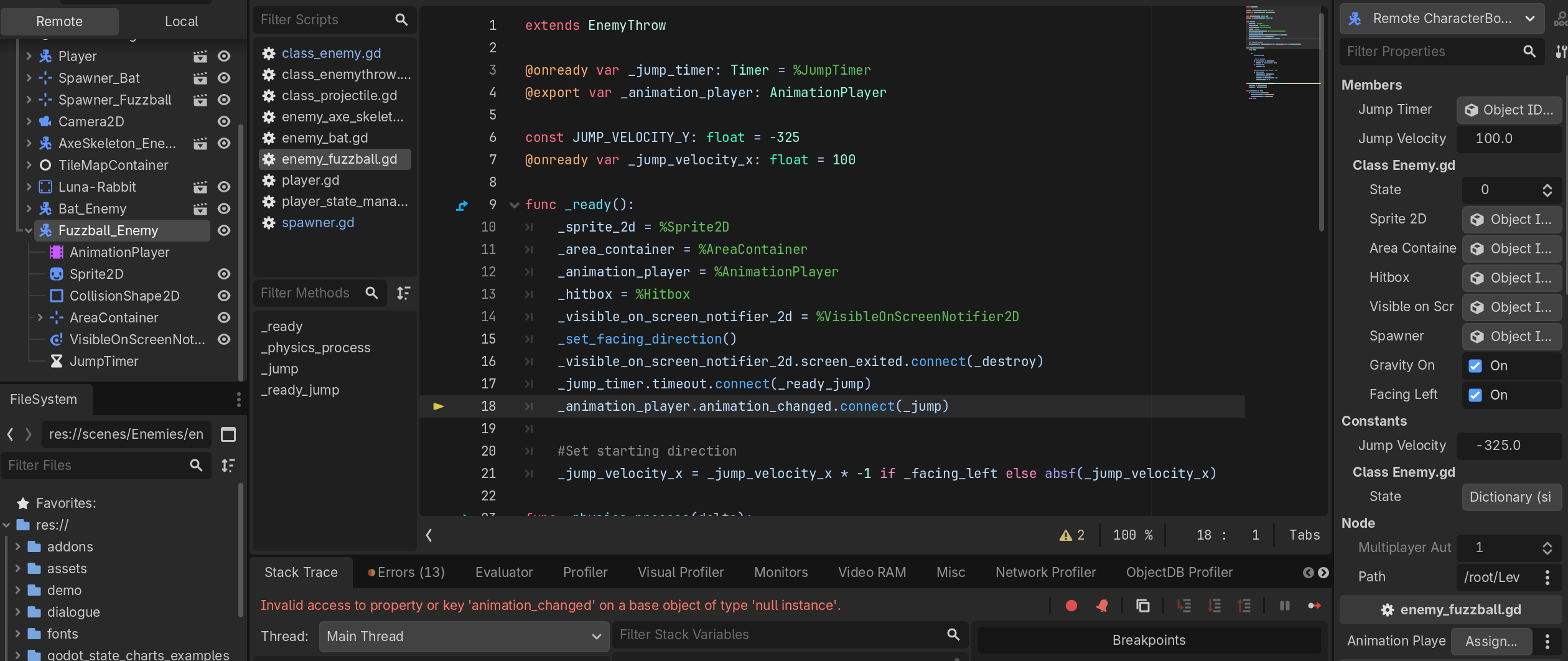
Error: Invalid access to property or key ‘animation_changed’ on a base object of type ‘null instance’.
Here’s the script for the scene I’m trying to load in it’s entirety.
extends EnemyThrow

@onready var _jump_timer: Timer = %JumpTimer
@onready var _animation_player: AnimationPlayer

const JUMP_VELOCITY_Y: float = -325
@onready var _jump_velocity_x: float = 100

func _ready():
_sprite_2d = %Sprite2D
_area_container = %AreaContainer
_animation_player = %AnimationPlayer
_hitbox = %Hitbox
_visible_on_screen_notifier_2d = %VisibleOnScreenNotifier2D
_set_facing_direction()
_visible_on_screen_notifier_2d.screen_exited.connect(_destroy)
_jump_timer.timeout.connect(_ready_jump)
_animation_player.animation_changed.connect(_jump)

#Set starting direction
_jump_velocity_x = _jump_velocity_x * -1 if _facing_left else absf(_jump_velocity_x)

func _physics_process(delta):
match state:

	_:
		move_and_slide()

		# Add the gravity.
		if !is_on_floor() && _gravity_on:
			velocity += get_gravity() * delta
		if is_on_floor():
			velocity.x = 0

		#Reverse direction when hitting a wall
		if is_on_wall():
			_facing_left = !_facing_left
			_set_facing_direction()
			velocity.x = _jump_velocity_x * -1
			_jump_velocity_x *= -1

func _jump(PrepareJump: StringName, Unsquash: StringName) → void:
velocity.y += JUMP_VELOCITY_Y
velocity.x = _jump_velocity_x

func _ready_jump() → void:
if is_on_floor() && _gravity_on:
_animation_player.play(“PrepareJump”)
_animation_player.queue(“Unsquash”)
else: return
I’ve even tried making the _animation_player an export variable and manually dragging the node in place, but it will also return null. Below you can see I placed a Breakpoint after where the Animation Player should be retrieved and while the Sprite2D and AreaContainer are retrieved as normal, despite the Animation Player being present in the tree, it’s no longer assigned.
I appreciate the help by the way!
Did you add this script as a global? Are you sure you assigned the @export variable in the enemy’s scene? Double checked in the main scene?
You should be able to use this line, you do not need a unique name.
@onready var _animation_player: AnimationPlayer = $AnimationPlayer
Script is not a global. I assigned the variable in the enemy scene (would have uploaded an image of it but I can only add one per post). I also tried assigning it when creating the variable to the same effect.
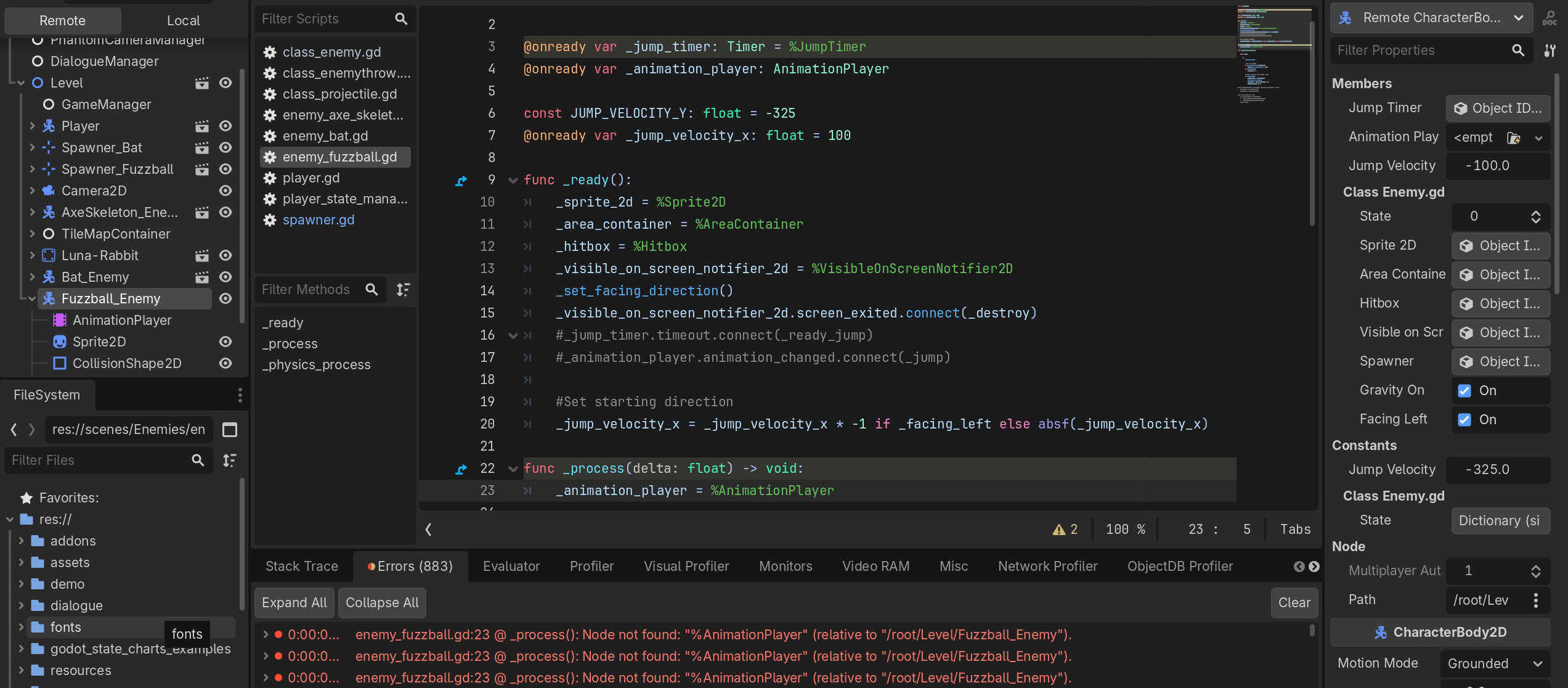
As long as the line _animation_player = %AnimationPlayer is in _ready(), any previous value assigned will be replaced by this (null, apparently - there should also be an error about this in the debugger like "@ _ready(): Node not found: “%AnimationPlayer” "). You need to remove/disable (or replace) this line when trying other approaches.
Tried removing the line and leaving it as an export variable but still returns null.
Even tried getting the variable via _process but it’s still unable to find the node.
Seems like the other nodes show the clapper icon indicating Bat_Enemy is a instantiated scene. Maybe instead of instantiating you have copied or made local the Fuzzball Enemy so none of your changes are applicable to this node, and Unique names will not work for it either.
1 Like
Oh, that’s progress! The bat and the fuzzball are spawned using the same code though and when I output what’s being instantiated, both the bat and fuzzball enemies appear in the output box. Is there something I forgot to do to the fuzzball scene when I saved it as a packed scene perhaps?
Tough to say, how are you spawning these creatures?
I have spawner scene with the following code that’s supposed to instantiate, relocate and then add the assigned Packed Scene to the level scene. Both the bat and the fuzzball are spawned using the same spawner.
extends Marker2D

@onready var projectile_sender = owner
@onready var spawn_timer = %SpawnTimer
@onready var _visible_on_screen_enabler_2d: VisibleOnScreenEnabler2D = %VisibleOnScreenEnabler2D
@onready var spawned_object

@export var object_to_spawn: PackedScene
@export var spawn_time: float = 0.0
@export var _one_shot: bool = true
@export var _spawn_facing_left: bool = true

func _ready():
spawn_timer.one_shot = _one_shot
spawn_timer.wait_time = spawn_time

spawn_timer.timeout.connect(_spawn_object)
_visible_on_screen_enabler_2d.screen_entered.connect(func(): spawn_timer.start(spawn_time))

_spawn_object()

func _spawn_object() → void:
if spawned_object != null && spawned_object.is_in_group(“enemy”) && !spawned_object.is_in_group(“projectile”): return

spawned_object = object_to_spawn.instantiate()
spawned_object.global_position = global_position
get_tree().current_scene.add_child.call_deferred(spawned_object)


if spawned_object.is_in_group("enemy"):
	spawned_object._facing_left = _spawn_facing_left

if spawned_object.is_in_group("projectile"):
	spawned_object.projectile_sender = projectile_sender

if "spawner" in spawned_object:
	spawned_object.spawner = self
Is there any chance you preload or @export this spawning script/scene? It could be a cyclical reference?
The spawner is a Packed Scene and currently there are two in the level scene that are placed via the editor and one in another Packed Scene that spawns a projectile. I haven’t done anything with this particular script outside of it being the main script for the Spawner_X scene you can see in one of the images above showcasing the tree.
Wild, seems pretty standard and should work; any way you could upload the project somewhere?
Uh, so this is frustrating for anyone else coming into this thread if they come across a similar issue. I duplicated the project and started cleaning the clone up to package and share when things started working again. “Okay, so maybe if I start deleting things one by one and testing the project I’ll find out the issue.”
Well, when I opened the original back up I ran the scene just to check the error again and things are just working now. Before this I already tried refreshing the scene, refreshing the project, restarting and shutting down the computer to no avail. I’m not sure what duplicating the project might have done, but the fuzzball scene now instantiates, gets added to the level scene and runs as it should.
If it breaks down again I’ll share the project but at the moment it seems this was just a glitch with Godot, maybe? I hate the idea that I did everything right and just got a random error I had to chase down for two days but I guess thems the breaks some times.