Godot Version
4.3 stable
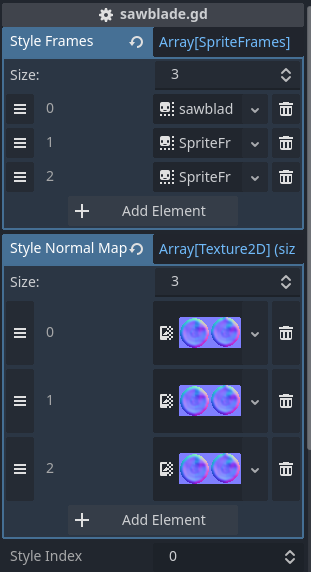
So i have a Sawblade obstacle for 2d platformer
which has 2 rescins for different chapters of my game. I made it so i can use one scene and just change the “style” of each Sawblade in inspector. The scene has one AnimatedSprite2D node, but uses 3 SpriteFrames resources for each style, handled by Array. The problem is i don’t want to create separate CanvasTextures for each sprite since only difference is color of sawblade, so i made only one normal map for them and decided to create another array containing normal maps and apply them by code. When i do that, animation stops playing, but if i leave normal map array blank, it plays normally (obviously without normal map lighting).
extends Area2D


@export var style_frames: Array[SpriteFrames] = []
@export var style_normal_maps: Array[Texture2D] = []
@export var style_index: int = 0

@onready var animated_sprite_2d: AnimatedSprite2D = $AnimatedSprite2D


func _ready() -> void:
	if animated_sprite_2d == null:
		animated_sprite_2d = get_node_or_null("AnimatedSprite2D")

	await get_tree().process_frame
	_apply_style()

func _process(_delta: float) -> void:
	print(animated_sprite_2d.frame, " | playing: ", animated_sprite_2d.is_playing())


func set_style(index: int) -> void:
	style_index = index
	_apply_style()

func _apply_style() -> void:
	if animated_sprite_2d == null:
		animated_sprite_2d = get_node_or_null("AnimatedSprite2D")
	if animated_sprite_2d == null:
		return
	if style_frames.size() == 0 or style_index < 0 or style_index >= style_frames.size():
		return

	var source_frames := style_frames[style_index]
	var normal_map: Texture2D = null
	if style_index < style_normal_maps.size():
		normal_map = style_normal_maps[style_index]

	if normal_map == null:
		animated_sprite_2d.sprite_frames = source_frames
	else:

		var wrapped: SpriteFrames = source_frames.duplicate(true)

		wrapped.set_block_signals(true)

		for anim in source_frames.get_animation_names():
			for i in range(source_frames.get_frame_count(anim)):
				var raw_tex := source_frames.get_frame_texture(anim, i)

				# Unwrap existing CanvasTexture to prevent nesting
				var diffuse_tex: Texture2D
				if raw_tex is CanvasTexture:
					diffuse_tex = (raw_tex as CanvasTexture).diffuse_texture
				else:
					diffuse_tex = raw_tex

				var diffuse_atlas := diffuse_tex as AtlasTexture
				var ct := CanvasTexture.new()
				ct.diffuse_texture = diffuse_tex

				if diffuse_atlas != null:
					var normal_atlas := AtlasTexture.new()
					normal_atlas.atlas = normal_map
					normal_atlas.region = diffuse_atlas.region
					ct.normal_texture = normal_atlas

				# Replace the frame in-place on the duplicate
				wrapped.set_frame(anim, i, ct, source_frames.get_frame_duration(anim, i))

		animated_sprite_2d.sprite_frames = wrapped


func _on_body_entered(body: Node2D) -> void:
	if body.is_in_group("Player"):
		body.die()
I know i can just go another way to create animations, but i’ve not given up just now and want to know what causing the issue