Godot Version
4.7
Question
I have a voxel chunk system created by SurfaceTool, and I have a custom shader that renders the texture of each voxel face. I am trying to rotate the vertices of the left side of each voxel as shown in the image below:
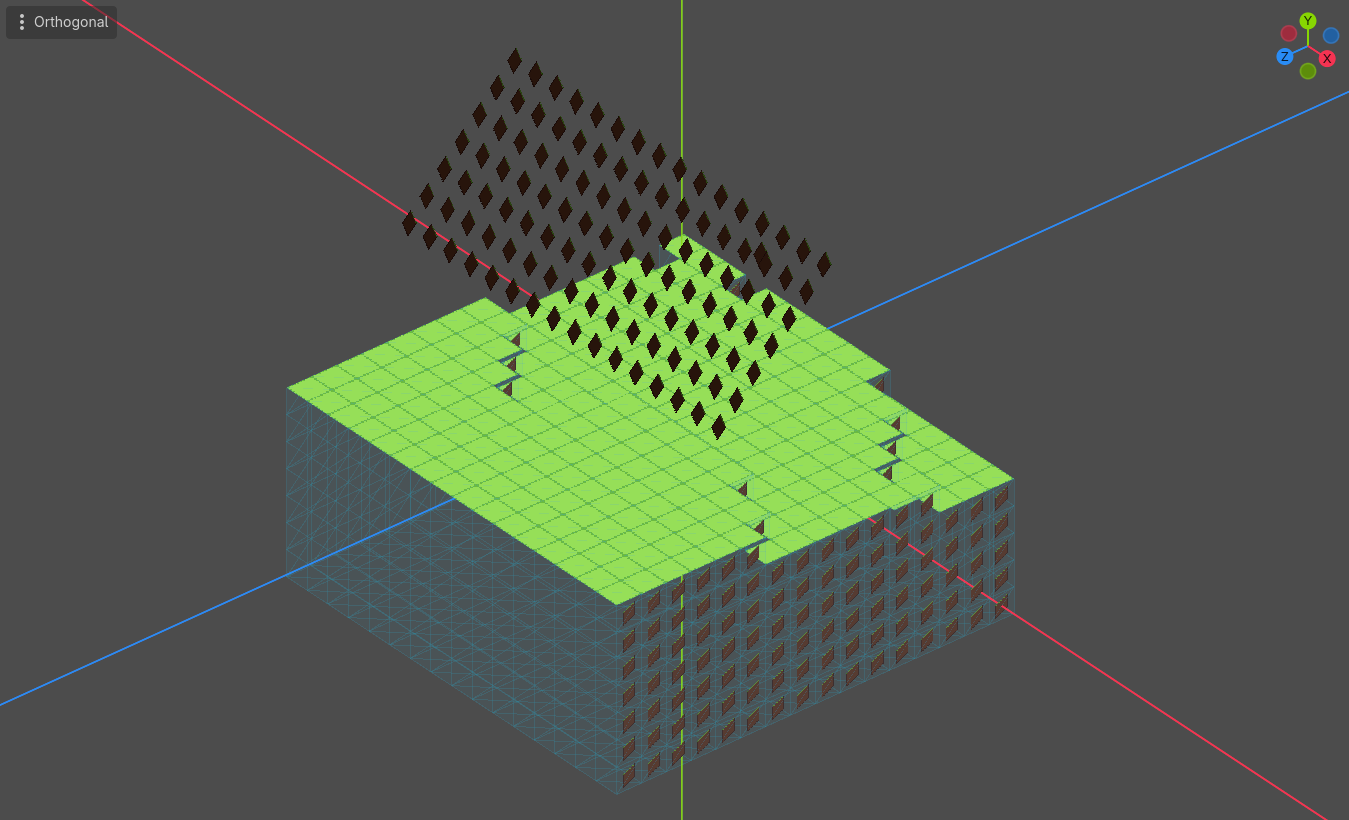
However, I want the rotation pivots to be local to each voxel, instead of the chunk’s whole left side mesh at one time. It should be aligned to the mesh like the right side is, but with the rotation applied as well. I tried using custom data to save the centers of each voxel face as shown below:
var leftSurfaceTool = new SurfaceTool();
var leftMaterial = new ShaderMaterial
{
     Shader = ResourceLoader.Load<Shader>("res://block resources/left_shader.gdshader")
};
leftMaterial.SetShaderParameter("albedo_texture", _textureAtlas);
leftMaterial.SetShaderParameter("atlas_size_ratio", _atlasSizeRatio);

leftSurfaceTool.Begin(Mesh.PrimitiveType.Triangles);
leftSurfaceTool.SetCustomFormat(0, SurfaceTool.CustomFormat.RgbFloat);

for (int x = 0; x < SideLength; x++)
{
    for (int y = 0; y < MaxHeight; y++)
    {
        for (int z = 0; z < SideLength; z++)
        {
            if (_blocks[x, y, z] == 0)
            {
                continue;
            }

            if (LeftFaceVisible(x, y, z))
            {
                var a = new Vector3(x + 0.5f, y + 0.5f, z + 0.5f);
                var b = new Vector3(x + 0.5f, y - 0.5f, z + 0.5f);
                var c = new Vector3(x - 0.5f, y - 0.5f, z + 0.5f);
                var d = new Vector3(x - 0.5f, y + 0.5f, z + 0.5f);
                var faceTexture = CalculateAtlasCoordinates(_grassBlock.LeftFace);
                var faceCenter = (a + b + c + d) / 4f;

                leftSurfaceTool.SetCustom(0, new Color(faceCenter.X, faceCenter.Y, faceCenter.Z));
                leftSurfaceTool.SetUV(faceTexture[0]);
                leftSurfaceTool.AddVertex(a);

                leftSurfaceTool.SetCustom(0, new Color(faceCenter.X, faceCenter.Y, faceCenter.Z));
                leftSurfaceTool.SetUV(faceTexture[1]);
                leftSurfaceTool.AddVertex(b);

                leftSurfaceTool.SetCustom(0, new Color(faceCenter.X, faceCenter.Y, faceCenter.Z));
                leftSurfaceTool.SetUV(faceTexture[2]);
                leftSurfaceTool.AddVertex(c);

                leftSurfaceTool.SetCustom(0, new Color(faceCenter.X, faceCenter.Y, faceCenter.Z));
                leftSurfaceTool.SetUV(faceTexture[0]);
                leftSurfaceTool.AddVertex(a);

                leftSurfaceTool.SetCustom(0, new Color(faceCenter.X, faceCenter.Y, faceCenter.Z));
                leftSurfaceTool.SetUV(faceTexture[2]);
                leftSurfaceTool.AddVertex(c);

                leftSurfaceTool.SetCustom(0, new Color(faceCenter.X, faceCenter.Y, faceCenter.Z));
                leftSurfaceTool.SetUV(faceTexture[3]);
                leftSurfaceTool.AddVertex(d);
            }

...

leftSurfaceTool.GenerateNormals();
var leftMeshArray = leftSurfaceTool.CommitToArrays();
var combinedMeshArray = new ArrayMesh();
combinedMeshArray.AddSurfaceFromArrays(Mesh.PrimitiveType.Triangles, leftMeshArray);
combinedMeshArray.SurfaceSetMaterial(0, leftMaterial);

// mesh assignment to collision shape
But all I get is this error:
 ERROR: servers/rendering/rendering_server.cpp:789 - Condition "p_arrays[ai].get_type() != Variant::PACKED_BYTE_ARRAY" is true. Returning: ERR_INVALID_PARAMETER
 ERROR: Invalid array format for surface.
I also tried overriding the shader’s COLOR built-in, but it results in pretty much the same thing as the first image.
Here’s how I implemented the vertex shader:
void vertex() {
	vec3 pivot = CUSTOM0.rgb;
	VERTEX -= pivot;
	float test_rot = -PI / 4.0;
	mat3 test_matrix = mat3(
		vec3(1, 0, 0),
		vec3(0, cos(test_rot), -sin(test_rot)),
		vec3(0, sin(test_rot), cos(test_rot))
	);

	VERTEX *= test_matrix;
	VERTEX += pivot;
}
Does anyone know why the custom value approach won’t work? Is there another way I can go about this?