Area2D detects collision hundreds of pixels outside of range

Godot Version

v4.7.stable.mono.official [5b4e0cb0f]

Question

I have very odd bug, that is fixable, but I consider cost of the fix to be not optimal to say the least. I will mostly describe it, since there is too much code involved.

I have 2D top down game, where enemies enter playable area in waves. I need to have reference to every mob in playable area, so I’m using Area2D to track them. Some enemies can move, so if they get out of bounds (intentional), I get rid of them.

I’m using object pool for enemies. It might be an overkill, since there will never be more than 20 enemies at once on the screen, but I’m running Godot .NET, so I really don’t want to trigger Garbage Collector. Once enemy state has been fully reset, they get sent back to object pool.

Current test scenario - single enemy type, 12 enemies in object pool.

  1. First wave, 12 enemies enter the area.
  2. Player destroyes them one by one, which sends them back to object pool. Once all have been defeated, it triggers wave 2.
  3. Another 12 enemies get spawned, but enemy that has been destroyed last gets destroyed offscreen. 11 enemies enter the area.

Enemies are spawned outside of area bounds, and enter the Area2D from the outside. I have managed to track down the source of the problem - that one mob gets detected by Area2D - it enters and exits, which triggers destruction. The issue is that it’s both visually and logically outside - GlobalPosition doesn’t match. This makes it hard to truly fix, since it violates the basic laws of the engine.

Once enemy is destroyed, I call this, which might be useful information:

_collisionShape.SetDeferred(CollisionShape2D.PropertyName.Disabled, true);
SetPhysicsProcess(false);

There are two fixes to this issue, but I find them not optimal:

  1. Once all enemies are defeated, do not send next wave instantly, but wait at least a second, so mobs have time to settle down. This works and there are no issues anymore, but it does make game pacing worse.
  2. Make sure enemies from previous wave never enter next wave. Meaning double the object pool size. But this is waste of memory.

I appreciate any ideas that can help me track the real issue and fix it. Worth noting that in my current testing scenario it only affects one enemy, but when I was randomly testing my game it affects up to 2 enemies. I suppose it can affect them all if player manages to destroy entire wave at once.
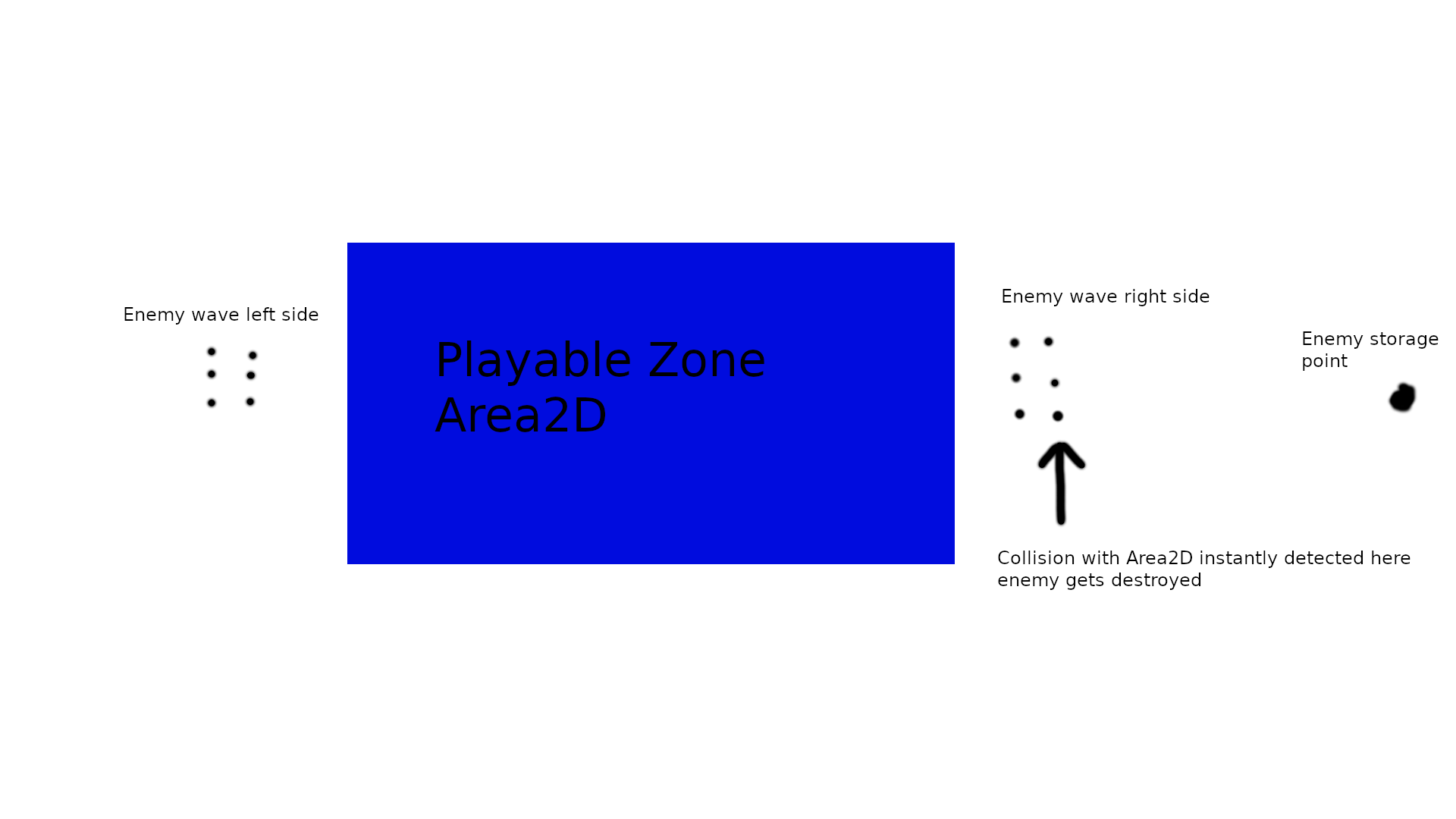
Enable Debug > Visible Collision Shapes to see what’s happening with the colliders at runtime.

It confirms what I already know. Collision shape changes color like there is a collision. Except there is nothing it could collide with.

One thing worth adding - enemies after defeat are not only fully disabled so they can’t be interacted with, they are also moved outside of the playable zone. Meaning there is no situation where enemy is enabled inside the playable zone and then moved outside for spawn. But if it were the case, issue would affect all enemies, not only the last destroyed ones.

That’s very unlikely. Are you sure there are no hidden nodes there?

100% nothing it can collide with outside of the arena. But I’ve had an epiphany right now, and I need to verify it. I said that enemy is moved outside of the playable area after defeat to avoid problems. This is true. But groups of enemies are moved using single “coordinator” PhysicsProcess. I need to check if there is no rogue change of the coordinates, which means in reality enemy gets snapped back to inside the playable area. That would mean when enemy is activated and placed at spawn point, it instantly triggers the removal, since initial appearance was in the playable area.

Can you make a minimal reproduction project?

If it ends up being a roadblock for a few days, I might have to. Don’t want to do it right now though, because setting it up will take some time, and maybe I will figure it out by this point.

Unfortunately my new solution is not a solution either. Enemies are in their spots outside of the screen. I’ve even added extra safety checks, but they don’t do anything, since enemies are located in their correct spots.

So it still looks very odd. Enemy is approaching the area 2D, and it triggers entrance and exit around 300 pixels away from it. I’m positive this is Area2D on the playable zone, I’ve used caller member name to verify.

Sounds like bug(s) somewhere in your code/setup.

Best to make from scratch a simplified example of what you (think) you currently have implemented. This will help you spot where things might have went astray.

This is what is most likely happening, but I think it’s less of an issue with the code itself, this must be some kind of Godot deferred timing quirk.

Here are some logs to visualize it. First wave is alright, and here are coordinates where they reach playable zone:

Entered: (-156.4346, -66)
Entered: (-156.4346, -42)
Entered: (-156.4346, -18)
Entered: (92.4346, -66)
Entered: (92.4346, -42)
Entered: (92.4346, -18)
Entered: (-158.04532, -58)
Entered: (-158.04532, -34)
Entered: (-158.04532, -10)
Entered: (94.04532, -58)
Entered: (94.04532, -34)
Entered: (94.04532, -10)

Here is the second wave, where problems start:

Entered: (535.07623, -10)
Left: (526.721, -10)
Entered: (-156.48999, -66)
Entered: (-156.48999, -42)
Entered: (-156.48999, -18)
Entered: (92.48999, -66)
Entered: (92.48999, -42)
Entered: (92.48999, -18)
Entered: (-158.08899, -58)
Entered: (-158.08899, -34)
Entered: (-158.08899, -10)
Entered: (94.08899, -58)
Entered: (94.08899, -34)

As you can see, the output is nonsensical - playable zone ends at x = 96, so enemy’s body can’t enter it at 535, as shown in logs.

Also rough visualization of the entire thing:

Currently my plan is to focus on finding out what is the difference between the enemies that appear correctly and those that do not. What flag or property is different, etc. This should help me figuring this out.

What happens if you only wait one physics tick instead?

Not enough time apparently. I have only tested one tick or entire second, I haven’t tried anything like 5 ticks.

Make a minimal example. It’s the fastest way to get to the bottom of this.

Probably won’t have time for that today. The good news is I had a few extra issues, and I’ve managed to track down that they are related to this thing, so even if it’s a multiple day roadblock, at least I tackle a few issues at once. And at least I have a few emergency hatches if needed. But I really want to solve it for real.

Are you reparenting the enemies upon respawning them?
I experienced something similar in 3D, don’t know if it also happens in 2D. Turns out it was an engine bug. I reported it, it was confirmed and people were working on fixes, but I don’t think a fix was merged on a release branch yet:

I’m not saying it’s the same bug or related, or even if your case is an engine bug, but I definitely wouldn’t state anything is “impossible”. Nobody can say that for sure. Obscure engine bugs exist and sometimes someone stumbles upon one.

I actually do reparent, but not in this scenario. Enemies are added to their Node2D container upon initialization of the object pool, and stay there. There are some cases that I have where container needs to be switched. But I haven’t encountered any issues with reparenting yet.

Some extra information:

  1. I can’t see any difference between affected mob and other mobs. For example all their collisions are still disabled when their are repositioned to spawn point, so it’s not the case of collision being disabled with extremely long delay.
  2. Delaying spawning next wave by 2 physics ticks seems to give me 100% success rate. But it doesn’t fix the source of the problem, and can come back biting me in the butt later.
  3. I’m almost sure it worked fine before. I’ve made only minimal changes to those systems lately. So perhaps I can go back to version for example from 2 weeks ago or a month ago and see if it works.
  4. I think I should give enemy separate CollisionShape2D and Area2D for interaction with environment and player bullets. Perhaps this will solve the problem. Currently enemy has only CollisionShape2D for interaction with everything.

The actually useful information would be scene structure and code.

I’ve just made minimal version of it, but I don’t think it’s going to be useful. It’s less than 200 lines vs over thousand lines of the original, and unluckily for me the minimal version works.

I will separate single collision to two (CollisionShape2D + Area2D) and see if it works. If it doesn’t work, perhaps I should just drop the object pool. I have a feeling it makes no difference for less than 20 enemies. Object pool for projectiles definitely stays though (projectiles also behave perfectly fine compared to enemies).

Well the key thing is to make the minimal version that reproduces the problem, not just a minimal version :slight_smile:

There’s probably some kind of screwup in your pool implementation. And sure, for such a small number of objects - pooling a total overkill.

I’ve seen similar issues before.

Its probably where you are teleporting the enemy to the storage point, as it jumps across the positions it is either triggering or something else is triggering it (more than likely the new wave coming out of the pool). Note in your screenshot the enemy storage point is past the enemy wave right side, so they will be going past that point when teleported.

Firstly I would also set monitoring and monitorable to disabled as well in your disable method, thats what I do with my pooled objects. See if that helps.