I am trying to do layout for Mobile (Android) and I am a Novice as far as Android and Godot are concerned although I do have many years of experience as a software developer.
I am trying to layout a game board that is a square (1-1 aspect ratio) with more controls above and below the square. I am locking the game to be portrait orientation only. The layout will need to adjust itself to whatever screen the users android device has while keeping the square board full width and letting other elements expand to fill vertical space. Currently I have reduced this to basic elements to try to resolve the AspectRatioContainer positioning issue I am having.
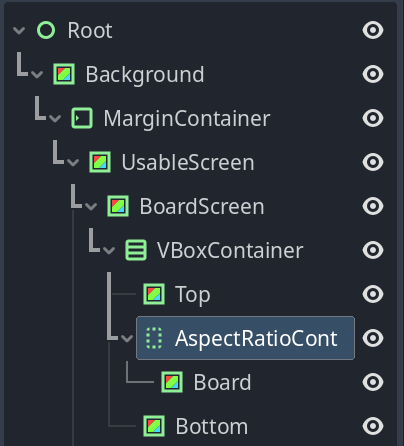
The Root->MarginContainer->UsableScreen->BoardScreen controls are just to manage the Camera cutout and allow for multiple UI screens which I intend to switch in and out with visibility. It is also currently a bunch of ColorRect controls set to different colors to clarify what I am actually seeing in the display.
The Top control is just a ColorRect with 60px minimum height and full width.
The Bottom control is the same on the bottom.
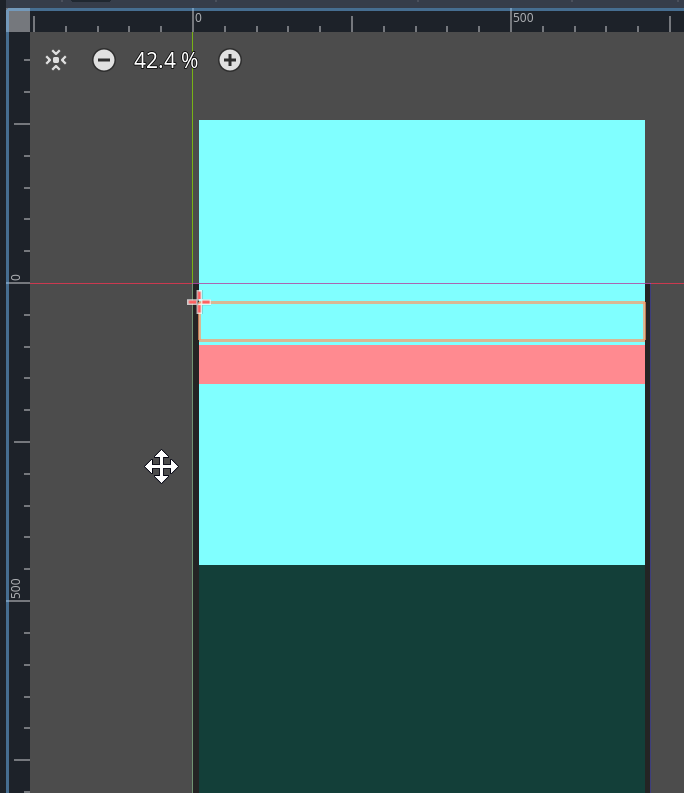
The AspectRatioContainer does size the Board(ColorRect) control it contains to be square at the full width of the screen, however it does not resize itself and is keeping whatever minimum height was assigned to it in layout (default 0px).
The VBoxContainer is placing the AspectRatioContainer based on its 0px minimum height and not based on the square ColorRect inside it. The overall layout has the perfectly square Board control covering the Top control and extending beyond the top of the Viewport and itself has the Bottom control covering it. just below its center. If I give the AspectRatioControl a Custom Minimum Size y = (its own width) everything looks fine but that is not a solution. I have highlighted the Top control you can’t otherwise in the screeshot.
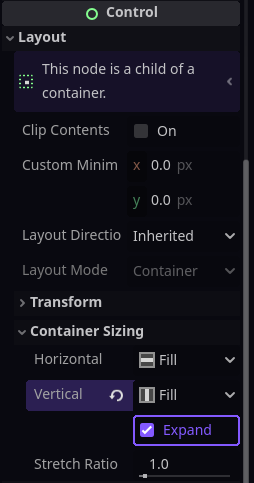
Have you set the size_flags_vertical of the AspectRatioContainer to SIZE_EXPAND_FILL? This will make it fill all the space in the VBoxContainer that isn’t taken up by the Top and Bottom ColorRects.
Yes, it is currently set and I am not sure why it isn’t filling the space. Ultimately I only want it to take up the required height for the square and let the other elements fill the remaining height as the AspectRatioControl has no content to put there.
Correction:
It is not filling the space because the VBoxController was not Full Rect but that still leaves the issue of how to I allow the other controls to fill the excess vertical space when the AspectRatioContainer is saying it does not need any.
I prefer to write my own container scripts when the behavior I need is more complex. Here’s an example of how you might code the behavior you’re looking for:
@tool
extends Container


func _ready() -> void:
	sort_children.connect(sort)


func sort() -> void:
	## The minimum height of the Top and Bottom [ColorRect]s.
	const MIN_COLOR_RECT_HEIGHT := 60.0
	## The maximum height that the [AspectRatioContainer] can take up.
	var max_container_height := size.y - MIN_COLOR_RECT_HEIGHT * 2
	## The height of the [AspectRatioContainer].
	var container_height := minf(size.x, max_container_height)
	## The height of each of the [ColorRect]s.
	var rect_height := maxf((size.y - container_height) / 2, MIN_COLOR_RECT_HEIGHT)

	fit_child_in_rect($Top, Rect2(0, 0, size.x, rect_height))
	fit_child_in_rect($AspectRatioContainer, Rect2(0, rect_height, size.x, container_height))
	fit_child_in_rect($Bottom, Rect2(0, rect_height + container_height, size.x, rect_height))
Try changing the VBoxContainer to a Container and attaching that script.
Thank you for the advice. I expect I will do something along that line and script the behavior I want.
I still think that the AspectRatioContainer not taking on the dimensions of its content is probably a bug but I am too new at Godot to be confident it is not user error. The VboxContainer is behaving as I expected it to and does the right thing as long as it recognizes the AspectRatioContainer requires the height of its contents. I will take a stab at fixing or replacing AspectRatioContainer to do what I want first.
I was just playing with an aspect ratio container this morning and decided it was not right for my use case, though it may be right for yours. Anyway, I think you may have misunderstood what it does. The ARC itself doesn’t change, it’s children change while maintaining the chosen aspect ratio in the event that the ARC changes. The ARC would only change if its parent container changes and the ARC’s anchors and such are set in such a way that the ARC changes. And then in that case the children of the ARC maintain their aspect ratio. Or you could modify the ARC with a script and then its contents should update automatically.
My issue is that because the ARC does not change its own height unless you set it to expand, it is hard to make it play nice with the VBoxContainer. The ARC contents is limited to the height the ARC applies to it. This Guarantees it will be leaving visible gaps around it in the layout when set to expand. Shrink causes the issues above if used in conjunction with other containers. I have applied some scripting to solve for my use case. I want the ARC to be a perfect square matching the UsableScreen width. I have added script to UsableScreen to get it. I changed the name.
func _notification(what: int) → void:
match what:
NOTIFICATION_RESIZED:
var x = usable_screen.size.x
# square is the name I gave to the ARC
square.set_custom_minimum_size(Vector2(x,x))
I will see if this causes me grief as I try to complete the full layout.