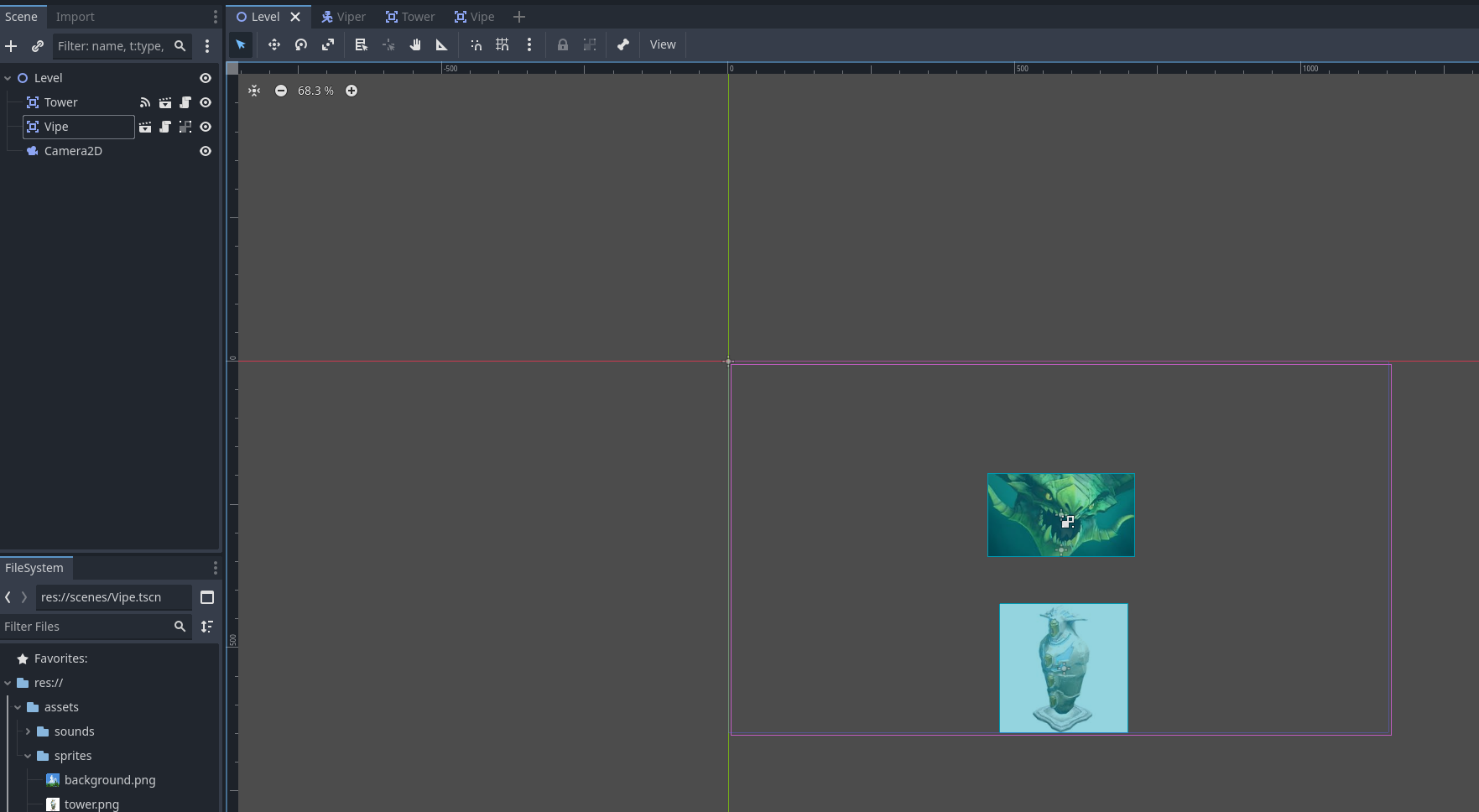
Beginner to Godot and gamedev in general, knowledgable about C# can't figure out why these two Area2D nodes are not registering a collision!
Tried Setting Monitoring to true
Ensured Collision Layer and Mask for both 2D Areas set to layer 1
Tried With Both a 2D Area and a Character Body
using Godot;
using System;

public partial class Vipe : Area2D
{
    [Signal]
    public delegate void HitEventHandler();

    // Called when the node enters the scene tree for the first time.
    [Export] public float JumpVelocity = 3f;
    private Vector2 Velocity = Vector2.Zero;
    public const string UP = "fly_up";
    public Vector2 ScreenSize;

    public override void _Ready()
    {
        ScreenSize = GetViewportRect().Size;
        this.Monitoring = true;
    }

    // Called every frame. 'delta' is the elapsed time since the previous frame.
    public override void _Process(double delta)
    {
        if (Input.IsActionJustPressed(UP))
        {
            //Player hit jump
            Velocity = Vector2.Up * JumpVelocity;
            GD.Print("Flying!");
        }
        else
        {
            Velocity -= Vector2.Down * -Gravity * (float)delta;
        }

        Position += Velocity * (float)delta;
        Position = new Vector2(
            x: Mathf.Clamp(Position.X, 0, ScreenSize.X),
            y: Mathf.Clamp(Position.Y, 0, ScreenSize.Y)
        );
    }

    private void OnBodyEntered(Node2D body)
    {
        GD.Print("OnBodyEntered");
    }

    public void OnAreaEntered(Area2D area)
    {
        GD.Print("OnAreaEntered");
        if (area.Name == "Tower")
        {
            GD.Print("Tower Area Hit!");
        }

        if (area is Tower tower)
        {
            GD.Print("Tower Hit!");
        }
    }
}
Image of nodes in main scene, I have applied a simple gravity vector so Viper (green lizard) falls on the tower (white structure)
Did you happen to change the layer and mask on one of the Area2D’s? Could you provide a screenshot of those settings of both?
Edit: I must’ve missed that second bullet point, my bad. Back to analysing!
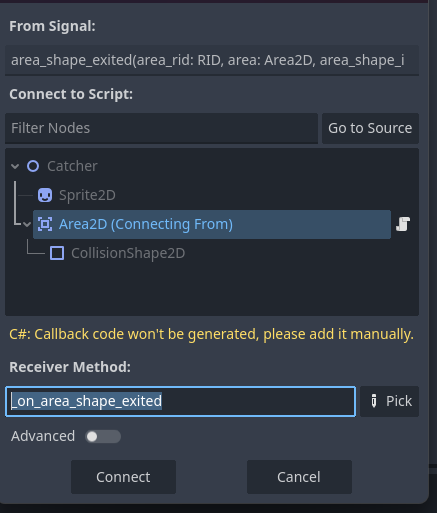
Edit2: Did you connect the signals via the editor? I believe (but my experience is based on Gdscript) just naming the signal the same doesn’t always connect it.
Hi! I’m about as knowledgeable as you are, but I did notice that your OnAreaEntered/OnBodyEntered aren’t hooked up in any way - at least not in the C# code. I don’t know how the C# integration works in Godot, but maybe you need to attach them to an event handler, or add an override keyword? I suspect it’s the latter, seeing how you’re using that for _Ready() and _Process.
I’m new to Godot but i tried a c# project where i made a simple catch game. I had an Area2D for the “basket”. to detact the falling objects (rigidbody2d) i had to add the Body Entered signal/event thing in the ready method
public override void _Ready()

    {

        // Area2D uses 'BodyEntered' for PhysicsBodies like RigidBody2D

        BodyEntered += OnBodyEntered;

    }
this worked for rigid bodies entering an area, you should be able to link up the AreaEntered in the same way I think
I believe this is the programatic way of connecting signals opposed to the option via the editor right? I never used Godot with C#, but can you connect signals via the editor when using C# also?
IIRC, you have to connect code programmatically yourself in C#. You can find tutorials online about how to do that.
As someone who has been a professional C# developer (and Java, C++, Ruby, Python..etc) I really recommend you try out GDScript even if you’re experienced with C#. You will find it a much easier experience. I made one game in C# with Godot after a year using GDScript. Never again.
This is correct and even mentioned in the guide I was following,.
I see this snipped from the guide
// We also specified this function name in PascalCase in the editor's connection window.
private void OnBodyEntered(Node2D body)
{
    Hide(); // Player disappears after being hit.
    EmitSignal(SignalName.Hit);
    // Must be deferred as we can't change physics properties on a physics callback.
    GetNode<CollisionShape2D>("CollisionShape2D").SetDeferred(CollisionShape2D.PropertyName.Disabled, true);
}
And it makes me think that this method should behave as a callback, I tried a comment above and put the override keyword but I just got a red squiggly. I also couldnt find any of these “signal” methods attatched to the object I am extending Area2D
This is it, thanks for the help I couldn’t find how to use the already available signals only create new ones. This makes more sense
For anyone else who runs into this, the built in signals are C# events that you can bind callback functions using the method metalhippy did my code ended up like this.
public override void _Ready()
    {
        ScreenSize = GetViewportRect().Size;
        this.Monitoring = true;
        // AreaEntered is the event we are observing
        //ShitHappens is the callback function
        AreaEntered += ShitHappens;
    }

    private void ShitHappens(Area2D area)
    {
        GD.Print("Shit Happened");
    }
If you have defined a method with proper signature then you can pick it in this dialog and the signal gets connected just fine. It simply does not generate the method for you.