[Beginner] CharacterBody2D rotate , move_and_slide with two sprites

Godot Version

4.4.1 Stable Mac OS

Question

`I messing around with physic and rotate function to create some dynamic geometry movements , but I can’t get full understanding how to organise scenes, nodes to achieve desired result :

Two Sprites, one rotate and move in direction , other move along without rotation .

Code for Wheelie currently ( I know it got lot of repetition , not good practice but for now want to figure out how it works )

extends CharacterBody2D

var target_position: Vector2
var moving_to_click := false
var speed := 600


func _physics_process(delta: float) -> void:
	var direction = Input.get_vector("ui_left", "ui_right", "ui_up", "ui_down")
	if direction != Vector2.ZERO:
		moving_to_click = false
		velocity = direction * speed
	else:
		if moving_to_click:
			var move_dir = (target_position - global_position).normalized()
			velocity = move_dir * speed
			var angle = move_dir.angle()
			
			if angle < PI/4:
				rotate(-0.1)
				move_and_slide()
			elif angle > PI/4 and angle < 3*PI/4:
				rotate(-0.1)
				move_and_slide()
			elif angle < -PI/4 and angle > -3*PI/4:
				rotate(0.1)
				move_and_slide()
			else:
				rotate(0.1)
				move_and_slide()
			
			if global_position.distance_to(target_position) < 5:
				velocity = Vector2.ZERO
				moving_to_click = false
		else:
			velocity = Vector2.ZERO
	
	if direction == Vector2.UP:
		move_and_slide()
		rotate(0.1)
	if direction == Vector2.DOWN:
		move_and_slide()
		rotate(-0.1)
	if direction == Vector2.RIGHT:
		move_and_slide()
		rotate(-0.1)
	if direction == Vector2.LEFT:
		move_and_slide()
		rotate(0.1)


func _unhandled_input(event: InputEvent) -> void:
	if event is InputEventMouseButton and event.button_index == MOUSE_BUTTON_LEFT and event.pressed:
		target_position = get_global_mouse_position()
		moving_to_click = true

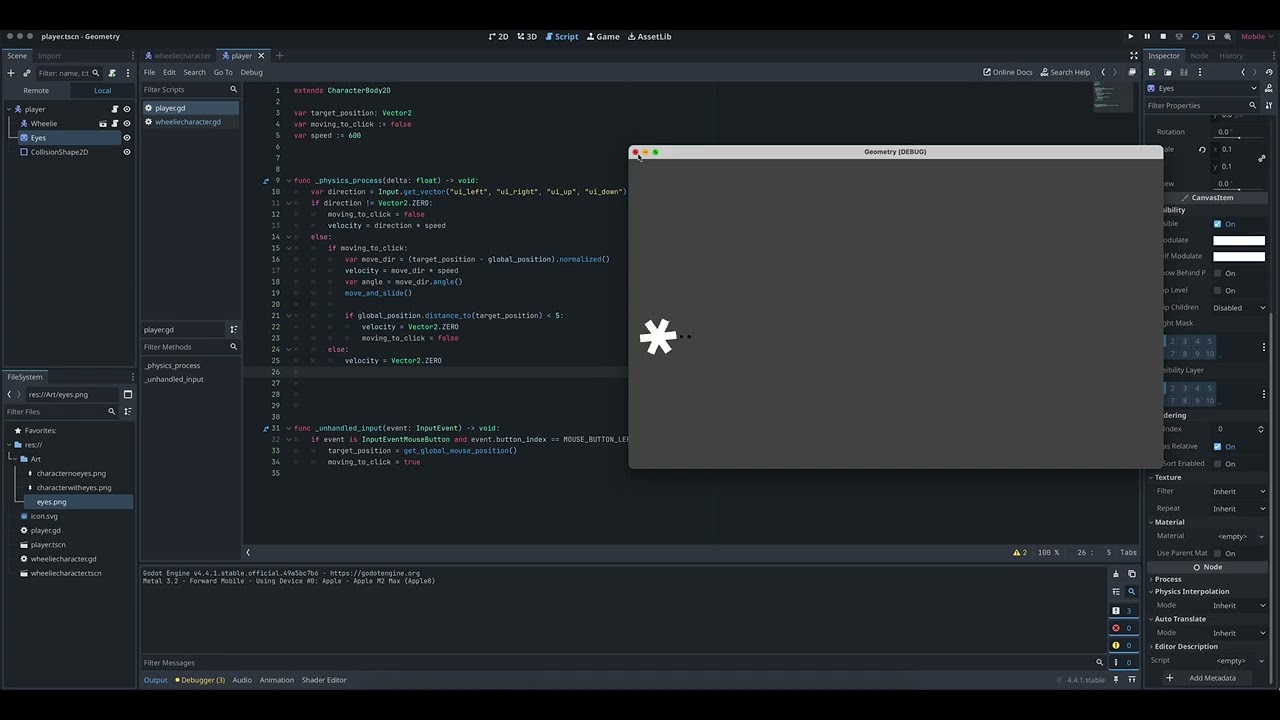
I tried to create scene for body and scene for player to control it with script but this was collide with each other body -

short demonstration

desired effect eyes stay in centre without rotate , only body will move based on direction ( clockwise and anticlockwise)

`

1 Like
extends CharacterBody2D

var target_position: Vector2
var moving_to_click := false
var speed := 600

@onready var wheel: Sprite2D = %wheel

func _physics_process(delta: float) -> void:
	var direction = Input.get_vector("ui_left", "ui_right", "ui_up", "ui_down")
	if direction != Vector2.ZERO:
		moving_to_click = false
		velocity = direction * speed
	else:
		if moving_to_click:
			var move_dir = (target_position - global_position).normalized()
			velocity = move_dir * speed
			var angle = move_dir.angle()
			
			if angle < PI/4:
				wheel.rotate(-0.1)
				move_and_slide()
			elif angle > PI/4 and angle < 3*PI/4:
				wheel.rotate(-0.1)
				move_and_slide()
			elif angle < -PI/4 and angle > -3*PI/4:
				wheel.rotate(0.1)
				move_and_slide()
			else:
				wheel.rotate(0.1)
				move_and_slide()
			
			if global_position.distance_to(target_position) < 5:
				velocity = Vector2.ZERO
				moving_to_click = false
		else:
			velocity = Vector2.ZERO
	
	if direction == Vector2.UP:
		move_and_slide()
		wheel.rotate(0.1)
	if direction == Vector2.DOWN:
		move_and_slide()
		wheel.rotate(-0.1)
	if direction == Vector2.RIGHT:
		move_and_slide()
		wheel.rotate(-0.1)
	if direction == Vector2.LEFT:
		move_and_slide()
		wheel.rotate(0.1)


func _unhandled_input(event: InputEvent) -> void:
	if event is InputEventMouseButton and event.button_index == MOUSE_BUTTON_LEFT and event.pressed:
		target_position = get_global_mouse_position()
		moving_to_click = true

this code do the desired result, but its a lengthy for just this simple thing .

1 Like

Do you want the Wheel to be a seperate character? That seems like a bad idea so far, you may be better off with the wheel as a Sprite2D. It is rarely a good idea to have physics bodies, such as CharacterBody2D as children of each other.

3 Likes

no , one character but have two parts of their body , one rotate , one doesn’t during vector2 position change

1 Like

Sure, one rotates, but I don’t think they need to be separate “bodies” to the game. A circular sprite can rotate while the collision information stays the same.

1 Like

they are two separate sprites , but one body - I have changed it

current code with debugging

extends CharacterBody2D

var target_position: Vector2
var moving_to_click := false
var speed := 600

@onready var wheel: Sprite2D = %wheel

func _physics_process(delta: float) -> void:
	var direction = Input.get_vector("ui_left", "ui_right", "ui_up", "ui_down")
	if direction != Vector2.ZERO:
		moving_to_click = false
		velocity = direction * speed
	else:
		if moving_to_click:
			var move_dir = (target_position - global_position).normalized()
			velocity = move_dir * speed
			var angle = move_dir.angle()
			
			if angle < PI/4:
				wheel.rotate(0.1)
				move_and_slide()
				print("right")
			elif angle > PI/4 and angle < 3*PI/4:
				wheel.rotate(-0.1)
				move_and_slide()
				print("down")
			elif angle < -PI/4 and angle > -3*PI/4:
				wheel.rotate(0.1)
				move_and_slide()
				print("up")
			else:
				wheel.rotate(-0.1)
				move_and_slide()
				print("left")
			
			if global_position.distance_to(target_position) < 5:
				velocity = Vector2.ZERO
				moving_to_click = false
		else:
			velocity = Vector2.ZERO
	
	if direction == Vector2.UP:
		move_and_slide()
		wheel.rotate(0.1)
		print("up")
	if direction == Vector2.DOWN:
		move_and_slide()
		wheel.rotate(-0.1)
		print("down")
	if direction == Vector2.RIGHT:
		move_and_slide()
		wheel.rotate(0.1)
		print("right")
	if direction == Vector2.LEFT:
		move_and_slide()
		wheel.rotate(-0.1)
		print("left")


func _unhandled_input(event: InputEvent) -> void:
	if event is InputEventMouseButton and event.button_index == MOUSE_BUTTON_LEFT and event.pressed:
		target_position = get_global_mouse_position()
		moving_to_click = true

current result -

1 Like

Looks good, is this the desired effect?

yes for now this was idea to achieve ,need to build enemies, environment and test some other things modifications to get better understanding nodes, how to stack them .

Could add some rotation curve in future , but not sure how to do it yet .
[Speed decrease over time ]
This topic was automatically closed 30 days after the last reply. New replies are no longer allowed.