Godot Version
4.4
Question
Hello everyone,
I’m working with Godot 4.4 and trying to figure out the best practice for creating vertical structures with TileMapLayer that also sort correctly with a player character using YSort.
I understand that in recent versions, TileMap has been deprecated, and using multiple TileMapLayer nodes is now the recommended approach.
My scene setup is as follows: I have a parent 2D node, and its children are the Player and several TileMapLayer nodes (e.g., wall1, wall2).
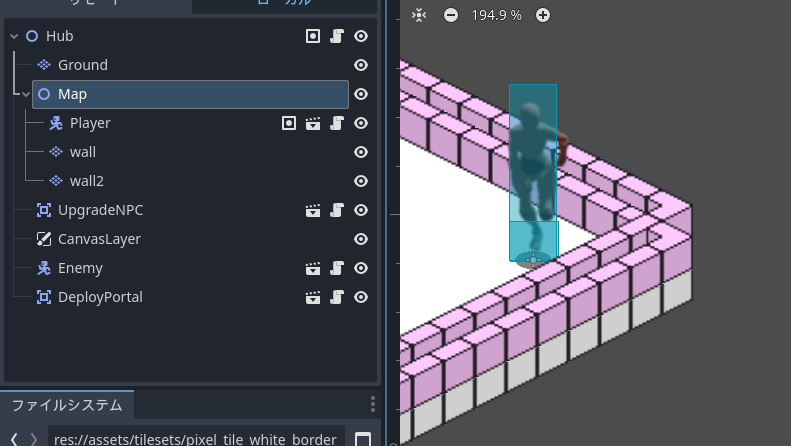
My goal is to have wall2 render on top of wall1 to create a taller wall, while also having the Player sort correctly behind this combined wall structure.
Here is the issue I’m facing:
-
If I enable YSort on the Player and both TileMapLayer nodes, the layers do not stack correctly. They are all sorted individually against the player’s Y-coordinate.
-
If I disable YSort on the TileMapLayer nodes, they stack correctly on top of each other, but then the Player no longer sorts behind them.
So, my question is: what is the correct workflow in Godot 4.4 for stacking TileMapLayer nodes vertically while ensuring they work as a single unit with a parent YSort node?
I feel like I’m missing a key concept about how YSort interacts with multiple TileMapLayer nodes. Any guidance on the best practice for this would be greatly appreciated.
Thank you!