Best way to load various scripts as editable Resources in the editor

(Godot version 4.6.2)

So, let’s say i have a class Action, that has a function execute(). My goal is to have a bunch of script that extends Action and overwrite the execute() function to handle specific tasks (like, move the character, or do an attack). Each of these new scripts can have specific parameters (like, distance for ActionMove, and damage for ActionAttack), and two instances of the same script can have different values for their parameters (like, one character moves 2 cells, the other one moves 3 cells).

I’d like those parameters to be editable from the editor, so i can assign an Action in a character node that exposes an Array[Action] and customize its parameters easily. I can do this by making the base class action extends Resource, but then, i can only create a base Action. Using the “Load” option of the Resource-assigning menu prevents from loading a .gd script, so i cannot immediately use all my scripts that extends Action.

To make this possible for all current and future Action-extended scripts, i have found multiple ways, and none of them is fully satisfying to me.

Option 1 - Register all Action-extended scripts as global classes

I can use class_name ActionMove (for the move action), and it makes it available in the editor, i don’t have to use the “Load” option. This seems to be how this person does it on another topic here.

My problem with it : if i have a lot of action, the list can grow quite big. It also feels dumb to me to register it editor-wide, when i really only need it in one place.

Option 2 - Use a setter to automatically switch to the specified script

I can expose a Script variable in the Action base class, with a setter that automatically applies it to itself, with something like this :

@export var custom_script : GDScript:
	set(new_custom_script):
		custom_script = new_custom_script;
		if custom_script : 
			set_script(custom_script);

That way, in the editor, i create a new Action, set its custom_script property to an extended script like ActionMove, and it automatically applies it (if there is an @tool tag at the beginning of the script).

My problem with it : it feels very wonky, not very safe, requires one more step than just loading a .gd file, and the custom_script variable just hangs there in the parameters once it’s been used to load a custom script.

Option 3 - Use a .tres file for each Action-extended script

The editor menu allows me to load a .tres or .res file, so i could create one for each .gd script that extends Action, and use those instead.

My problem with it : it makes twice as much files, including one that has no real purpose. Also, i did not test it much but it seems that it doesn’t work if i don’t register the extended script with class_name, so if that’s needed anyway, Option 1 is much better.

Option 4 - Use Node instead of Resources

I could make the base class Action extends Node instead of Resource, and then export each extended script as a Packed Scene, that i would put in the Character’s node tree. I could build some structure to get the same “slot” system than an Array[Action].

My problem is it : it makes twice as much files, and it seems overkill to use scene for just a single script.

Now, i have a very limited knowledge of Godot, so i might be missing obvious options or obvious design principles that make all this a very dumb thing to do. I’d be happy to learn about what you know anyway, so if you have any advice on this, please share ! If i don’t find anything better, i’ll probably go with option 1, it seems the most logical one.

Option 5 - Use a State Machine

I don’t have time to go into detail now, but you can use a push state machine (also called a finite state machine) and follow the same path you’re going down of having the state machine call the states. Or you can use a pull state machine. In which case you can try out my State Machine Plugin.

Go with 1 but full on duck type it.
Maintain an array of Script objects. When you need to execute, instantiate the script and check if it has execute() method implemented. If yes - run it.

Yes, i could drop the Action base class, it doesn’t make much sense in my problem of script-as-resources. I use it to implement a series of function that all Action scripts can use, so that i can edit the logic after the fact, but it doesn’t really matter here.

The only problem with an Array of scripts would be that i could not customize the script’s parameters for each character that uses it, could i ? To my knowledge, the script has to be “instantiated” (not sure if it is actually instantiated, i mean whatever the editor does when you click the “New Resource” option) to have customized parameters.

A state machine could maybe work, i’ll look into it. However, it’s for a turn-based games, so i’m not sure state machines are the best fit. And i think that i will stumble on a similar problem, cuz for now i can only think of encoding the states as scripts, or having the state execute a custom scripts, and in both cases the same problem arises : the parameters defined by the custom script cannot be tweaked from editor without using one of the workaround.

Node based state machine would require the same number of named classes as approach 1

Just go with 1. You said " IF i have a lot of action, the list can grow quite big". Do you have a lot of actions or you’re just trying to future proof?

Yup, 1 is clearly the best for now. I have 4 actions ready, and some of the next step of the prototype will be to add around 20 actions. It’s still manageable, but i was asking in case i was missing an obvious or easy solution.

On the other hand, if actions are parameterized why do you need to implement each as a class. Put all action functions in one script and just assign a list to each entity of which actions to call with what parameters.

Well, those actions would be the core of the game, so tit’s for maintainability that i want to avoid having one big script redirecting to each action’s function.

It seemed to me far easier to store the parameters script-by-script, otherwise i’d have to either implement custom parameters in each character’s variables, either have a big data structure that contains every parameter an action could require. With script parameters, i can declare as much new parameters as i want without changing code elsewhere, and i only have to deal with the parameters i need.

I could very well get it by code, with this in each character’s _ready() :

action1 = preload("/path/to/custom_script.gd").new()
action1.custom_parameter1 = "Custom Value"

or like what you suggest (if i get it right) with assign a list to each entity of which actions to call with what parameters. :

func call_action_1() : 
	# Replace this function to replace the action
	custom_action_1("Custom Value")

but it would require a custom script for each character (manageable for now, maybe not in the future), and it’s a bit less convenient that tweaking it on the fly in the editor, like the Option 1 allows me to.

Having all actions in one script is far easier to maintain than randomly scattering them around numerous tiny classes. And you yourself complained that there’d be too many classes

Put all action functions in a script, have a single resource class Action, that specifies action function name and a list of parameters. Keep a list of actions for each entity.

You can simplify even further, eliminate Action class, and keep all action descriptions as strings or expressions.

Okay, so the tradeoff of each Action having unnecessary parameters to avoid having multiple files seems worthy to you. I kinda feel like it’s not much different of having an Action class containing functions action_1(), action_2(), etc., and having an Action subfolder containing scripts action_1.gd, action_2.gd, etc., but that it makes a difference of having Distance | Damage | Duration | Type | Special Effect | etc. when you can have only Distance to deal with, but i’ll trust your experience.

I’m not sure i get this part :

keep all action descriptions as strings or expressions.

If i understand it right, you’d need some kind of interpreter after the fact to read it right ?
Like having smthg like “move 5” where “move” triggers a part of the function that reads the next number and moves current character.

You can have a very simple “syntax” that’s trivial to parse, or alternatively use GDScript expressions and actually execute them.

Having all action functions in one script doesn’t require clicking around the script files. And it’s easy to make and test variants simply by copying a function. If you can’t tolerate 20 functions in a script then sure, break them each into separate class if you prefer to organize like that. I wouldn’t opt for that as I prefer keeping related things in one place.

You can test the variants of this approach and see how it’d work for you. If it proves inadequate for whatever reason, you can always fall back to doing 1. It’s still a very workable approach.

Ooh, thanks a lot for the link, i didn’t know about Expressions. Will look into that ! And yes, i’ll probably try both and see what fits best.

Yeah, expressions might actually be quite useful in your case.

That is not true from where I’m sitting. Either you have a fundamental misunderstanding of how Godot works, or I’m not understanding what you are trying to accomplish.

This is true. But @normalized hates nodes. :slight_smile:

I would recommend you use nodes because it’s a lot easier to see all your states and edit them.

In which case a pull-based state machine is perfect for you. You add it to the tree and it triggers itself when needed, but you remove it from the tree and nothing breaks.

That seems dangerously close to being called a “Manager”.

Yeah, I misunderstood the logic of Godot here, or at least did not project me enough into this solution at first.

If i’m correct, i’d just have to get a State Machine for each character, and create a new State then switching its script to my desired custom script (provided it extends State). And in this case, i would indeed have the possibility to customize its parameters. I’m kinda unsure about how much hassle it would be to manage it via nodes, but this is already an excellent solution, which i could not see at first.

I’ll test it out as well as well as option 1 and the expression workflow, and see what i prefer, but i suspect i’ll end up with a state machine or something close.

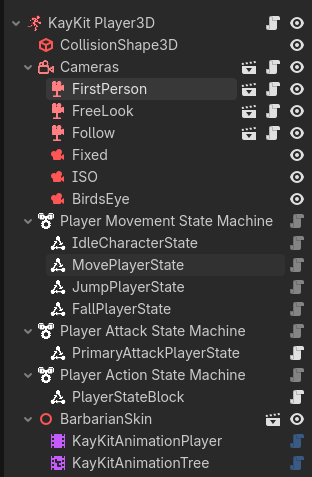
Here are some examples of how I use state machines:

Wow, had no idea it could be used for handling menus as well. Learned something there, thanks a lot !

How? It’s almost a textbook example of the action/command pattern.

And I don’t see how a state machine has any business here. There’s no state to manage. Speaking of managers, state machines spend their lives on the edge of being called State Managers.