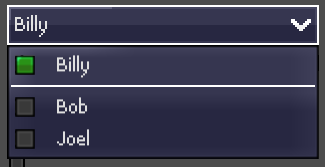
Hey, I’m putting together a UI template for my game and ran into something odd. Two elements in the theme, a Button and a PopupMenu (OptionsButton), are using the exact same resource, so changes to one affect the other. But for some reason, the PopupMenu appears blurry, almost like it’s using linear filtering, even though both it and the project are set to nearest filtering. What could be causing this, and how can I fix it?
You mean like the font seems linearly interpolated?
If so, I may have a few suggestions/questions:
When you mean the project is set to linear filtering, do you refer to the setting : rendering/textures/canvas_textures/default_texture_filter?
Have your tried importing your font without anti-aliasing? (there is also a setting for default non anti-aliasing: gui/theme/default_font_antialiasing)
Oh no, the font works great. (LanaPixel if anyone is wondering, great for localisation too), its the background of the buttons itself. In the upper portion, the background is pixel-perfect, nearest-neighbor scaling, but in the panel for the Option button itself, it’s blurry, as if linear scaling was used. The whole project and the buttons themselves are set to nearest neighbor scaling, and both the button and the panel share the same resource.
So, yes, it looks like the texture of the background of the OptionsButtons is stretched in the popup menu to match the size of the list of options, and this stretch is not set to nearest indeed. I did a bit of reading of the doc, but I can find where this stretched texture is shown. I guess it is in the PopupMenu (OptionsButtons.get_popup()) or the parent class Popup but the doc is a bit lacunary on the subject.
I have to move but I find something, I’ll let you know. Working with themes is actually pretty hard.
The texture on the PopupMenu is blurry but the button isn’t, both share the same resource so if the texture was blurry it’d be blurry on both the button and the menu.
Hey, a bit late on the reply, but I was also working on my UI for a pixel art game as well, and encountered the same problem.
Reading the document for OptionButton, there’s a function get_popup() to get the PopupMenu that will appear when selecting it.
I have found a simple fix to simply call that function on the OptionButton and manually set the texture filtering to nearest in _ready() . Something like this:
func _ready() → void:
   # other code here
   # ....
   get_popup().canvas_item_default_texture_filter = Viewport.DEFAULT_CANVAS_ITEM_TEXTURE_FILTER_NEAREST
Hope this can work for you too! Or other people in the future looking at the same problem.